
12 Software Demo Video Mistakes That Lose Technical Buyers, and the Fix for Each
Software demo video mistakes are rarely about production quality. They are a tour instead of a task, no version on screen, a flawless take with the failure cut out, proof from the narrator, and a video that is never re-run after a release. Twelve mistakes in the order they happen, each with a fix that costs an afternoon at most.
Part of our guide to How to Make a Marketing Video for a Software Product, Step by Step, Recorded From a Real Run.
Software demo video mistakes are rarely about production quality. The lighting is fine, the cut is clean, the voice is confident, and a technical buyer still closes the tab, because the video never finished a task, never said which version it was recorded on, or cut out the one moment where something went wrong. This page lists the twelve mistakes we see most in product demos, in the order they happen, with the fix for each. None of them needs a bigger budget.
The list comes from the rules we apply to our own verified walkthroughs and from the rubric on our annotated video marketing examples. Where a mistake has a cheap fix, the fix is a sentence. Where it does not, we say what it costs.
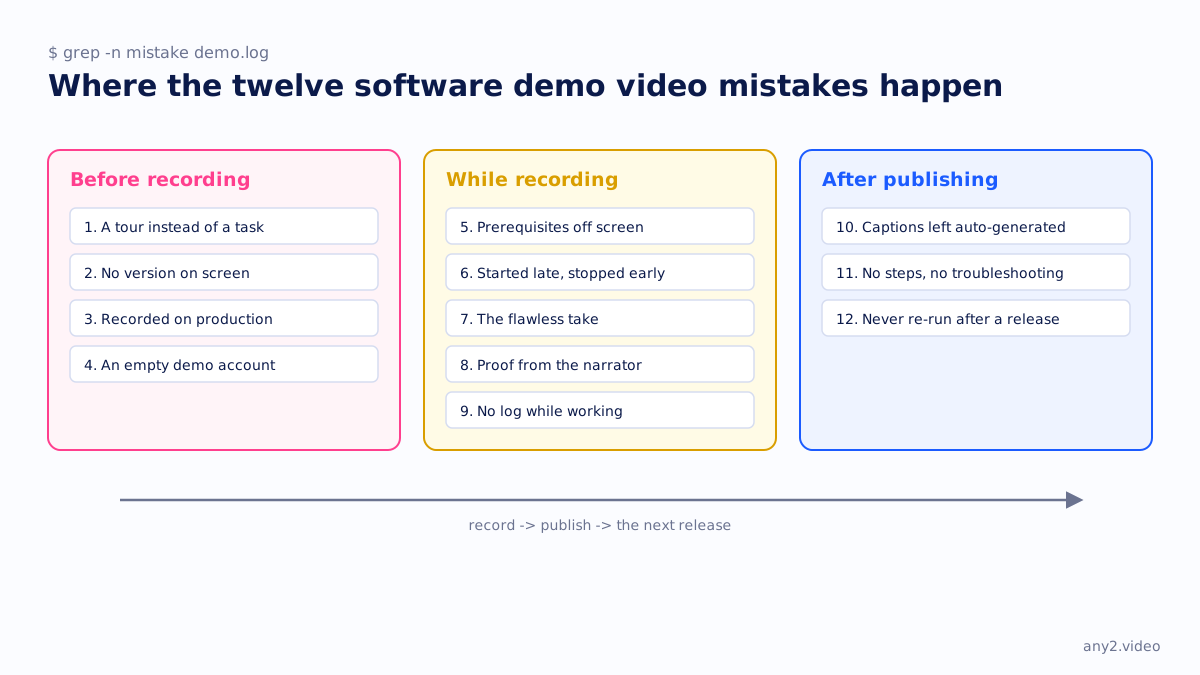
Software demo video mistakes at a glance
| Mistake | What the buyer sees | The fix |
|---|---|---|
| 1. A tour instead of a task | Features shown, nothing finished | One task with a finish line you can name |
| 2. No version on screen | Footage of unknown age | Put the version in frame and in the title |
| 3. Recorded on production | Real customer data, or blurred boxes | A clean environment with realistic fake data |
| 4. An empty demo account | Dashboards with nothing in them | Seed the account before recording |
| 5. Prerequisites off screen | The task starts in the middle | Show the starting state and what must already exist |
| 6. Recording started late, stopped early | Setup missing, the failure missing | Start before the task, keep running after it fails |
| 7. The flawless take | A performance, not a run | Keep the failed attempt and its fix |
| 8. Proof from the narrator | "And now it works" | Proof from the product: a file, an alert, a boot |
| 9. No log while working | Captions written from memory | A timestamped log kept during the run |
| 10. Auto-generated captions left as they are | Product names mangled | Correct the captions from the log |
| 11. No written steps or troubleshooting | Nothing to act on | Steps beside the video, failures in a section |
| 12. Never re-run after a release | A button that moved, a dead end | A version tag and a re-run on release day |
Before recording
1. A tour instead of a task
The most common mistake is the one that is hardest to see from inside the company: the video shows the billing features, the reporting features and the admin features, and nothing finishes. A buyer cannot name the moment the job was done, because there was no job. The fix is to write the task as one sentence with a finish line before anything is recorded. "Send a client their first invoice" finishes; "show the billing features" does not. Our one-sentence brief is this fix as a form.
2. No version on screen
A demo without a version is footage of unknown age. The interface it shows may be two releases old, and the viewer has no way to tell. Put the version in the frame, in the title and in the description, so that when a release moves a button the video says which build it was recorded on. It also makes the twelfth mistake visible, which is the point.
3. Recorded on production
Recording on the live system gives you real customer names, real figures and a legal problem, and the usual answer, blurring, tells the viewer that the video is hiding something. Set up a clean environment with realistic but fake data. Never production, never a real customer. Our how-to guide on business videos walks through the setup.
4. An empty demo account
The opposite mistake: a fresh account with no data, so every dashboard is blank and every list has one row called Test. It is safe and it looks like nothing. Seed the account with enough fake data that the task has something to act on and the result has something to show.
While recording
5. Prerequisites off screen
The task starts in the middle, with the integration already connected and the permissions already granted, and the viewer who tries to follow it hits a wall at step one. Show the starting state before the first click, and list what must already exist: account type, permissions, dependencies, anything that cannot be undone later. In the Proxmox VE 9.2 install that includes the fact that the installer takes the whole disk.
6. Recording started late, stopped early
The recording begins after the setup and ends at the first failure, so the two most useful parts of the run are missing. Start the recorder before you begin and keep it running when something goes wrong. Footage is cheap; the moment the product surprised you is not.
7. The flawless take
A demo where every click lands and nothing waits is a performance by somebody who already knew the answer. Buyers know this, and it is why a polished take gives them nothing to inspect. Keep the attempt that failed and the fix that followed. It is the single strongest trust signal a product video can carry, and it is free, because it already happened. The argument is on what a verified walkthrough proves.
8. Proof from the narrator
"And now the backup is complete" is a claim. A file that exists, an alert that arrives in the other inbox, a machine that boots to the login screen is evidence, and it comes from the product rather than the person. End on the evidence. The confirmation screen alone is not enough, because confirmation screens are also claims.
9. No log while working
If nobody kept a timestamped log during the run, the captions and the written guide are reconstructed from memory afterwards, and memory smooths over exactly the steps that were confusing. Keep a log as you go: time, who acted, what happened. It becomes the chapter list, the guide and the troubleshooting section without a second pass.
After publishing
10. Auto-generated captions left as they are
Automatic captions get product names, flags and file paths wrong, and a technical viewer reads the captions. Write them from the log, or at least correct the generated ones against it. Our closed captions vs subtitles page covers which kind you need.
11. No written steps or troubleshooting
A video with nothing beside it cannot be acted on. Nobody wants to scrub for the setting at minute six. Publish the written steps next to the video, link into the real documentation, and put the failures and their fixes in a troubleshooting section of their own. The troubleshooting section is the part a tidy editor deletes first, and it is the part that stops the tickets.
12. Never re-run after a release
The release moves a button; the video does not. A customer follows it into a dead end, and the video now costs you more than it saves. The fix is a habit rather than a file: tag every video with its version, work out which videos a release invalidates, and re-run those on release day. The release campaign page lays out the week.
What is the biggest mistake in a software demo video?
Showing features instead of finishing a task. Every other mistake on this list can be forgiven by a buyer who saw the job done; none of them can be forgiven by one who did not. If you fix one thing, write the task as a sentence with a finish line and record until the product itself shows the result.
Should a demo video show the product failing?
Yes, when the failure is real and the fix is shown. A kept failure proves a real task was run by somebody who did not already know the answer, and it tells the viewer what to do when the same thing happens to them. Cut the dead air, not the failure.
How do you keep demo videos up to date?
Tag each video with the version it was recorded on, list which videos each release touches, and re-run those the day the release ships. A library that does this is never more than one version behind. A library that does not is stale within two releases, and nobody knows which videos are the stale ones.
Send us the one task your demo never finishes. We will record it on the real product, keep the failure, and send the log. The first sample is free.
$ get-sample →