
9 Release Week Video Formats, Day by Day From T-5 to Launch: Changelog Clips, Upgrade Walkthrough, Re-runs, Partner Cut and More
Release week video formats: the nine kinds of video a software release can produce and the day each one is made, from changelog task clips and the old-versus-new comparison at T-5, through the upgrade walkthrough and feature deep-dive, to the re-runs of invalidated videos at T-1 and the overview, vertical cuts, partner cut and translations on release day.
Part of our guide to How to Run a Video Marketing Campaign Around a Product Release.
Release week video formats are the nine kinds of video a software release can produce, and the day in the week each one is made. A release is the one moment a product changes on a known date with a written list of what changed, which makes it the easiest week in the year to make videos that are specific, current and true. It is also the week that invalidates the videos you already have. This page lays out the nine formats on a timeline from T-5 to release day, with what each needs and what it costs.
The timeline is the one on our video marketing campaign for a product release page; this page is the format list that hangs off it. Everything below assumes the recording is done on the real product, on the release build, with the version in frame, because a release video on the wrong build is worse than no video.
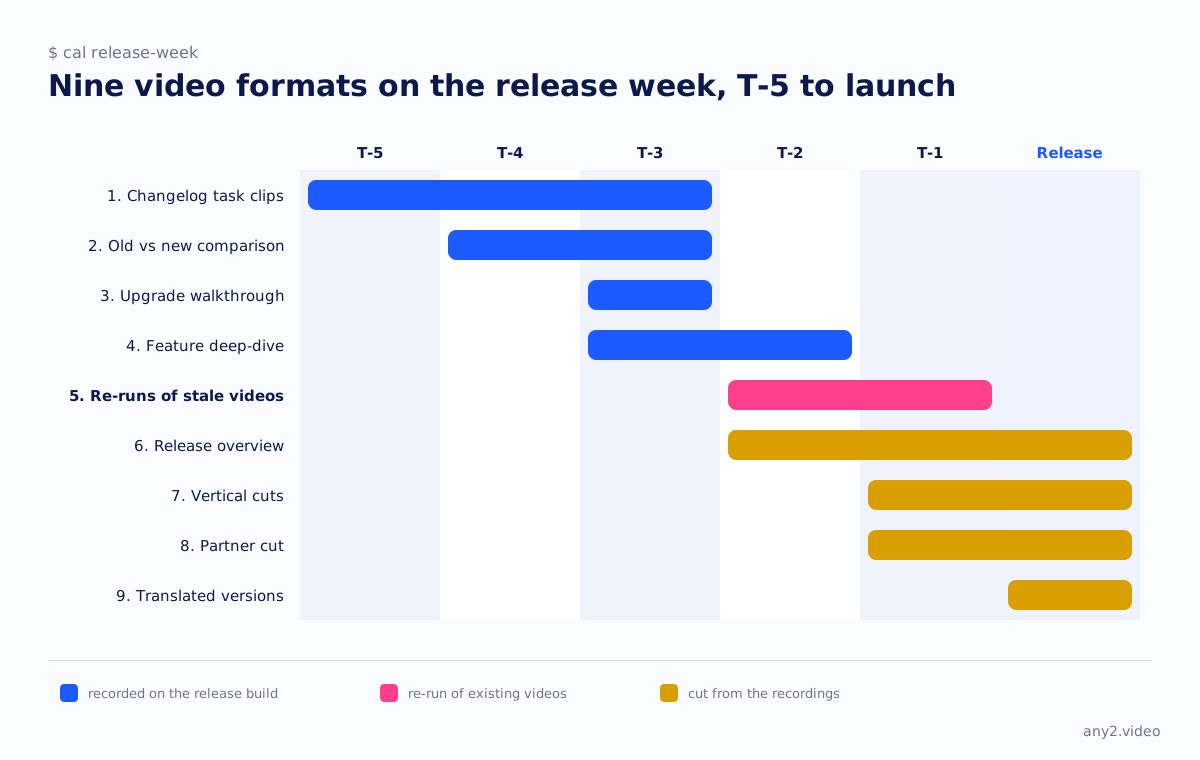
Release week video formats at a glance
| Format | Day | What it needs | What it is for |
|---|---|---|---|
| 1. Changelog task clips | T-5 to T-3 | The frozen changelog, one task per item | Docs, release notes, support |
| 2. Old versus new comparison | T-4 to T-3 | An instance of the previous version | Buyers deciding whether to upgrade |
| 3. The upgrade walkthrough | T-3 | A pre-release instance, the upgrade path | Customers on the old version |
| 4. The feature deep-dive | T-3 to T-2 | One headline change, one real task | Sales, the landing page |
| 5. Re-runs of invalidated videos | T-2 to T-1 | The list of what the release touched | Keeping the library current |
| 6. The release overview | T-2, published on release day | The task clips, cut together | The homepage, the announcement |
| 7. Vertical cuts | T-1 | The clips above | Social, the channel's shorts |
| 8. The partner cut | T-1 | The overview plus the partner's framing | Resellers and integrators |
| 9. Translated versions | Release day onward | The log and captions | Every market you sell in |
Recorded during the week
1. Changelog task clips
The changelog freezes at T-5 and every line in it that a user can act on becomes a task with a finish line. "Set a retention policy per bucket" is a task; "improved retention handling" is not, and the clip forces the translation. Record each task on the release build, start to result, one clip per item. Turning the changelog into tasks takes about an hour; recording five of them takes half a day once the environments exist. These clips are the raw material for everything else on this list.
2. Old versus new comparison
For any change a buyer might argue about, record the same task on the previous version and on the release build. This needs an instance of the old version kept alive through the week, which is why it is prepared at T-4 rather than discovered at T-2. The comparison is the honest form of "faster" and "simpler": the viewer sees both and counts the clicks themselves.
3. The upgrade walkthrough
Customers on the old version have one question, which is whether the upgrade will hurt. Record it: the backup first, the upgrade path, what the product shows during it, and the first login afterwards. Keep the failure if there is one. This is the single most reusable video in the week, because the support team will link it for months, and it needs the old instance from format 2.
4. The feature deep-dive
One headline change, one real task, with the terminal or the logs on screen for the evaluator who wants to see what actually happened. This is the clip the landing page and the sales deck embed. It should be the longest recording of the week and the only one that earns a script; the demo script template is built for exactly this.
5. Re-runs of invalidated videos
Somewhere in the existing library are videos whose screens this release moves. At T-2, while cutting, go through the changelog against the library and list them. At T-1, re-run those tasks on the release build. Nobody enjoys this format and it is the one that decides whether the library can be trusted at all. A library that re-runs on every release is never more than one version behind; one that does not is stale within two.
Cut from the recordings
6. The release overview
Not a new recording. Cut the task clips together with a title card per change and the version tag on every screen, and publish it with the announcement on release day, linked from the changelog. It is the video most teams make first and alone; here it is made last and from parts, which is why it shows real tasks instead of a feature list.
7. Vertical cuts
Each task clip cut to a vertical short: the finish line in the first seconds, the result at the end, the version in the frame. These go on the channel's shorts and on the social accounts, personal accounts first, which is where our social media strategy page suggests B2B reach is actually found. Every delivery from us includes a vertical cut for this reason.
8. The partner cut
Resellers and integrators give your demo to their customers, and after a release they give the old one. A partner cut is the overview with the partner's framing at the front and the same version tag, sent to the channel the day the release ships so that every partner demo moves to the new version together. Channel partners are the audience that most needs a current video and least often gets one.
9. Translated versions
Because every clip was recorded with a timestamped log and captions written from it, translation is a captions-and-narration job rather than a re-recording. The task does not have to be run again because the buyer speaks another language. Start on release day, from the overview and the upgrade walkthrough, in the languages your support queue arrives in.
What should a release video show?
A task from the changelog, done on the release build, start to finish, with the version on screen. Not a feature list read over a mock interface. The overview can list the changes, but every change it lists should cut to a clip of the task being done.
When should you record release videos?
After the changelog freezes and before the release ships, which in the week on this page is T-5 to T-1. Recording before the freeze means recording changes that may not ship; recording after release means the videos arrive late and the stale ones stay up for a week longer than they should.
Which old videos does a release invalidate?
Any video whose screens the release moves, renames or removes. The only reliable way to know is to carry a version tag on every video and to read the changelog against the library at T-2. Re-run those at T-1. If the library has no version tags, this release is the week to add them.
Shipping a release this month? Send us the changelog. We will turn one line into a recorded task on the release build, and the first sample is free.
$ get-sample →