
Software Demo Script Template: A Free Scene-by-Scene Script for Product Demo Videos (PDF and Word)
A software demo script template with the eight decisions every demo needs before recording, a scene table for what is on screen, what is said and what result should appear, a filled-in example from a real install, and a variant for live sales demos. Free as PDF and Word.
Part of our guide to Product Video for Software Companies.
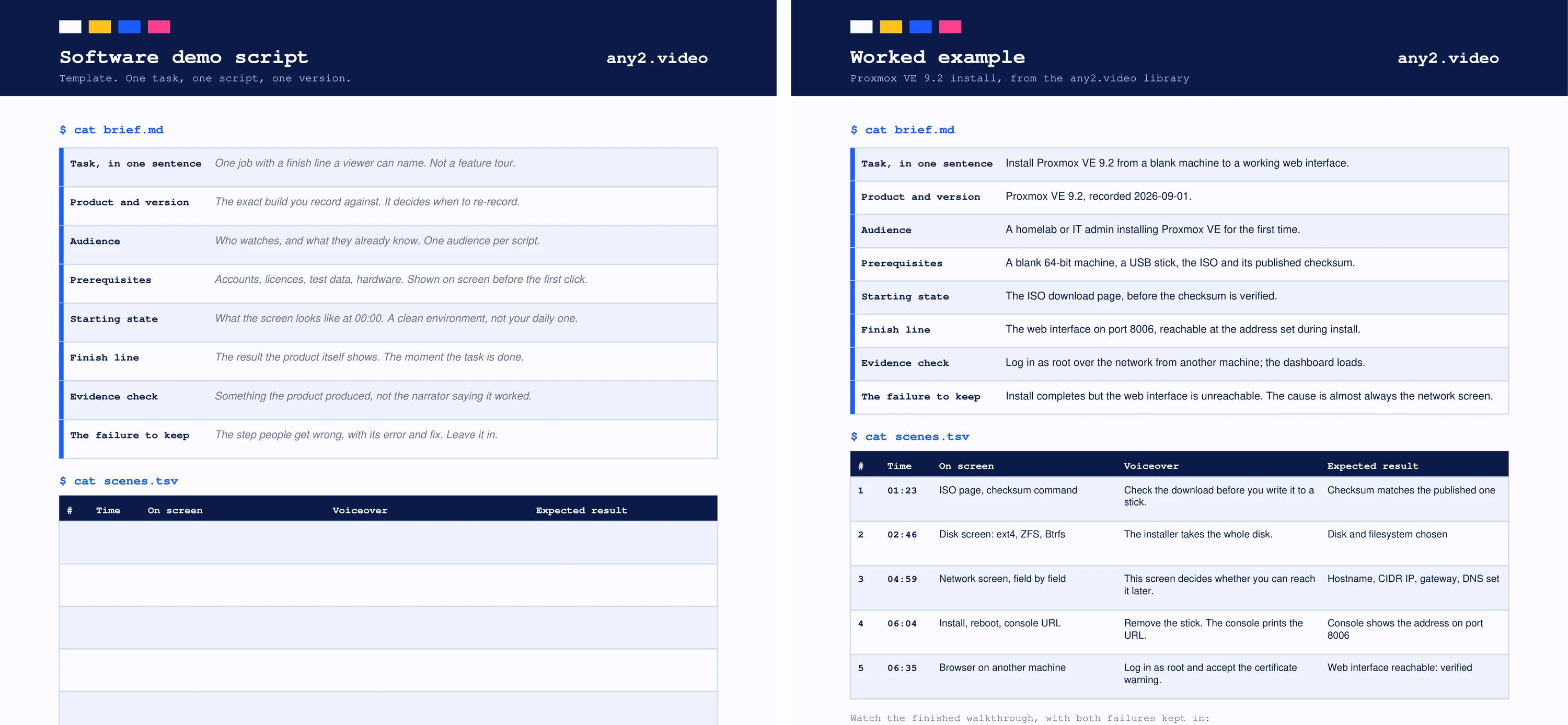
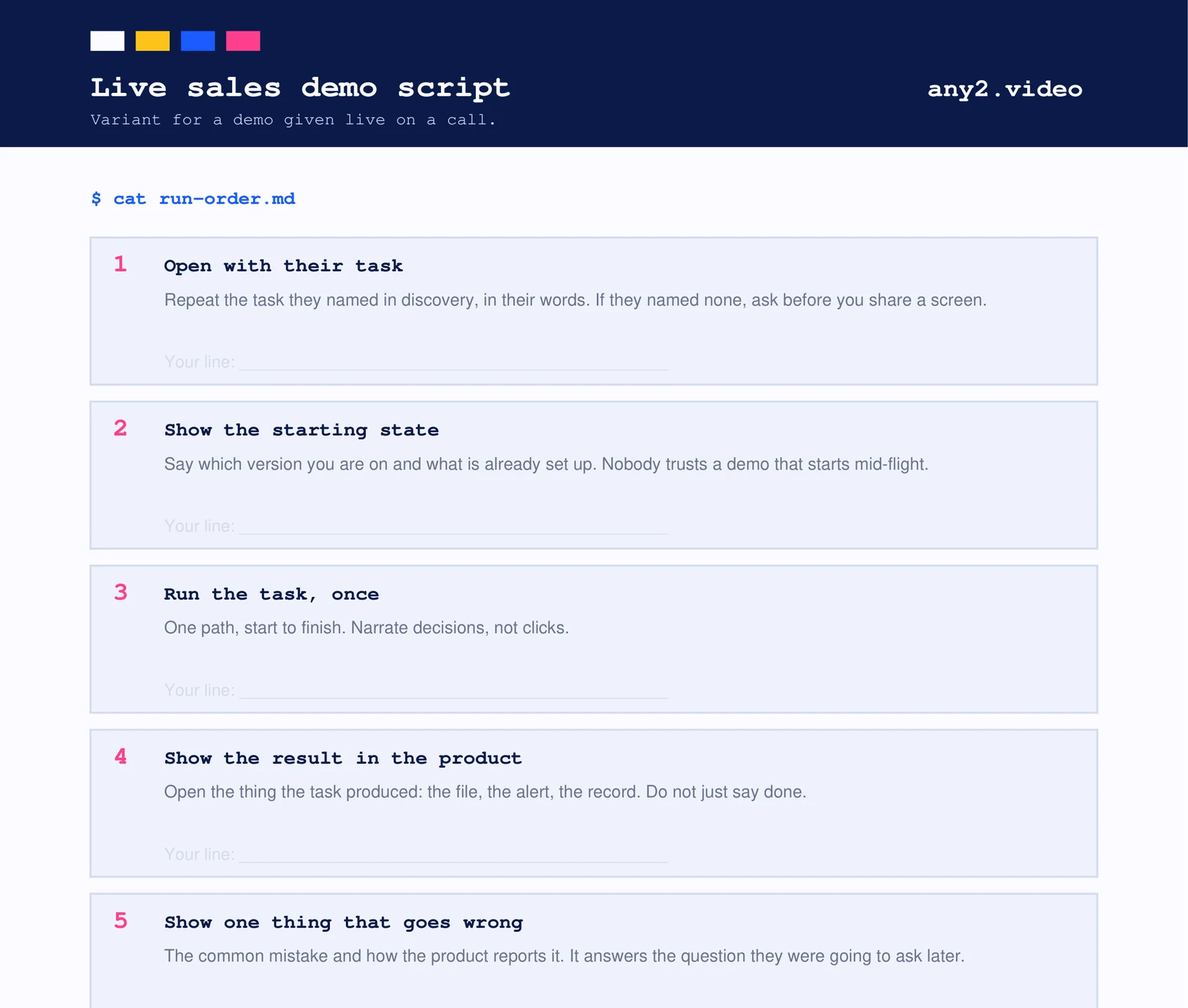
This software demo script template is a three-page download, in PDF and Word. Page one is the template: eight fields to fill in before recording, then a scene table with columns for what is on screen, what is said and what result should appear. Page two is the same template filled in from a real run, our Proxmox VE 9.2 install. Page three is a short demo script for live sales calls.
It is built around one idea: a demo script describes one task, on one version, ending on a result the product itself shows. Most demo scripts are a tour of features in the order they appear in the menu, which is easy to write and hard to watch. Download links are at the end of this page.
What is a demo script?
A demo script is the written plan for a product demonstration: which task is shown, in what order, what appears on screen at each step, what the narrator or presenter says, and what result proves the step worked. For a recorded demo video it becomes the shot list and the voiceover. For a live sales demo it is the running order the presenter follows.
What should a software demo script include?
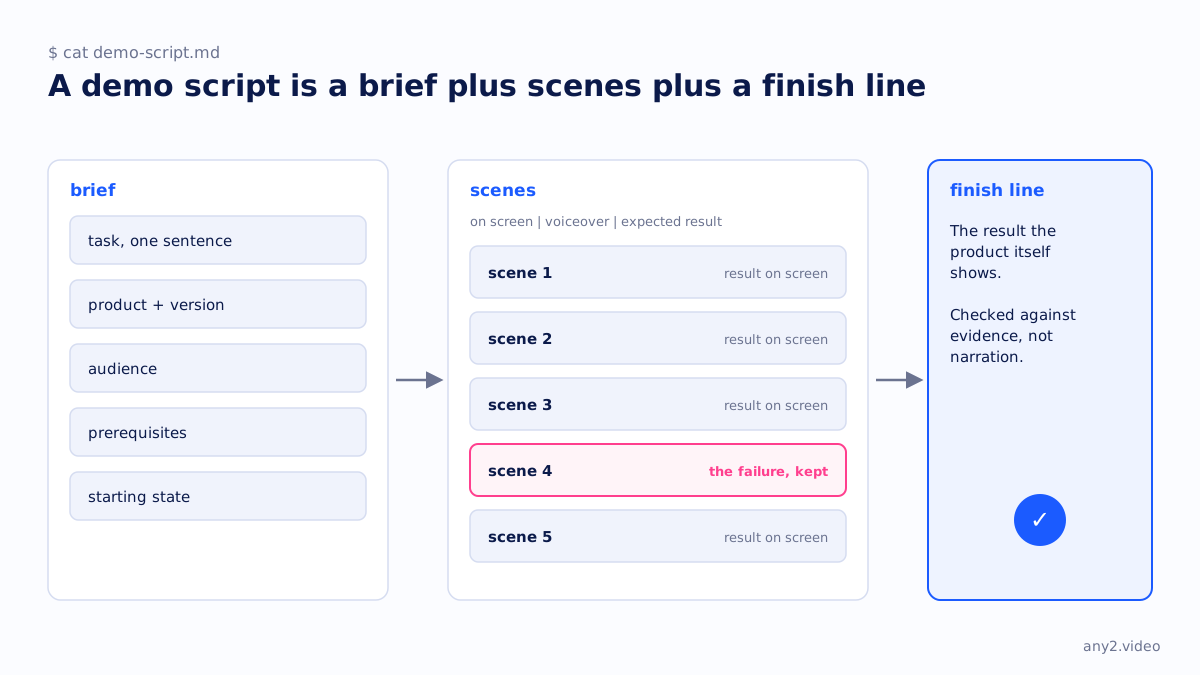
Eight decisions before any scene: the task in one sentence, the product and version, the audience, the prerequisites, the starting state, the finish line, how the result is checked, and the failure you will keep in. Then one row per scene with what is on screen, the voiceover and the expected result. The template has a field for each.
| Field | What to write | Why it matters |
|---|---|---|
| Task, in one sentence | One job with a finish line a viewer can name | A feature tour has no ending, so viewers leave |
| Product and version | The exact build you record against | It decides when the video needs re-recording |
| Audience | Who watches and what they already know | One audience per script; two audiences is two scripts |
| Prerequisites | Accounts, licences, test data, hardware | Shown before the first click, or viewers get stuck at step one |
| Starting state | What the screen looks like at the start | A clean environment, not your daily one |
| Finish line | The result the product itself shows | The moment the task is done |
| Evidence check | Something the product produced | Not the narrator saying it worked |
| The failure to keep | The step people get wrong, with its fix | It answers the question viewers would otherwise search for |
How do you write a demo script?
Write the task as one sentence and the finish line before anything else. Then run the task once yourself on a clean account, noting every screen and where you hesitated. Each screen that changes something becomes a scene. Write the expected result for each scene before the voiceover, so the words describe what the viewer sees rather than what you hope they see.
- Run the task first and write the script from the run, not from memory or the docs.
- Narrate decisions, not clicks. "Pick ext4 unless you have a reason for ZFS" helps; "now I click Next" does not.
- Keep the failure. If a step went wrong in your run, it will go wrong for viewers too.
- End on the result in the product: the file, the alert, the dashboard. Not on a logo.
Demo script example
Page two of the download is a filled-in example from the Proxmox VE 9.2 install in our library. The task is to install Proxmox VE 9.2 from a blank machine to a working web interface. The finish line is the web interface on port 8006, reachable at the address set during install, and the evidence is a root login from a second machine.
The failure it keeps is the one most installers hit: the install completes but the web interface is unreachable, almost always because of the network screen. That is why the script gives the network screen its own scene, field by field. The scene timestamps on the example page are the published video's own.
What is a sales demo script?
A sales demo script is the running order for a demo given live on a call. It is shorter than a recorded script and built around the prospect's own task: open with the task they named in discovery, show the starting state and version, run the task once, open the result in the product, show one thing that goes wrong and how the product reports it, and agree a next step with a date.
How long should a demo script be?
As long as the task, and no longer. A script for a short feature demo may be four scenes; the Proxmox install runs to five scenes and just under eight minutes because that is how long the install takes when every screen is explained. Cutting steps to hit a length is how viewers get lost. If the script is long, the task is probably two tasks.
Using the template
Print page one or open the Word file, fill in the eight fields, and do not start the scene table until the finish line is written. When the product ships a new version, the version field tells you which scripts to re-record. For the recording itself, our comparison of screen recorders for software demos covers the tools, and what a product demo video is covers the difference between a demo and proof. The creative brief template for video is the step before this one.
Rather have the demo recorded on the real product, with the version shown and the failure kept in? Send us the task. The first sample is free.
$ get-sample →