
How to Write Step-by-Step Instructions: A Free How-To Guide Template for Software Tasks (PDF and Word)
Good step-by-step instructions name one task, list what the reader needs first, give one action per numbered step with what they should see after it, show the step people get wrong, and end on a result the reader can check. This guide covers each part, visual work instructions, and a free how-to guide template with a filled-in example.
Part of our guide to Product Video for Software Companies.
To write step-by-step instructions that work, name one task in the title, list what the reader needs before they start, write one action per numbered step with what they should see after it, include the step people usually get wrong with its fix, and end on a result the reader can check. Then follow your own instructions on a clean setup before anyone else does.
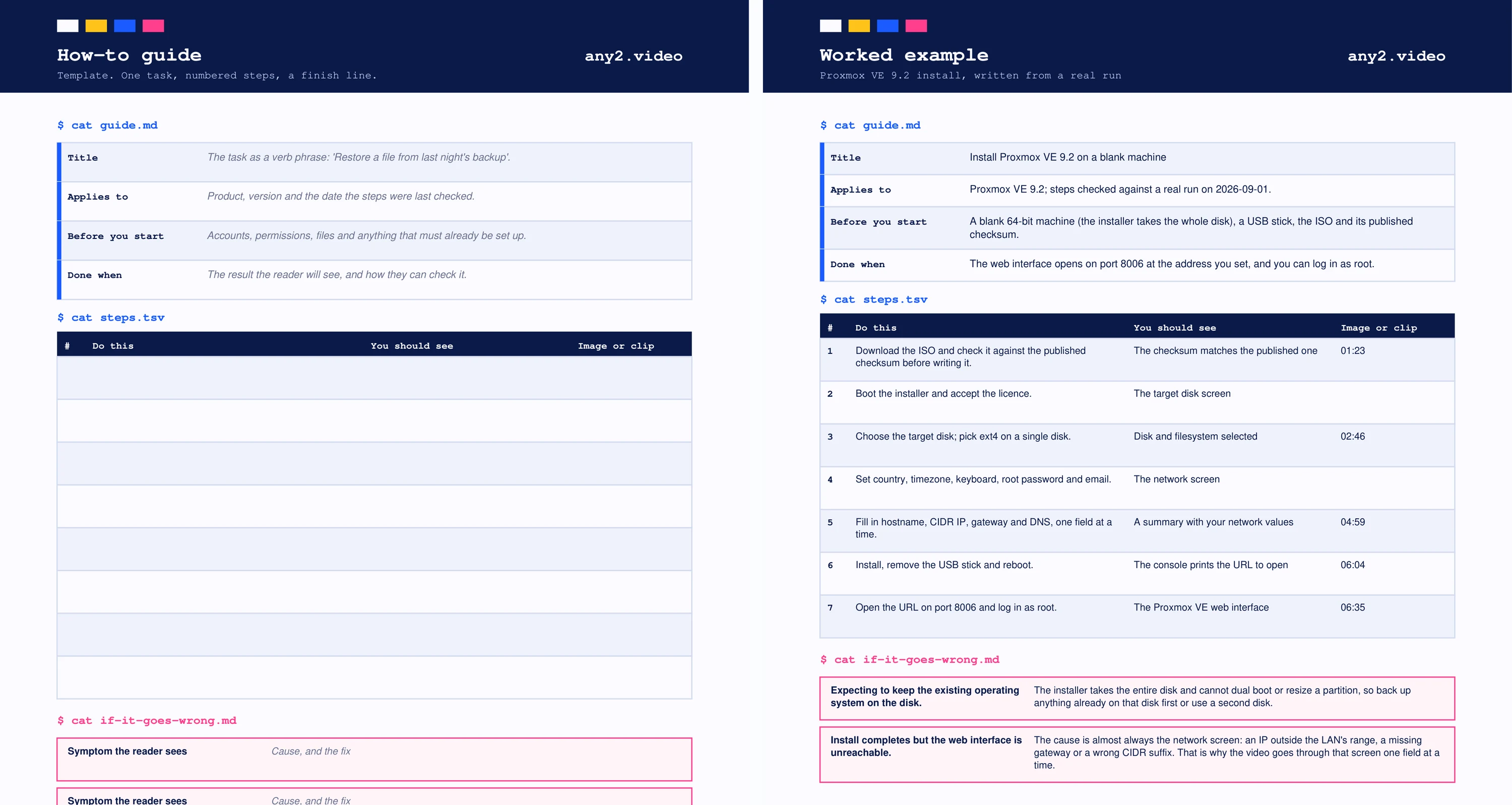
This page goes through each part, with a free how-to guide template in PDF and Word at the end. The template's filled-in example is written from a real run: our Proxmox VE 9.2 install, the same task as the video in our library, so you can compare the written steps with the recording.
What makes good step-by-step instructions?
Five things: one task with a finish line, the prerequisites before step one, one action per step in the order the reader will do it, what the reader should see after each step, and the common failure with its fix. Instructions fail most often at the first and last of these: they cover a whole feature instead of a task, and they stop before the reader can tell whether it worked.
How do you write step-by-step instructions?
Do the task yourself on a clean setup and write each step as you do it, not from memory. Start each step with a verb, name the exact button or field as it appears on screen, and add what the reader should see next. Number the steps, keep one action per step, and put warnings before the step they apply to, not after it.
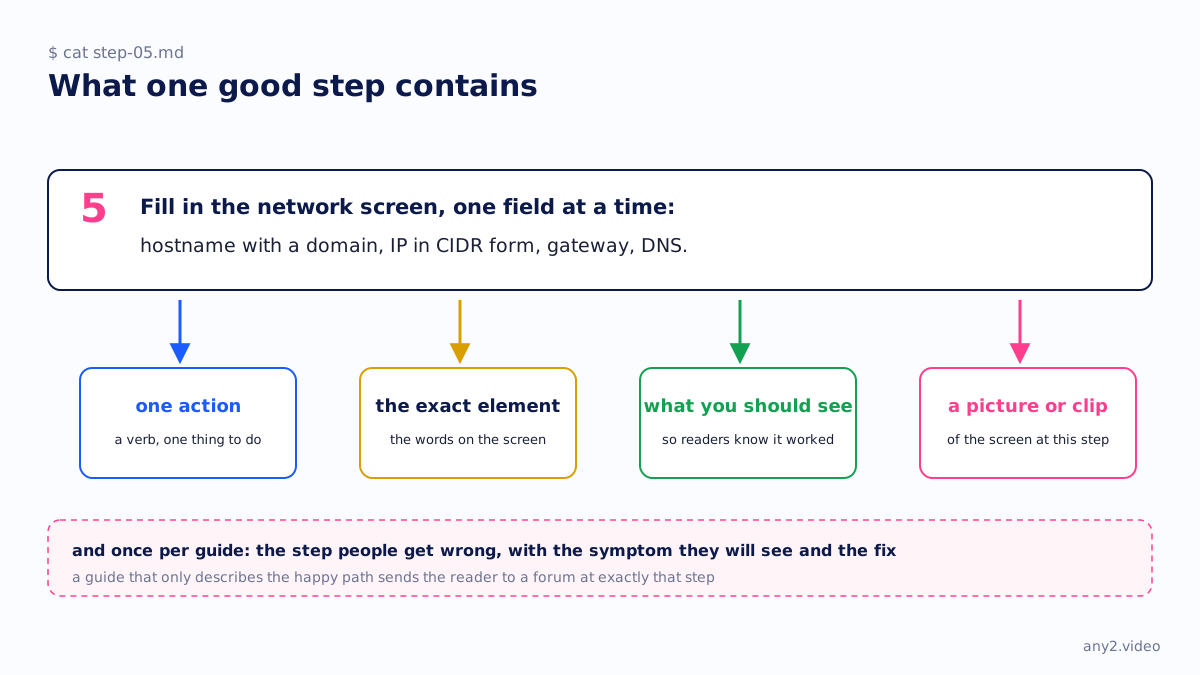
- Title the guide with the task as a verb phrase: "Install Proxmox VE 9.2 on a blank machine", not "Installation".
- State what it applies to: the product, the version, and the date the steps were last checked.
- List prerequisites before step one, including the ones that cannot be undone later. In the example, the installer takes the whole disk.
- One action per step. "Fill in the network screen, one field at a time" is one action; "configure networking and storage" is two.
- Write what the reader should see after the step, so they know whether to continue.
- End on a check: "The web interface opens on port 8006 and you can log in as root."
What are visual work instructions?
Visual work instructions are step-by-step instructions where each step is shown as an image, a diagram or a short video clip, with as little text as possible. They are common on factory floors and in field service, and for software they usually mean annotated screenshots or a clip per step. The picture shows where; the text still has to say what to do and what should happen.
For software, screenshots go stale with every interface change, and a clip of the real run is often easier to keep current than twenty annotated images. That is why the template has an image-or-clip column rather than a screenshot column: in the worked example it points to timestamps in the library video.
How-to guide template
The template has four fields at the top (title, applies to, before you start, done when), a numbered step table with columns for what to do, what you should see and an image or clip, and an if-it-goes-wrong box with a symptom and a fix. Page two is the same template filled in for the Proxmox VE 9.2 install, including the two failures from the real run.
| Section | What goes in it | Example from page two |
|---|---|---|
| Title | The task as a verb phrase | Install Proxmox VE 9.2 on a blank machine |
| Applies to | Product, version, date checked | Proxmox VE 9.2, checked against a run on 1 September 2026 |
| Before you start | What must exist first | A blank machine, a USB stick, the ISO and its checksum |
| Steps | One action, what you should see, image or clip | Seven steps, five with a clip timestamp |
| If it goes wrong | Symptom, then cause and fix | Web interface unreachable: almost always the network screen |
| Done when | The result and how to check it | Log in as root on port 8006 |
How detailed should instructions be?
Detailed enough that someone who has never done the task can finish it without asking, and no more. Every step the reader must perform gets its own line, including the obvious ones a new user will not know, like removing the USB stick before rebooting. Background and reasons go in a sentence after the step, not inside it, so a reader skimming the numbers still gets every action.
Instructions, a video, or both?
Both, for any task with more than a few steps. Written steps are searchable and quick to skim; a video shows what the screen looks like and how long things take. Step recorders such as Scribe and Tango generate the written half from your clicks, which our Scribe vs Tango vs Guidde comparison covers, and a how-to video covers the other half. Keep them on the same page and give them the same version.
Using the template
Open the Word file, fill in the four fields first, run the task while you write the steps, and fill in the failure box from what actually went wrong. When the product releases a new version, the applies-to line tells you which guides to check. For a demo or tutorial video of the same task, the software demo script template uses the same structure.
Have the written steps and want the video beside them, recorded on the current version? Send us the task. The first sample is free.
$ get-sample →