
Software Demo Video Examples: Eight Vendor Demos Scored on What Makes a Demo Believable
Eight real software demo videos from Proxmox, Zabbix, JetBrains, GitHub, GitLab, Veeam, Atlassian and HubSpot, scored on six questions: does a task finish, is the version stated, are prerequisites shown, is there evidence on screen, is anything shown going wrong, and are written steps linked. What each gets right, and what to borrow.
Part of our guide to Product Video for Software Companies.
These eight software demo video examples were published by the vendors themselves, on their own YouTube channels, between 2024 and 2026: three from infrastructure and IT, three from developer tools and two from business SaaS. Each shows the product doing a task rather than a brand message, and each runs between five and twenty minutes.
We scored every one on the six questions we use for our own videos: does a task finish at a moment you can name, is the product version stated, are the prerequisites shown first, is there evidence the product produced, is anything shown going wrong with its fix, and are written steps linked. We read each video's title, description, chapters and transcript on 3 October 2026; timestamps below come from those. We did not grade the visuals.
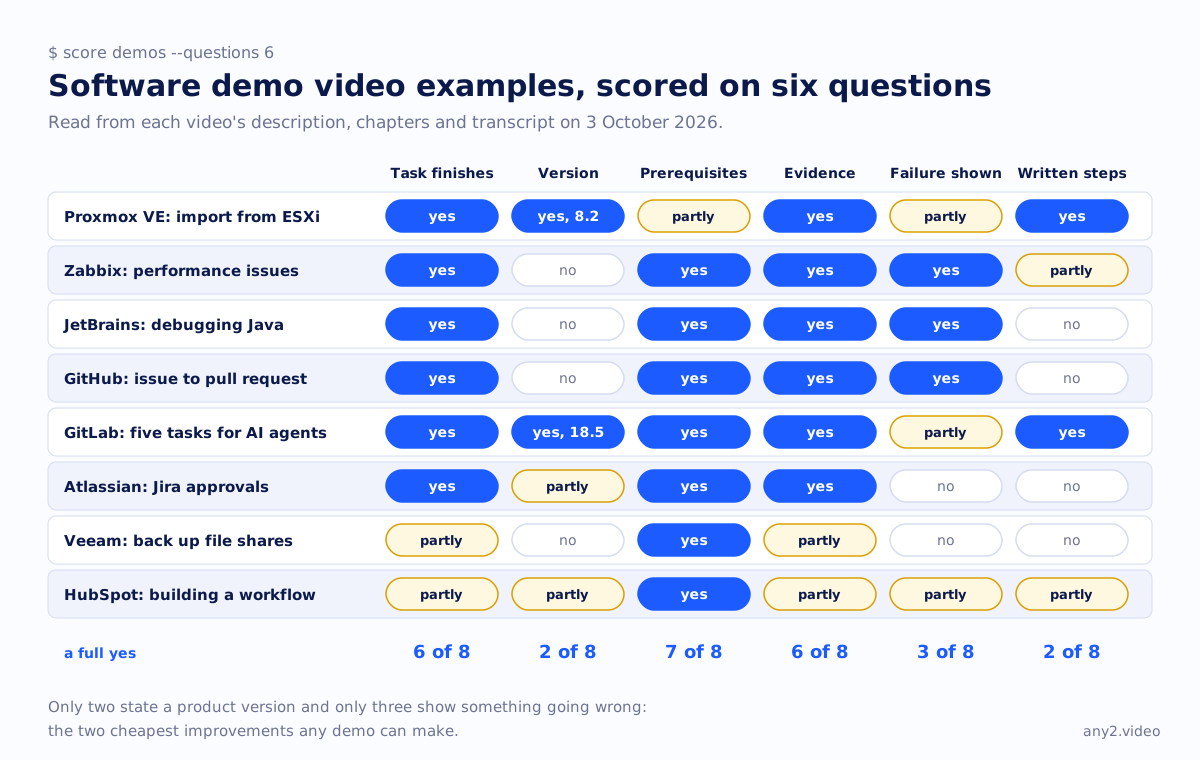
Software demo videos at a glance
| Demo | Task finishes | Version | Prerequisites | Evidence | Failure shown | Written steps |
|---|---|---|---|---|---|---|
| Proxmox VE: import VMs from VMware ESXi | Yes | Yes (8.2) | Partly | Yes | Partly | Yes |
| Zabbix: troubleshooting performance issues | Yes | No | Yes | Yes | Yes | Partly |
| JetBrains: debugging Java in IntelliJ IDEA | Yes | No | Yes | Yes | Yes | No |
| GitHub: end-to-end agentic development with Copilot | Yes | No | Yes | Yes | Yes | No |
| GitLab: five tasks for AI agents (18.5) | Yes | Yes (18.5) | Yes | Yes | Partly | Yes |
| Atlassian: Jira approvals | Yes | Partly (edition) | Yes | Yes | No | No |
| Veeam: back up file shares (NAS) | Partly | No | Yes | Partly | No | No |
| HubSpot: workflows, the complete guide | Partly | Partly (plan tiers) | Yes | Partly | Partly | Partly |
Proxmox VE: importing a VM from VMware ESXi
The most complete demo here. It imports a Windows Server 2022 VM from an ESXi host into Proxmox VE, boots it, and then does the step most demos skip: switching the boot disk to VirtIO SCSI, finishing at 6:09 with the VirtIO controller confirmed inside the guest. The description states the version (8.2), the narration notes which VMware versions need extra settings, and the description links the wiki section with the written steps.
 7:11
7:11
What to borrow: finish the whole job, not the wizard, and prove it where the user will check it. What it leaves out: the ESXi-side prerequisites such as credentials are not covered.
Zabbix: troubleshooting a slow server
A rare vendor demo that starts from a broken state. The server health dashboard shows the problems, the server log says the value cache should be increased, one configuration change is made, and after the restart the cache usage recovers at 4:07. It then names the misconfigurations that caused the problem. Viewers with the same symptom can match it line for line.
 7:20
7:20
What to borrow: open on the symptom, read the product's own log message on screen, and show the metric recovering. What it leaves out: no Zabbix version, and the written follow-up is a general tuning post rather than these steps.
JetBrains: debugging Java in IntelliJ IDEA
Built entirely around failures: a failing unit test that passes at 2:10, an exception traced to a copy-paste error, a breakpoint the presenter places on the wrong line and moves, and bad input data, ending on a correct run at 7:00. Leaving the presenter's own mistake in is what makes it believable.
 7:26
7:26
GitHub: from issue to pull request with Copilot
A short demo that takes a backlog issue to a pull request. The first test run fails, the errors are read and fixed, a missing dependency is installed, and the tests pass at 3:08; a second agent's branch passes at 4:55. It shows the product recovering rather than a clean happy path. One visible time skip at 2:45 is announced in the narration, which is the honest way to cut.
GitLab: five tasks handed to AI agents in 18.5
The strongest example for version and setup. The release is in the title and the narration, the description links the 18.5 release post and docs, and before the code-review agent runs, the demo shows the service account, token, role, CI/CD variables and flow file a viewer would need. Each of the five tasks ends on a result in the product. The problems the review and security agents find are logged as issues, not fixed on camera, and at nearly thirteen minutes it is the longest of the developer demos.
Atlassian: adding approvals to a Jira workflow
A clean before-and-after in about six minutes: first the current workflow, where anyone can move an item from In Review to Accepted; then the approval step is configured; then an item is blocked until approved and moves to Accepted at 5:01, with a declined item shown too. It states which editions and project types support approvals but gives no written guide.
Veeam: backing up file shares
Explains the four components needed before the first click and starts from an empty console, which most demos skip. It then walks the wizard and starts the job at 6:04, but stops there: a finished backup or a restore is never shown, so the evidence that it worked is missing.
HubSpot: building a workflow
Thorough: plan requirements first, then a realistic automation with a wait, a branch by country and a test send, plus a look at a running workflow's error log with real failure reasons. At nineteen minutes it is long, the workflow is never shown being switched on, and the test messages are not shown arriving.
What makes a good software demo video?
From these eight, six things: a task that finishes at a moment you can name, the product version, the prerequisites before the first click, evidence the product produced rather than narration, the failure a user will hit with its fix, and written steps linked from the description. Only two of the eight state a product version, and only three show something going wrong. Those are the two cheapest improvements any demo can make.
How long should a software demo video be?
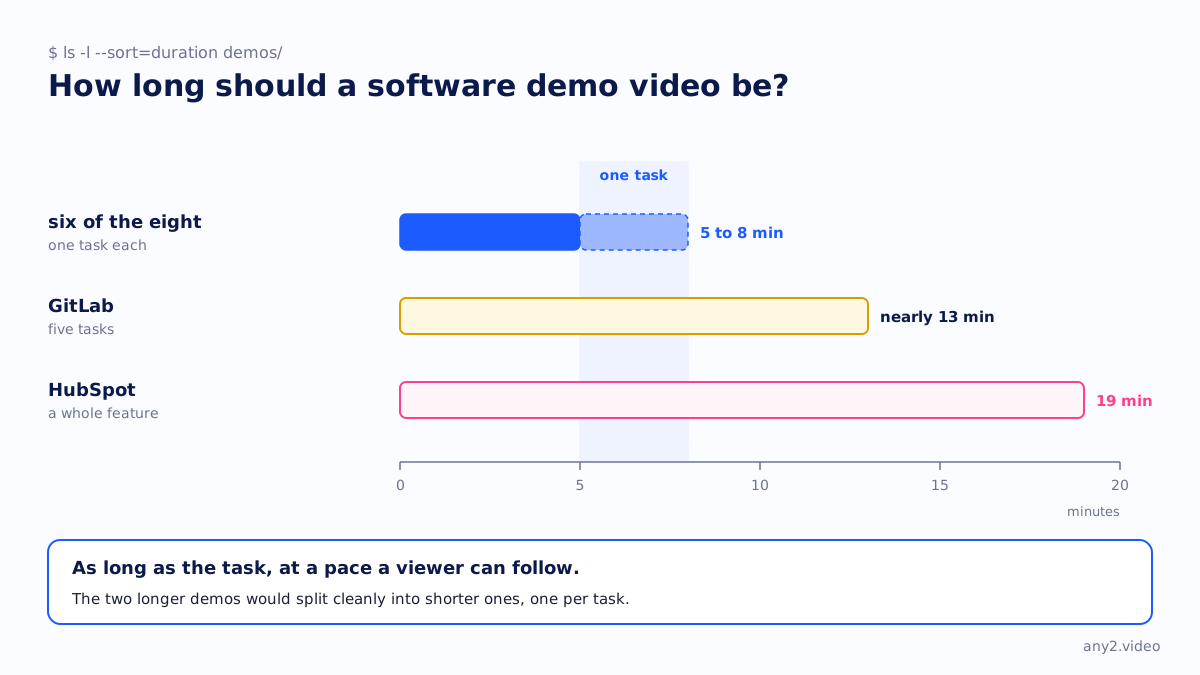
As long as the task, at a pace a viewer can follow. Six of these eight run between five and eight minutes for one task. The two longer ones, GitLab at nearly thirteen minutes and HubSpot at nineteen, cover several tasks or a whole feature, and both would split cleanly into shorter demos, one per task.
Making your own
Our software demo script template has a field for each of the six questions, and what a product demo video is covers the difference between a demo and proof. The Proxmox VE 9.2 install in our library is our own attempt at all six, with both of its failures kept in. For new-user videos specifically, see the onboarding video examples.
Want your demo scored on the same six questions, or recorded so it passes all six? Send us the task. The first sample is free.
$ get-sample →