
What Is an Onboarding Video? Definition, the Types Worth Making, and How Often to Re-Record
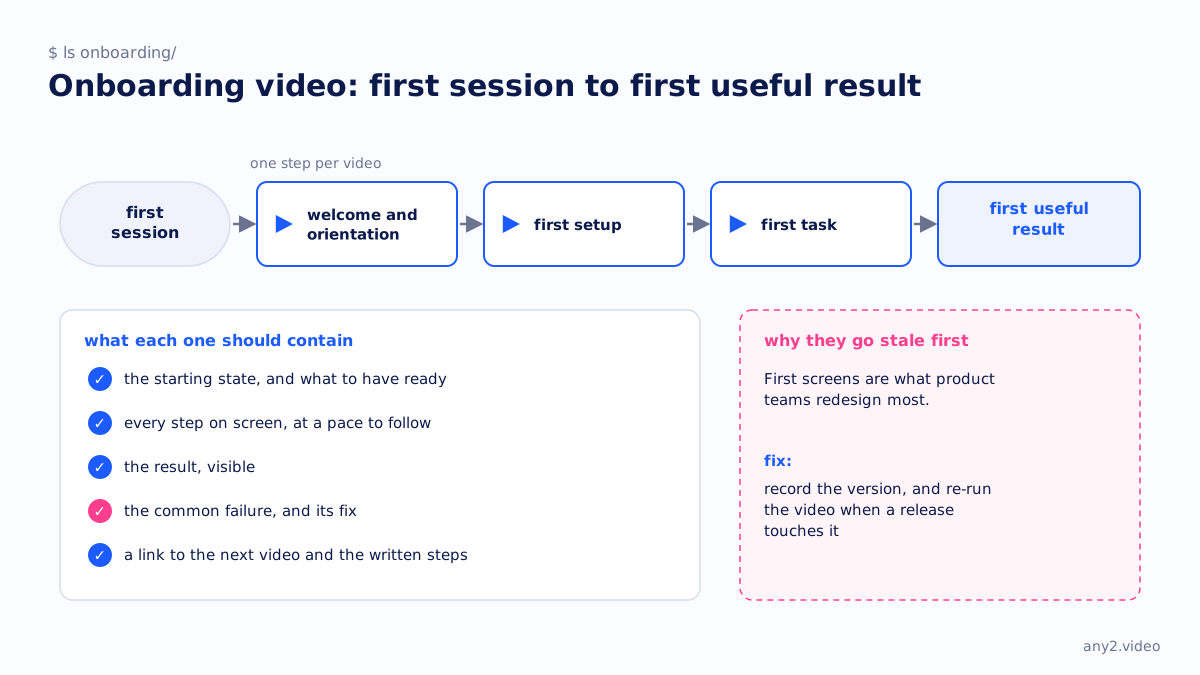
An onboarding video is a short video for new users of a product that takes them from their first session to a first useful result, such as a completed setup or a first task. It is usually one of a series, one step each, and releases affect it more than any other video type because it shows the first screens.
Types of onboarding video
| Type | What it covers |
|---|---|
| Welcome and orientation | What the product is for and where things are. Short, and the least useful on its own. |
| First setup | The steps from an empty account to a configured one. |
| First task | The one job a new user came to do, done end to end. |
| Role-based | The same product from an administrator's and an end user's seat. |
| Migration | Moving from the tool they used before. |
What each one should contain
The starting state, including anything the user must have ready. Every step on screen at a pace that can be followed. The result, visible. A link to the next video and to the written steps. If the step has a common failure, such as a permission that is off by default, show it and the fix; new users hit it, and a video that skips it sends them to support. Our page for SaaS onboarding teams covers how this fits a customer education programme.
Why onboarding videos go stale first
Onboarding shows the first screens, and first screens are what product teams redesign most. A video that still shows last quarter's sign-up flow teaches the wrong path to the users least able to tell. The fix is the same as for any how-to video: record the version, and re-run the video when a release touches it. The library piece one demo, five markets adds the other onboarding problem, which is doing all of this in more than one language.
Onboarding video and support tickets
The clearest sign an onboarding video is working is a ticket category getting quieter. Pick the first-week tickets with the highest count, make the video that answers each, and watch the count. That is also the honest way to decide which video to make next. Does video marketing work for software companies says what can and cannot be measured yet.
Questions
What should an onboarding video include?
The starting state and prerequisites, every step on screen, the result, the common first failure and its fix, and a link to the next step and the written guide.
How long should an onboarding video be?
One step per video, as long as that step takes. A series of short videos beats one long one, because users arrive at different steps.
How often should onboarding videos be updated?
Whenever a release touches the screens they show, which for onboarding is often. Record the product version in each video so you know which ones a release affects.
What is the difference between onboarding and training videos?
Onboarding gets a new user to a first result. Training builds skill across the product over time, usually for existing users.
See one, with its run log and the attempts that failed.
$ cd /library →