
What Is B-Roll? Meaning, Its Role in Product Video, and the Generated Kind
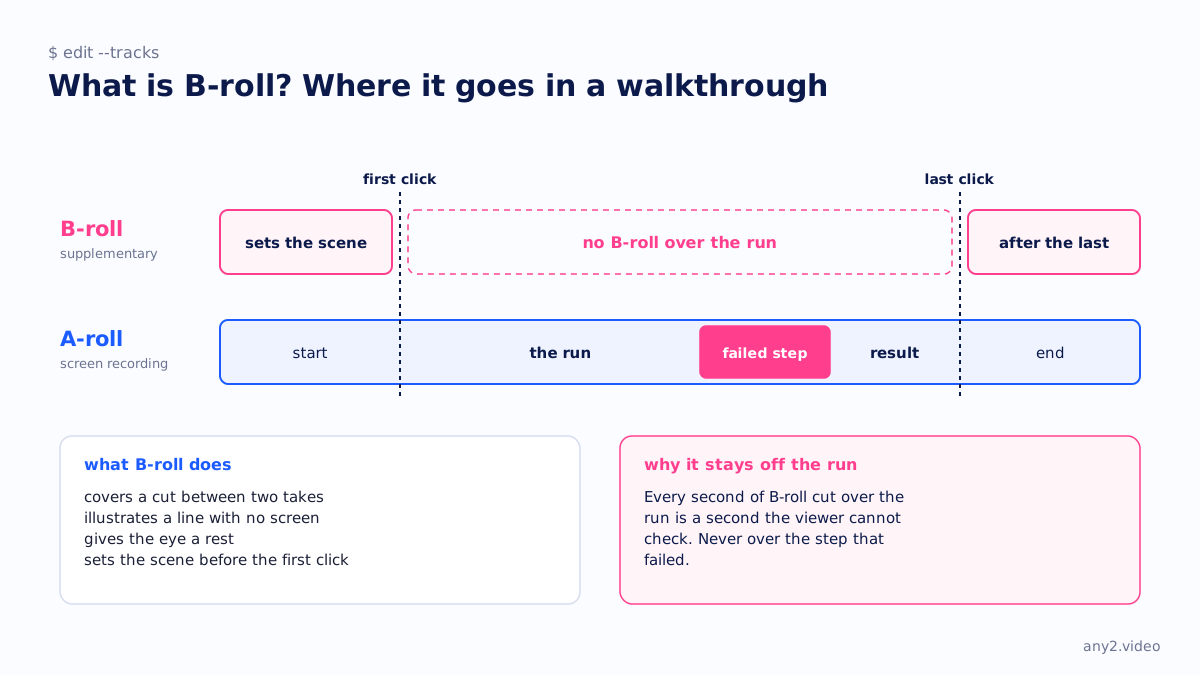
B-roll is supplementary footage edited over or between the primary shots of a video to illustrate what is being said, cover a cut or set a scene. In a product video the A-roll is the screen recording or the presenter; the B-roll is everything else: hands typing, a server rack, a close-up of the result.
What B-roll does
- Covers a cut, so two takes of narration join without a visible jump.
- Illustrates a sentence that has no screen behind it, such as a line about where the product is deployed.
- Gives the eye a rest during a long stretch of interface.
- Sets the scene at the start, before the first click.
B-roll in a software walkthrough
Keep it away from the task. A walkthrough is evidence that a task finished on a stated version, and every second of B-roll cut over the run is a second the viewer cannot check. Use it before the first click and after the last, and never over the step that failed. The Proxmox VE 9.2 install in our library has none over the run at all; the chapters and the run log do the pacing instead.
Generated B-roll
AI video generators are good at B-roll: a data centre at dusk, a hand on a keyboard, a city at night. That is the right use for them, because nothing in those shots makes a claim about the product. The line is crossed when a generated shot shows an interface, a result or a dashboard, because then the B-roll is asserting something the run did not. Our comparison of AI video generators for product marketing covers where that line sits, and what counts as raw footage explains why the run itself has to stay untouched.
Questions
What is the difference between A-roll and B-roll?
A-roll is the primary footage that carries the content: the interview, the presenter or the screen recording. B-roll is the secondary footage cut over it to illustrate, cover cuts or set a scene.
Can B-roll be AI-generated?
Yes, and it is one of the better uses of a video generator, as long as the generated shots show scenery and not the product. A generated interface or result is a claim the run never made.
Does a software demo need B-roll?
Very little. A short opening shot and an ending shot are enough. Over the task itself, B-roll hides what the viewer came to check.
See one, with its run log and the attempts that failed.
$ cd /library →