
AI Video Generators for Product Marketing: What Synthesia, HeyGen, Runway and Veo Can and Can't Show
AI video generators for product marketing come in two kinds. Avatar tools such as Synthesia, HeyGen and Colossyan put a generated presenter in front of a script. Generative models such as Runway and Google Veo render footage from a prompt. Both save real production time, and neither can show your software doing something, because neither runs it.
Part of our guide to AI Video Marketing for Software Products.
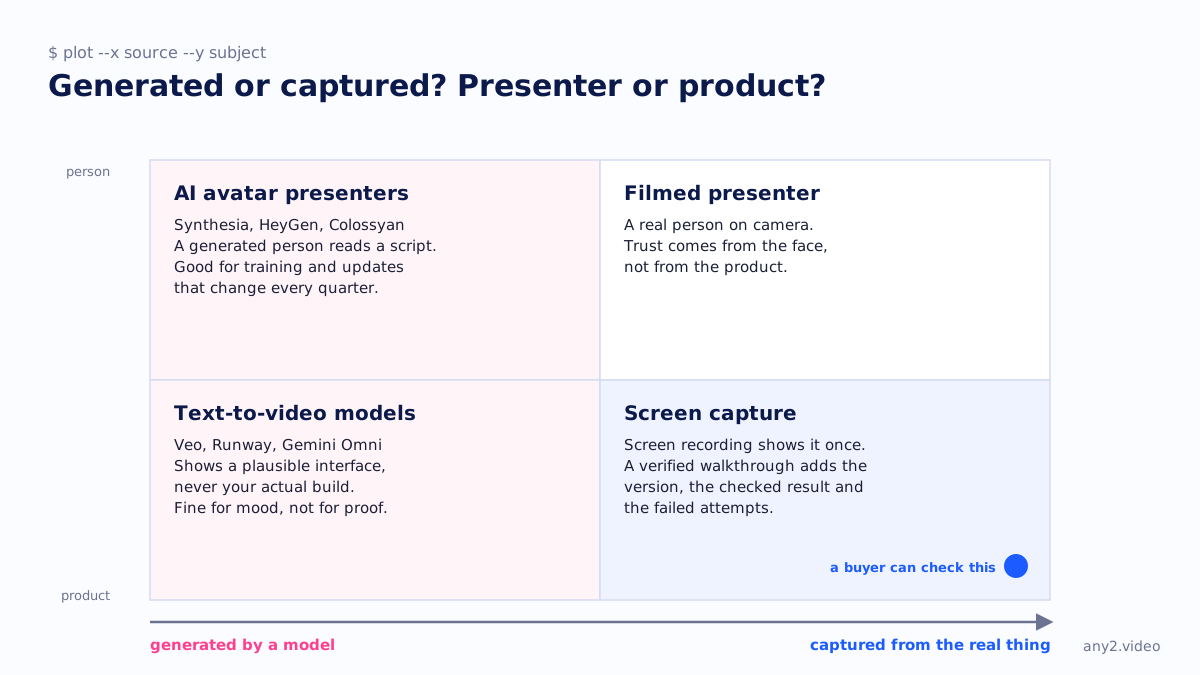
AI video generators for product marketing split into two groups that solve different problems. Avatar platforms, led by Synthesia, HeyGen and Colossyan, turn a script into a video with a generated presenter and a cloned or stock voice, in dozens of languages. Generative models, such as Runway Gen-4.5 and Google's Veo 3.1, render short clips from a text prompt or reference images. The first replaces a filming day. The second replaces stock footage.
What neither does is operate your product. That matters the moment a video's job is to show that something works. We compared the main tools from their own pages, licences and model documentation on 29 September 2026 and checked their prices again on 3 October 2026. One big name is missing from the shortlist for a reason covered below: OpenAI shut Sora down.
AI video generators at a glance
| Tool | Type | Length per video or clip | Screen recording | Provenance and watermark | Paid ads |
|---|---|---|---|---|---|
| Synthesia | Avatar presenter | Not stated; plans are metered in minutes | Yes, AI Screen Recorder extension | Terms forbid removing provenance marks | Stock avatars not allowed in any paid promotion |
| HeyGen | Avatar presenter, plus prompt-to-video agent | 1 min free, 30 min Creator and Pro, 60 min Business | Yes, screen, webcam and mic | Visible logo on the free plan; no C2PA found | Commercial use allowed; disclose AI where law requires |
| Colossyan | Avatar presenter for training | 20 min Starter, more on paid plans | Listed in the plan comparison | Watermark removed from Professional | Avatars not for TV broadcasting or advertising |
| Runway Gen-4.5 | Text and image to video | 2 to 10 seconds, 720p | Not stated | C2PA on outputs; visible watermark on free | Allowed, including product advertising |
| Google Veo 3.1 | Text and image to video with audio | 8 seconds; extensions up to 148 seconds at 720p | Not stated | SynthID; C2PA listed on Vertex AI | Google claims no ownership of outputs |
| OpenAI Sora 2 | Text to video | Discontinued | No | Not verified | Unavailable: app closed 26 April 2026, API closed 24 September 2026 |
Can AI make a product demo video?
AI can make the video around a demo, not the demo itself. Synthesia, HeyGen and Colossyan all include a screen recorder, so a person records the product and the tool adds an avatar, voice and captions. A text-to-video model can render an interface, but it invents that interface from a prompt. None of these tools documents opening your software, running a task or checking the result.
Avatar platforms: Synthesia, HeyGen and Colossyan
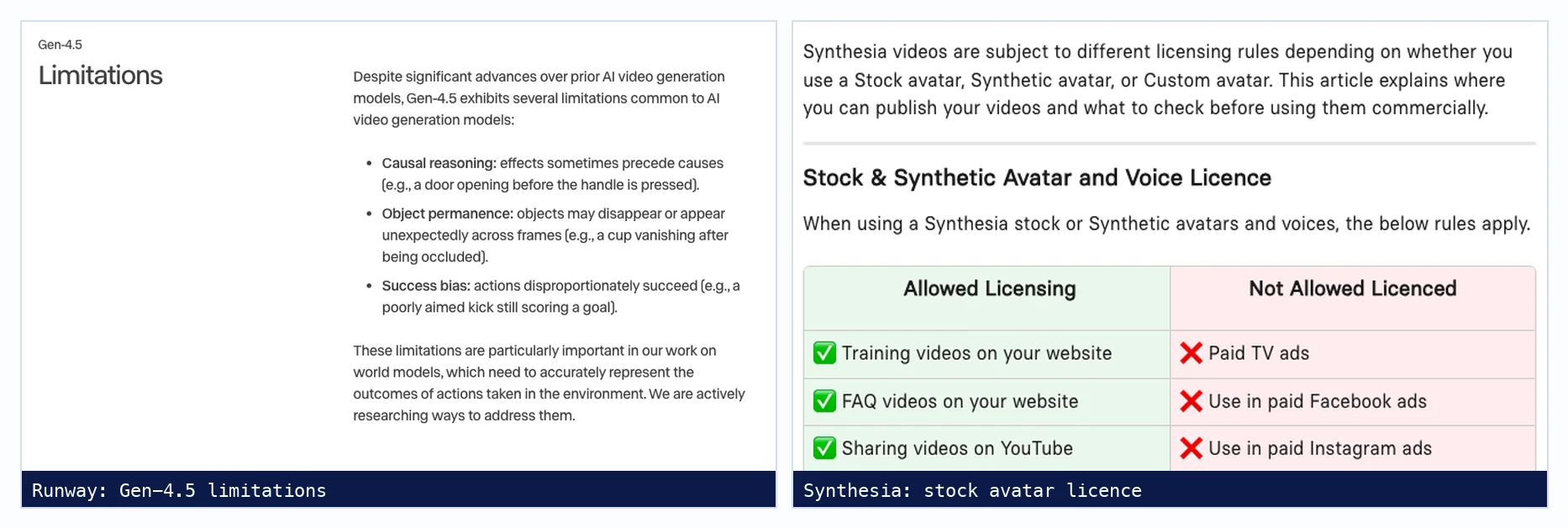
Synthesia offers 160+ languages and voices on every plan, stock and personal avatars, a Chrome screen recorder that turns narration into an editable script, and APIs. Its licence is the detail most marketing teams miss: stock and synthetic avatars may appear in training, FAQ and product videos on your site and in organic social posts, but not in paid TV, paid social or programmatic ads.
HeyGen puts avatars trained on a recording of you alongside 700+ stock avatars on paid plans, translates into 175+ languages with lip sync, and exports 4K on Pro. Its terms allow commercial use, forbid presenting output as entirely human made, and warn that factual claims in outputs should be checked independently. Colossyan targets training and onboarding, with SCORM export for learning systems, and its acceptable use policy rules out television broadcasting and advertising.
Generative models: Runway and Google Veo
Runway Gen-4.5 generates clips of 2 to 10 seconds at 720p, with 4K upscaling on paid plans, and its terms allow product advertising. Runway lists the model's limitations plainly, including what it calls success bias: actions disproportionately succeed. In a product video that is the wrong failure mode, because a generated interface will tend to show the action working whether or not your product does.
Google's Veo 3.1 generates 8-second clips with native audio at up to 4K, can hold a product's appearance from up to three reference images, and marks every video with SynthID. It remains available in Google Flow, the Gemini API and Vertex AI, while the Gemini app is moving to a newer model, Gemini Omni. Both are strong for launch visuals and B-roll.
What can't AI video generators show?
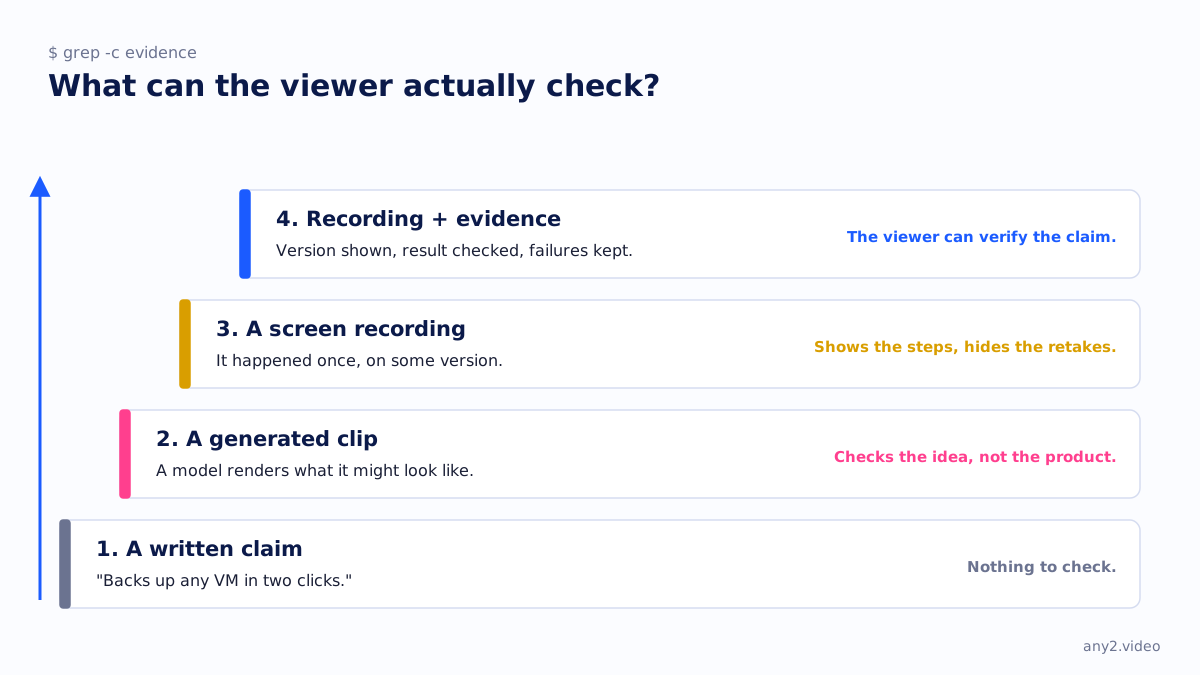
They cannot show your product running. A generated clip shows what a model predicts the scene should look like, so the interface, the output and any success message are invented. Runway notes that generated actions tend to succeed and that legible text is hard. An avatar can describe a feature, but the viewer still sees no evidence the feature works.
Do buyers trust AI avatar videos?
We have no survey data to offer, and we would treat the figures that circulate with care. The useful question is what the video asks the viewer to believe. An avatar explaining a policy or a pricing change asks for little trust and saves a filming day. An avatar claiming your product does something asks for trust the video cannot earn, because nothing on screen shows it happening.
Can you use AI avatar videos in paid ads?
It depends on the licence, not the technology. Synthesia's stock and synthetic avatars are not licensed for paid TV, paid social or programmatic ads, and Colossyan's avatars and voices may not be used for television broadcasting or advertising. HeyGen's terms allow commercial use of outputs. Custom avatars of your own staff follow the consent you agreed with them. Read the current licence before a campaign.
Do you have to label AI-generated video?
Often, yes. YouTube requires creators to disclose realistic generated content, such as a scene that did not happen, and may add a label automatically when a video carries C2PA metadata. In the EU, Article 50 of the AI Act, applying from 2 August 2026, requires deployers to disclose deep fakes, which it defines as generated content resembling real people, objects or events that would falsely appear authentic. This is not legal advice.
In the United States the FTC has no rule that says AI video must carry a label, but its long-standing standard applies: advertising must be truthful and claims must be backed by evidence, and its 2024 rule on reviews and testimonials names AI-generated fake reviews explicitly. A generated clip of your product doing something it cannot do is a product claim, however it was made.
What happened to Sora?
OpenAI discontinued it. The Sora web and app experience closed on 26 April 2026, and the Sora 2 models and the Videos API were shut down on 24 September 2026, with no one-to-one replacement according to OpenAI's developer documentation. For marketing teams it is a reminder that a hosted generator can disappear with a few months' notice, taking a production workflow with it.

What is the best way to generate video with AI?
Match the tool to what the video has to show. For a presenter reading a script in many languages, an avatar platform such as Synthesia, HeyGen or Colossyan. For short scenes, mood shots and B-roll, a generative model such as Runway or Veo. For anything that must show your software doing a task, record the real product and use AI for the voice, captions and translation around it.
When is AI-generated video the right choice?
When the content changes more often than you could film it, and when nobody needs to see the product actually work. Training modules, policy updates, onboarding explainers and localised versions of the same message suit avatar tools. Launch teasers, mood shots and B-roll suit Runway or Veo. Evaluation content, where a buyer decides whether the product does what you say, needs captured footage.
How much does Synthesia cost?
Synthesia has a free plan with 500 credits a month, about ten minutes of video, with a watermark and no download. Starter costs $18 a month billed annually or $29 monthly, and Pro starts at $64 a month annually or $89 monthly at its entry credit tier. Enterprise is priced on request. Each plan includes one editor, according to Synthesia's pricing page on 3 October 2026.
How much do AI video generators cost?
Entry paid plans run from $12 to $59 a month on annual billing, and all have a free tier. Avatar platforms price by video minutes or credits and editors; generative models price by credits per second of footage. Google's Veo comes with a Google AI subscription, from $19.99 a month for AI Pro.
| Tool | Free plan | Entry paid plan | Billed annually | Billed monthly |
|---|---|---|---|---|
| Synthesia | 500 credits a month, watermark | Starter | $18 a month | $29 a month |
| HeyGen | 3 videos a month, up to 1 minute | Creator | $24 a month | $29 a month |
| Colossyan | 20 minutes a month | Professional (1 editor) | $59 a month | $89 a month |
| Runway | 125 credits, one-time | Standard | $12 a month | $15 a month |
| Google Flow and Veo | 50 Flow credits a day | Google AI Pro | Not stated | $19.99 a month |
Where generated video stops
The two approaches combine well. A generated opener or an avatar introduction in six languages, followed by a real run of the task on the real product, with the version shown and the failed attempt kept in. Our comparison with AI video generators sets out where each wins, and the Proxmox VE 9.2 install shows the captured half. For other formats in this series, see AI video translation tools and interactive demo software compared.
Sources, all fetched 29 September 2026: Synthesia video licensing, HeyGen pricing, Colossyan acceptable use, Runway Gen-4.5, Veo, OpenAI deprecations, YouTube disclosure rules, EU AI Act Article 50 and the FTC rule on fake reviews. Prices: Synthesia, HeyGen, Colossyan, Runway and Google AI plans, fetched 3 October 2026.
Keep the avatar for the intro. For the part where the product has to work, send us the task and we will run it on the real thing. The first sample is free.
$ get-sample →