
AI Video Translation Tools for Technical Product Videos: Six Dubbing Tools Compared
AI video translation tools can now dub a product video into dozens of languages in the original speaker's voice. For technical videos, the feature that matters most is a glossary: a way to tell the tool which product names and terms to keep or translate a fixed way. HeyGen, Rask AI and CAMB.AI document one on self-serve plans; Synthesia offers it on Enterprise; ElevenLabs and YouTube do not state one.
Part of our guide to AI Video Marketing for Software Products.
AI video translation tools transcribe your video, translate the transcript, and speak it again in another language, usually in a clone of the original voice. For a talking-head video that is often good enough to publish. A technical product video is harder, because it is full of words that must not change: product names, commands, menu labels and version numbers. Whether a tool lets you control those words decides whether the dub helps or confuses.
We compared six options from their own documentation on 29 September 2026: ElevenLabs Dubbing, HeyGen Video Translate, Rask AI, Synthesia AI Dubbing, CAMB.AI and YouTube's automatic dubbing. We did not dub a test clip through each of them. Prices were checked again on 3 October 2026 and are in their own section below. Several vendors contradict themselves across pages; where that happens we say so.
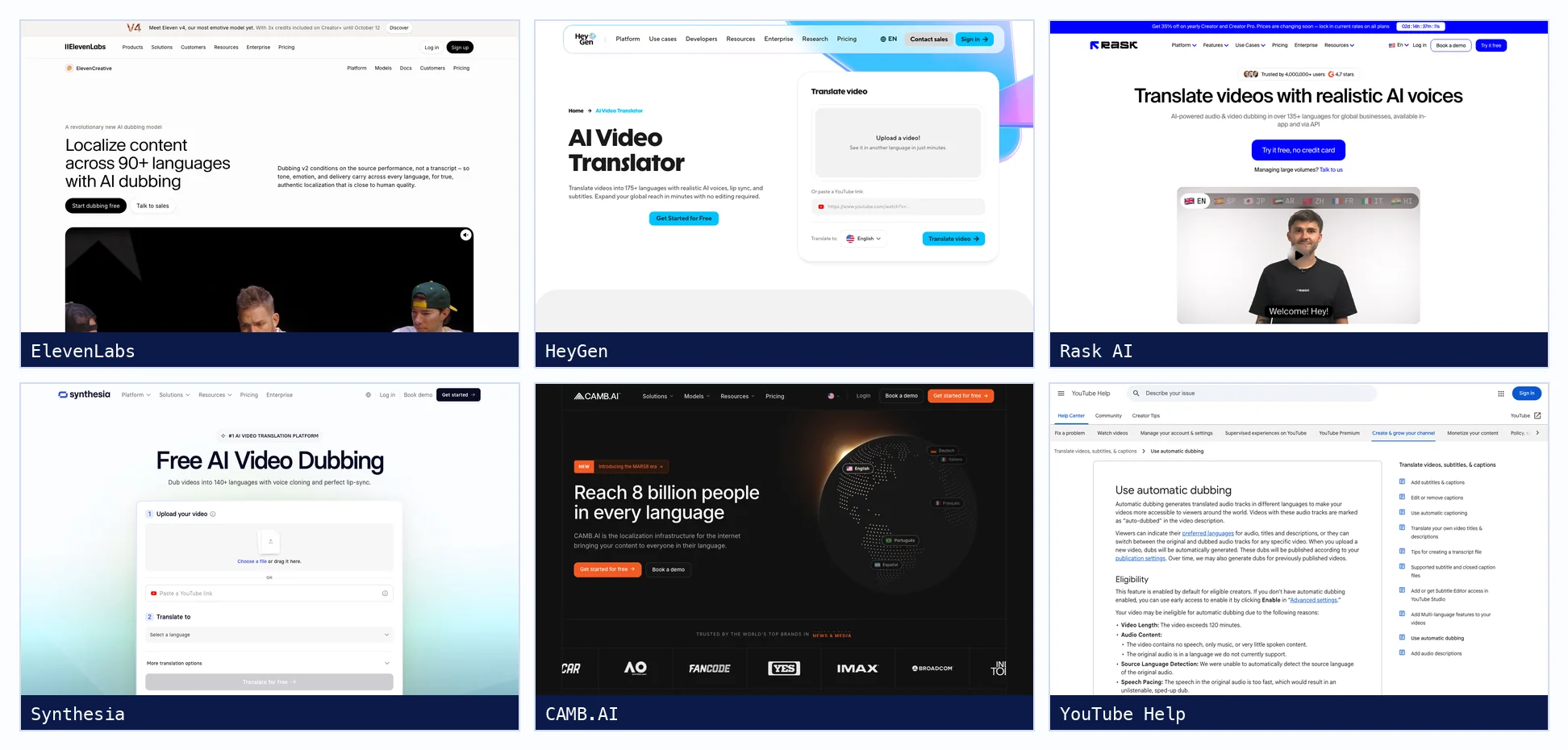
AI dubbing tools at a glance
| Tool | Languages (as stated) | Glossary or do-not-translate | Edit before dubbing | SRT | Lip sync |
|---|---|---|---|---|---|
| ElevenLabs Dubbing | 90+ | Not stated for dubbing | Only in the older Dubbing Studio, now in maintenance | Export from Dubbing Studio | No, per its help centre |
| HeyGen Video Translate | 175+ | Brand Glossary: Force Translate, Don't Translate, pronunciation | Proofread on Pro and up | Import and export | Yes, two quality levels |
| Rask AI | 135+ (voice cloning in 32) | Translation Dictionary from Creator Pro | Built-in editor, then redub | Import and export | Yes, multi-speaker |
| Synthesia AI Dubbing | 70+ self-serve, 140+ Enterprise | Custom Glossary, Enterprise only | Review transcript, Enterprise only | Not stated | Yes, optional |
| CAMB.AI | 81 locales listed for dubbing | Keywords files, one column per language | Step-wise: stop after transcription or translation | Import; export SRT, VTT, TXT | Mentioned, no feature page |
| YouTube automatic dubbing | English into 20 languages | No; warns about proper nouns and jargon | No, automatic dubs cannot be edited | Not applicable | Experimental, select channels |
Can AI dubbing handle technical terms?
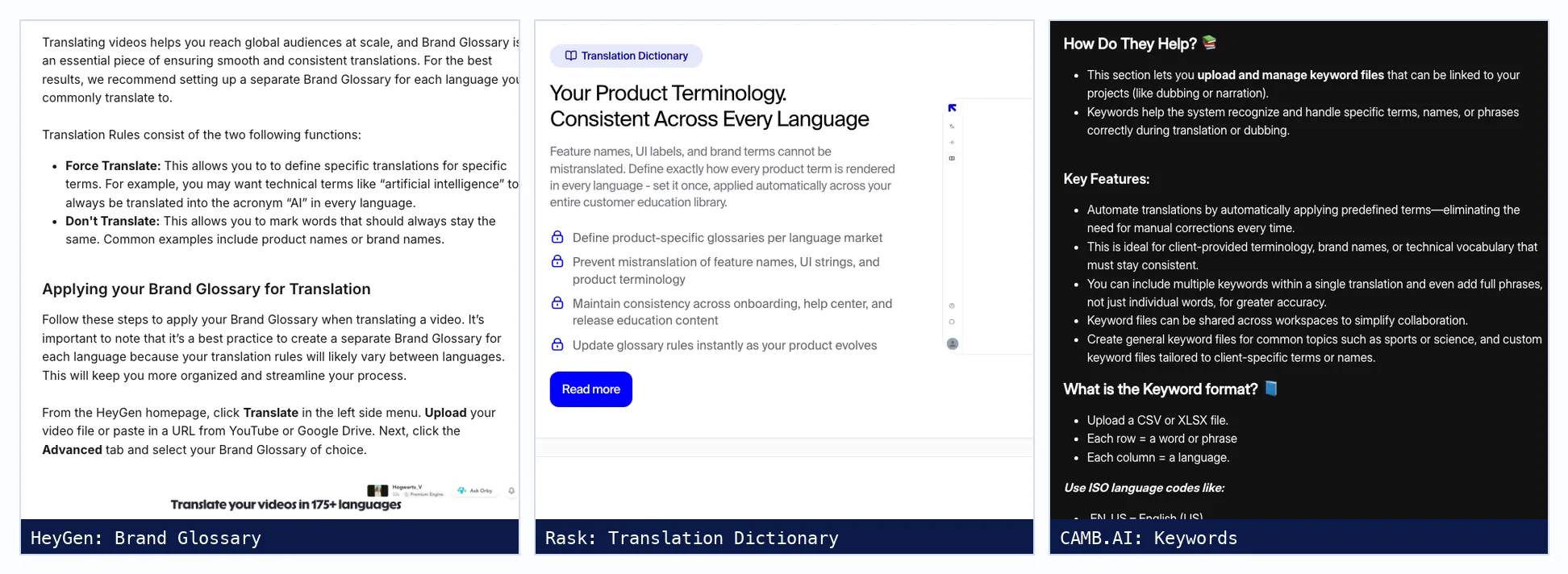
Only if you tell it how. Without a glossary, a dubbing tool treats a product name or command like any other word and may translate it, or pronounce it oddly. HeyGen, Rask AI, CAMB.AI and Synthesia on Enterprise let you define terms that stay unchanged or always translate one way. ElevenLabs and YouTube document no glossary for dubbing, and YouTube warns about jargon itself.
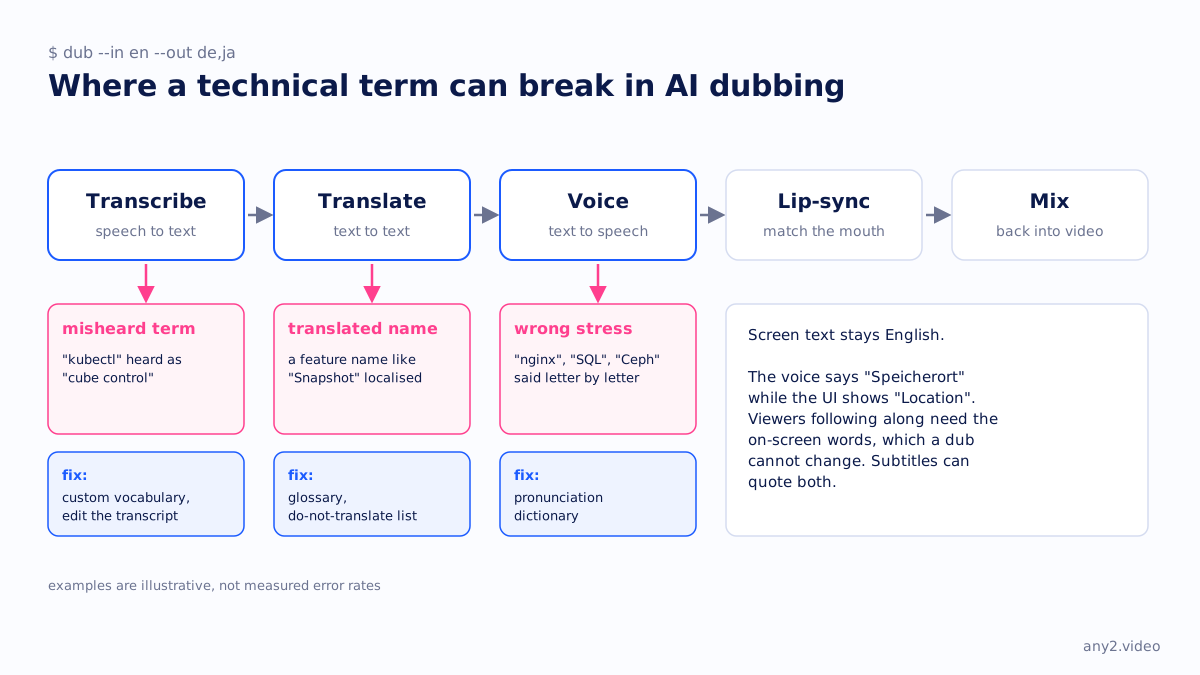
The six tools, one by one
ElevenLabs Dubbing
ElevenLabs dubs into 90+ languages with automatic voice cloning and detects up to 32 speakers. Its current Dubbing v2 model is in alpha and has no editor in the app; the editable Dubbing Studio runs on the older model and is in maintenance mode. Its help centre says dubbing does not include lip sync. Pronunciation dictionaries are documented for text to speech, not for dubbing.
HeyGen Video Translate
HeyGen translates an uploaded video or a YouTube link into 175+ languages in the speaker's cloned voice, with or without lip sync. Its Brand Glossary sets Force Translate and Don't Translate rules plus pronunciation, imported from CSV, and HeyGen recommends one glossary per target language. Editing the translated script before rendering, which it calls Proofread, needs Pro or higher. On-screen text is not translated.
Rask AI
Rask AI translates into 135+ languages and clones voices in 32 of them, including all eight languages this site is published in. Its Translation Dictionary is pitched at exactly this problem, preventing mistranslation of feature names and UI strings, and starts on Creator Pro along with lip sync and script controls. SRT files go in and out.
Synthesia AI Dubbing
Synthesia dubs any uploaded video or YouTube link, not only videos made in Synthesia. Its pages give 70+, 130+ and 140+ languages in different places. Self-serve plans dub straight away; reviewing the transcript first and the custom glossary are Enterprise features, and its docs say pronunciation rules have no effect on dubbing.
CAMB.AI
CAMB.AI is aimed at media, sports and live broadcast, and its help centre lists 81 locales for dubbing. Keyword files, in CSV or XLSX with one column per language, hold brand names and technical vocabulary. Step-wise processing pauses after transcription or translation so someone can review before any voice is generated, which is the workflow a technical video needs.
YouTube automatic dubbing
YouTube generates dubbed audio tracks for eligible channels at no cost. English videos dub into 20 languages, a list that does not include Chinese. Automatic dubs cannot be edited, videos over 120 minutes are not eligible, and the help page warns about proper nouns and jargon. Separately, multi-language audio lets you upload dubs you made elsewhere to the same video.
How accurate is AI dubbing?
Accurate enough for general speech, and least reliable exactly where product videos need it: names, commands and jargon. The vendors say as much. YouTube notes errors from mispronunciations, accents and background noise, and ElevenLabs calls its newest model alpha. Accuracy depends mostly on the transcript, so review the transcript and a sample minute before dubbing a whole video.
Should you dub or subtitle a product demo?
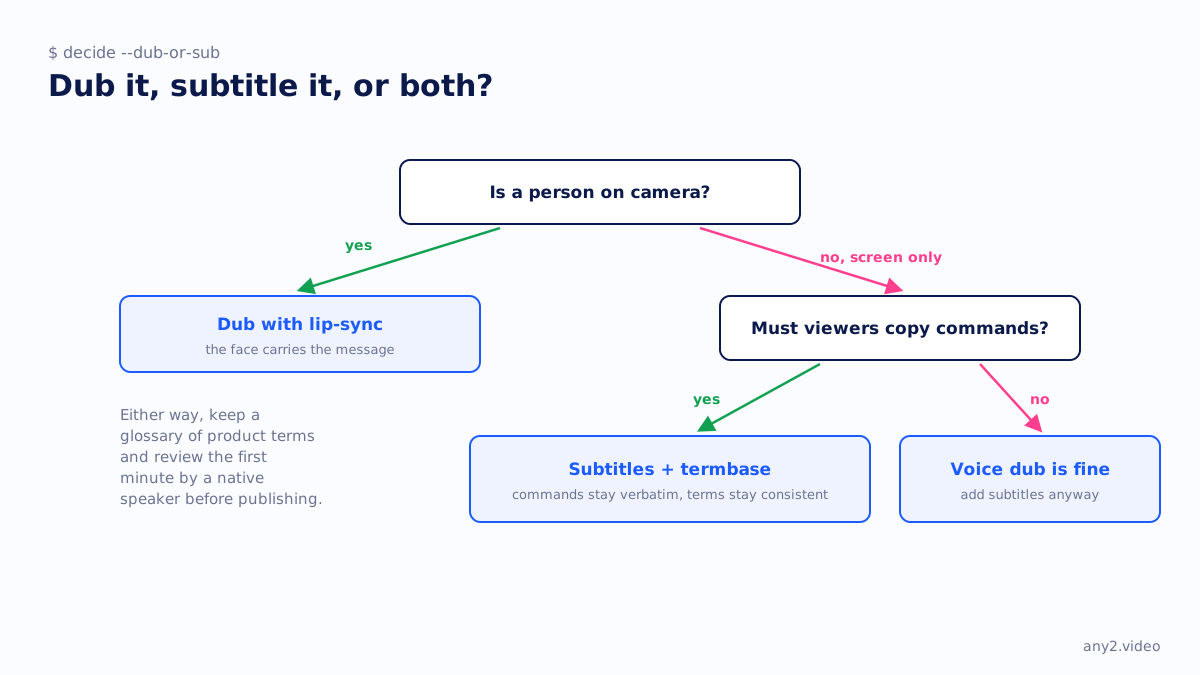
Subtitle a screen-only demo, and dub a video where a person on camera carries the message. In a screen recording the interface stays in English whatever the voice says, so a German voice describing a button labelled in English can confuse. Subtitles can quote both the translated term and the on-screen label, and they keep commands verbatim.
W3C's accessibility guidance draws a related line: captions are in the same language as the audio, subtitles are a translation, and translated subtitles are not in themselves an accessibility accommodation. If accessibility is the goal, caption the original first.
How do you localize a product video into several languages?
Start with a termbase: every product name, menu label and command, with its fixed translation or a do-not-translate flag for each language. Load it into a tool with a glossary, review the translated transcript before voicing, then have a native speaker watch the first minute. Publish each language as an audio track or subtitle file on the same video, so one URL serves every market.
The termbase is the part teams skip, and the part that makes the second video cheaper than the first. This site keeps one for its own seven translated editions, which is how a product term stays the same across German, Japanese and Polish pages. Our pages on one demo for five markets and vendors entering Europe cover the commercial side.
Is YouTube auto-dubbing good enough for product videos?
For reach on general content, it is a free baseline. For product videos, usually not, because automatic dubs cannot be edited, have no glossary and do not cover every language: English does not dub into Chinese. A better use of YouTube is multi-language audio, which lets you upload dubs you have reviewed elsewhere onto the one video.
How much does AI dubbing cost?
From free on YouTube to a few dollars per dubbed minute. ElevenLabs plans start at $5 a month billed annually, with extra Dubbing v2 minutes from $2.23 to $2.70 on paid plans. HeyGen Creator is $24 a month annually, Rask AI Creator $28 a month annually with 300 minutes a year, and Synthesia Starter $18. CAMB.AI's entry plan includes one dubbing minute a month.
| Tool | Free plan | Entry paid plan | Billed annually | Billed monthly |
|---|---|---|---|---|
| ElevenLabs | 10k credits a month | Starter | $5 a month | $6 a month |
| HeyGen | 3 videos a month, up to 1 minute | Creator | $24 a month | $29 a month |
| Rask AI | Trial, 3 minutes | Creator | $329 a year (300 minutes) | $39 a month (25 minutes) |
| Synthesia | 500 credits a month, watermark | Starter | $18 a month | $29 a month |
| CAMB.AI | 5K credits, one-time | Essentials (1 dubbing minute a month) | $55 a year | $5 a month |
| YouTube automatic dubbing | Free for eligible channels | None | Free | Free |
Where the tools stop
Every tool here changes the voice and, at best, the subtitles. None changes the screen. If a product video must work for a German or Japanese buyer, the steps have to make sense with the interface they will actually see, and the result has to be checked on the product, not in the transcript. For the other formats in this series, see AI video generators for product marketing and screen recorders for software demos.
Sources, all fetched 29 September 2026: ElevenLabs dubbing docs, HeyGen Brand Glossary, Rask AI pricing, Synthesia dubbing docs, CAMB.AI keywords, YouTube automatic dubbing and W3C on captions and subtitles. Prices: ElevenLabs, HeyGen, Rask AI, Synthesia and CAMB.AI, fetched 3 October 2026.
Need a product video that works in more than one language, with the terms kept straight? Send us the task and the markets. The first sample is free.
$ get-sample →