
Best Screen Recording Software for Software Demos: 7 Tools Compared for Product Teams
The best screen recording software for software demos depends on the demo. Screen Studio suits polished Mac demos with automatic zoom, Camtasia suits training with captions, Loom suits a quick video to one person, Descript suits editing by transcript, and OBS Studio suits anyone who needs it free.
Part of our guide to AI Video Marketing for Software Products.
Choosing screen recording software for a software demo comes down to three questions: which operating system you record on, how much editing you are willing to do, and whether the demo will need re-recording when the product changes. We compared seven recorders that product and marketing teams actually use: OBS Studio, Loom, Camtasia, Screen Studio, Tella, ScreenFlow and Descript.
Everything below comes from each vendor's own site on 29 September 2026. We did not benchmark them. Prices were checked again on 3 October 2026 and are in their own section below. Where a vendor's page does not mention a feature, we say it is not stated rather than assume it is missing.
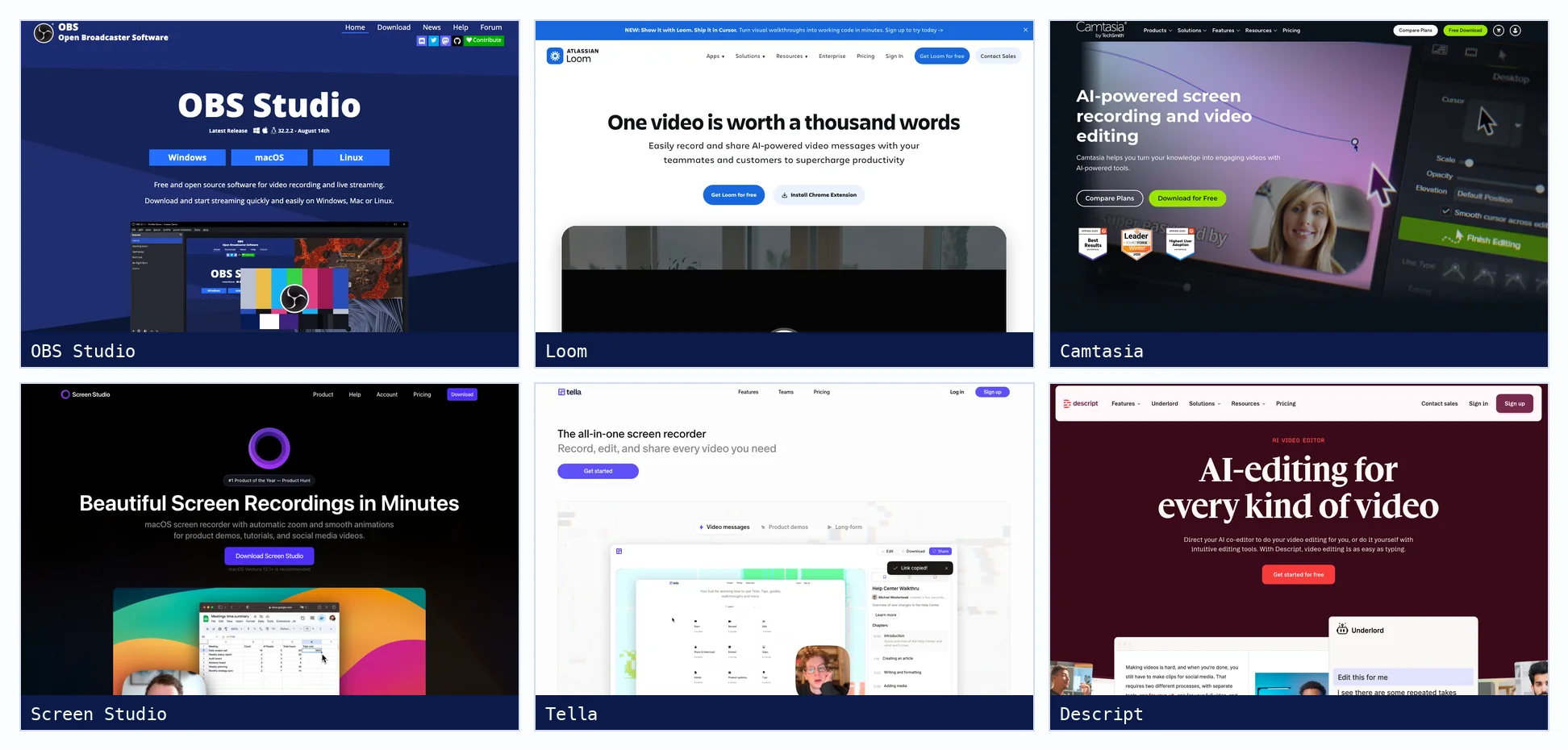
Screen recorders for software demos at a glance
| Tool | Platforms | Free option | Demo polish | Editing | Captions |
|---|---|---|---|---|---|
| OBS Studio | Windows, macOS, Linux | Free and open source | Not stated | None built in; edit elsewhere | Not stated |
| Loom | Mac, Windows, Chrome, iOS, Android | 25 videos, 5 minutes each, 720p | Mouse emphasis and drawing on Business | Trim and stitch; edit by transcript on Business + AI | All plans, transcription in 50+ languages |
| Camtasia | Windows, Mac | Full editor, watermarked exports | Auto zoom and pan, cursor effects, 4K 60 fps | Multitrack timeline, text-based editing | Auto captions; translation into 7 languages |
| Screen Studio | macOS only | Not stated | Automatic zoom on clicks, cursor editable after recording | Timeline: trim, cut, speed, crop | Generated locally with Whisper or Apple speech |
| Tella | Mac, Windows, Chrome, browser | 7-day Pro trial, no free plan | Auto zoom from clicks, animated cursor | Timeline and transcript editing | Transcription in 106 languages |
| ScreenFlow | Mac only | Unlimited trial, watermarked exports | Pointer path smoothing | Multitrack timeline, templates | Caption editor; auto transcription not stated |
| Descript | Mac, Windows, browser | 1 media hour a month, 720p | Not stated | Edit the video by editing the transcript | 25 languages; captions translated into 61, dubbing in 30 |
What is the best screen recorder for product demos?
For a polished product demo on a Mac, Screen Studio, because it zooms in on each click automatically and lets you change the cursor after recording. On Windows, Camtasia offers the same kind of automatic zoom and cursor effects inside a full editor. Tella does automatic zoom on both platforms and in the browser. If the budget is zero, OBS Studio records well but leaves all editing to another tool.
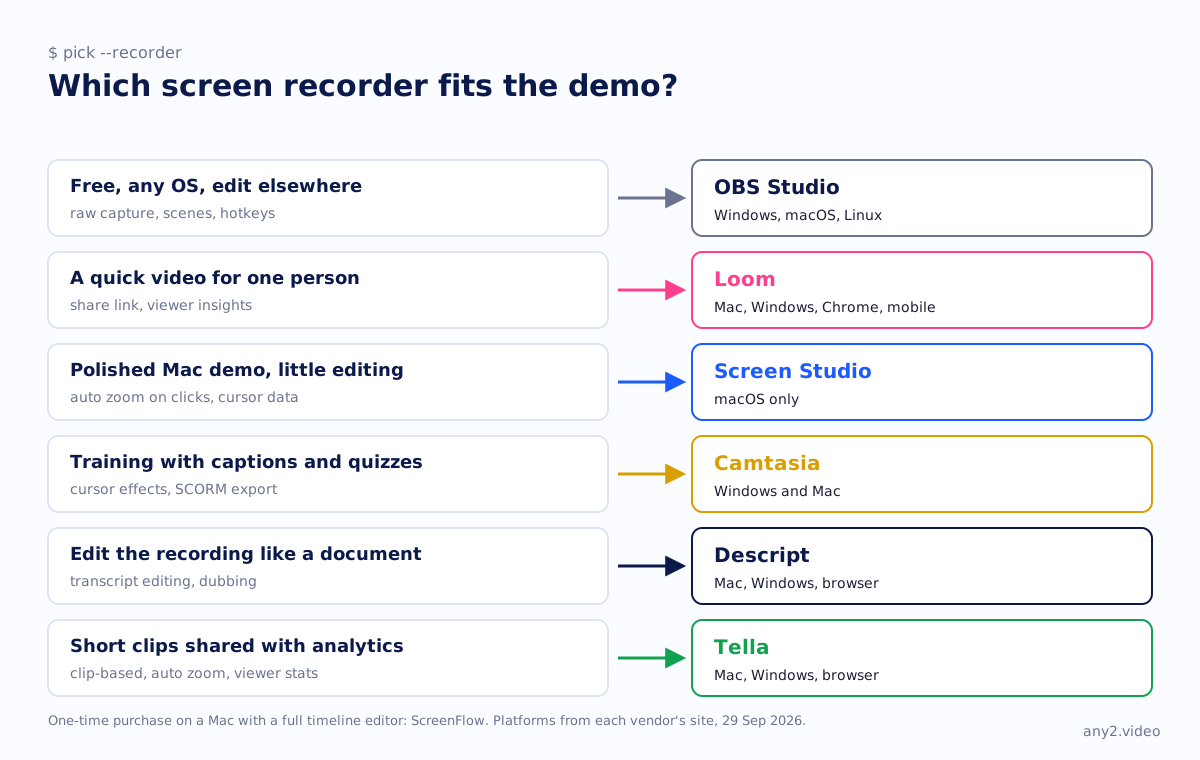
The seven recorders, one by one
OBS Studio: free, open source, no editor
OBS Studio is free and open source on Windows, macOS and Linux. It builds recordings from scenes of sources, including windows, webcams and browser windows, with hotkeys for almost every action. Its knowledge base recommends recording to MKV, which survives a crash, and remuxing to MP4 afterwards. There is no editor, no captions and no sharing, so budget time in another tool.
Loom: fastest from recording to link
Loom records screen and camera on Mac, Windows, a Chrome extension and mobile, and shares a link the moment you stop. The free Starter plan allows 25 videos per person at up to 5 minutes and 720p. Business adds trim and stitch, removes Loom branding and raises quality to 4K; editing by transcript and filler-word removal need Business + AI. Viewer insights are on every plan.
Camtasia: the deepest cursor and caption controls
Camtasia records screen and webcam on separate tracks at up to 4K and 60 fps, and stores cursor data so you can smooth, highlight, magnify or reroute the pointer after recording. It adds AI auto zoom, auto captions, AI voices generated from a script, quizzes and SCORM export. The free version is the full editor with watermarked exports.
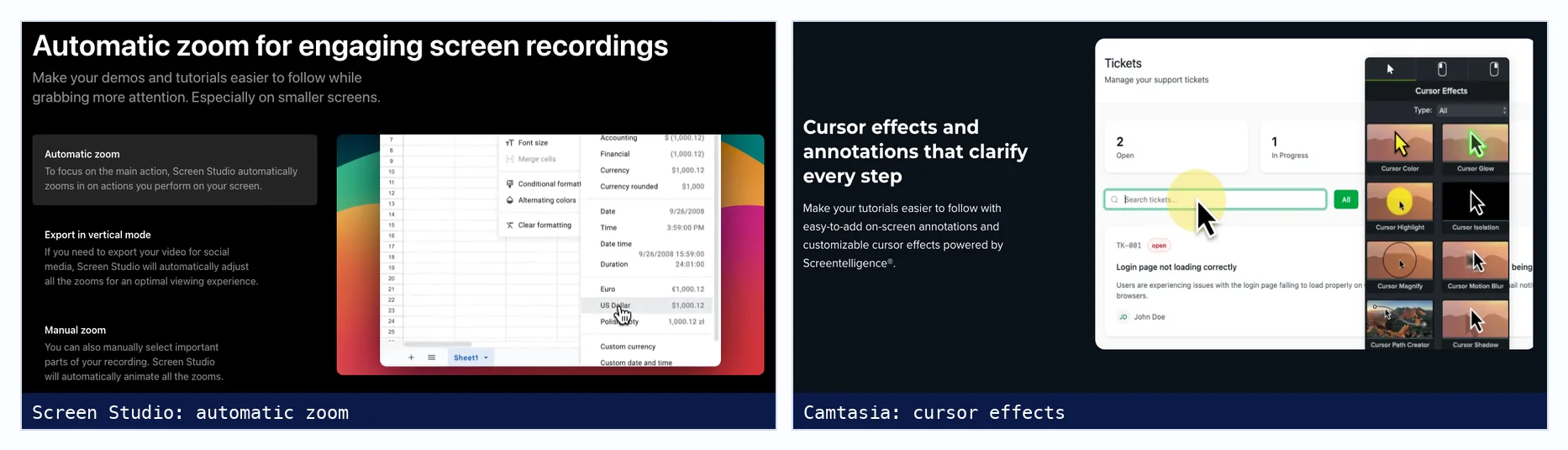
Screen Studio: polished Mac demos with little editing
Screen Studio is a macOS recorder built around automatic zoom: it zooms in where you click and animates the transitions, and it adjusts those zooms if you export a vertical cut. Because the cursor is recorded as data, you can resize or hide it later. Captions are generated on your Mac. It has no Windows version, and its FAQ says there are no near-future plans for one.
Tella: clips, links and viewer analytics
Tella records on Mac, Windows, a Chrome extension or in the browser, and encourages recording several short clips instead of one long take. That makes it easy to re-record one outdated clip. It offers auto zoom from clicks, transcript editing, subtitles in 106 languages and view analytics. There is no free plan, only a 7-day trial.
ScreenFlow: a one-time purchase for Mac
ScreenFlow from Telestream is Mac only and sold as a one-time purchase, with major versions as paid upgrades. It records screen, cameras and audio from several apps at once into a full multitrack editor with templates and a caption editor. Its trial has no time limit but watermarks exports.
Descript: edit the demo like a document
Descript's recorder captures screen, webcam and system audio straight into its text-based editor, where deleting a sentence in the transcript deletes it from the video. It removes filler words and retakes, and it can translate captions into 61 languages and dub audio into 30. The free plan gives one media hour a month with 720p exports.
Is Loom good enough for a product demo?
For a demo sent to one prospect after a call, yes: it is fast, personal and tells you who watched. For the demo on your website that every evaluator sees, usually not. A single take hides nothing and edits little, and it does not show which product version it records. We cover the difference in Loom for marketing vs a verified walkthrough.
OBS or Camtasia for software tutorials?
Camtasia, unless cost rules it out. OBS Studio is an excellent free recorder but has no editor, no captions and no cursor effects, so a tutorial needs a second tool for all of that. Camtasia records and edits in one place, with zoom, cursor highlights, captions and quizzes built for tutorials. Choose OBS if you record on Linux or already edit in another program.
Which screen recorders zoom in automatically?
Screen Studio, Camtasia and Tella all state automatic zoom on their sites. Screen Studio zooms in on each click and animates between zooms, Camtasia calls it AI auto zoom and pan, and Tella generates editable zooms from clicks on Mac, Windows and browser recordings. Loom offers mouse emphasis on paid plans, and the OBS, ScreenFlow and Descript pages we read did not mention automatic zoom.
How do you record a software demo without mistakes?
Write the task as one sentence, prepare a clean account and test data, then record in short sections so a slip costs one section, not the whole take. Use automatic zoom and cursor highlighting instead of fast mouse moves. Then decide what to do with the mistakes that happen for real, because cutting every failed attempt removes the part a buyer learns most from.
That last point is where our approach differs from a polished recording. When a step fails on a real product, the error and the fix are usually the most useful minute in the video. Our note on briefing a walkthrough in one sentence covers preparation, and the Proxmox VE 9.2 install keeps its failed attempt in.
How much do screen recorders for demos cost?
From free to a one-time purchase. OBS Studio is free and open source. Loom Business is $18 per user per month billed monthly, Tella Pro $13 billed annually or $26 monthly, Screen Studio $9 a month billed yearly or $29 monthly, and Descript Hobbyist $16 annually or $24 monthly. Camtasia is sold yearly, and ScreenFlow as a one-time purchase.
| Tool | Free option | Entry paid plan | Billed annually | Billed monthly |
|---|---|---|---|---|
| OBS Studio | Free and open source | None | Free | Free |
| Loom | Starter: 25 videos, 5 min, 720p | Business | $180 a year for one user | $18 per user |
| Tella | None listed | Pro | $13 per user | $26 per user |
| Screen Studio | None shown | Single plan | $9 a month | $29 a month |
| Descript | 60 media minutes a month, 720p | Hobbyist | $16 per person | $24 per person |
| Camtasia | Watermarked exports | Essentials (first plan without a watermark) | €182.49 a year | Not offered |
| ScreenFlow | Trial, watermarked exports | ScreenFlow | $199 one-time | One-time |
What happens when the product UI changes?
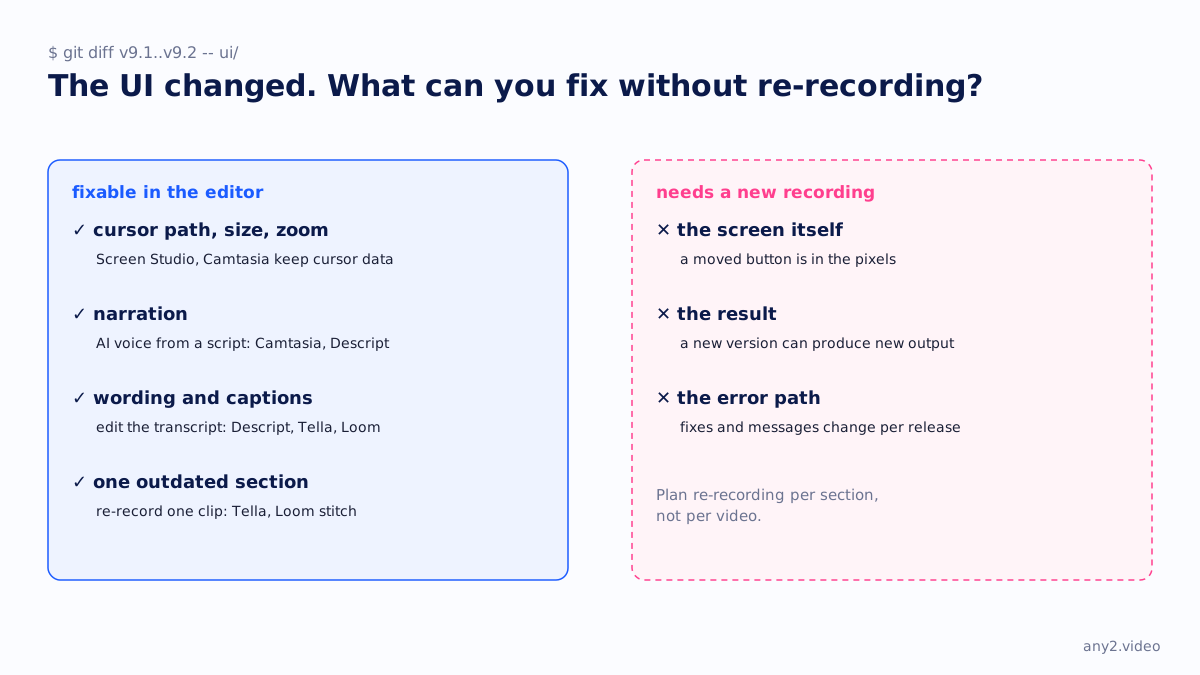
Every recorder above records pixels, so a moved button means recording that part again. The tools differ in how much of the rest survives: Camtasia and Screen Studio keep cursor data, Descript and Camtasia can regenerate narration from a script, and Tella and Loom make it easy to replace one clip. Plan re-recording per section, and write down which version each section shows. For other formats in this series, see interactive demo software compared and Scribe vs Tango vs Guidde.
Sources, all fetched 29 September 2026: OBS Studio, Loom pricing, Camtasia features, Screen Studio guide, Tella pricing, ScreenFlow overview and Descript screen recording. Prices: Loom, Tella, Screen Studio, Descript, Camtasia and ScreenFlow (29 September), fetched 3 October 2026.
Recording the demo is the easy part. If you want the task run on the real product, with the version shown and the result checked, send it to us. The first sample is free.
$ get-sample →