
Scribe vs Tango vs Guidde: Step Recorders and How-To Guide Generators Compared
Scribe vs Tango vs Guidde: Scribe and Tango turn your clicks into a written step-by-step guide with screenshots, and Guidde turns the same clicks into a narrated video with a matching doc. All three record the route through a web app. None of them records whether the task actually finished.
Part of our guide to AI Video Marketing for Software Products.
If you are choosing between Scribe, Tango and Guidde, start with the output you need. Scribe and Tango are step recorders: you do a process once in the browser, and they write a how-to guide with a screenshot and a sentence for every click. Guidde captures the same way but puts a narrated video first, with the written steps generated alongside it. The right pick depends on who reads the guide and what happens after they close it.
We compared the three from their own pricing pages, feature pages and help centres on 29 September 2026. We did not run a benchmark, and plans change often, so treat the table as a snapshot of what each vendor said that day. Prices were checked again on 3 October 2026 and are in their own section below.
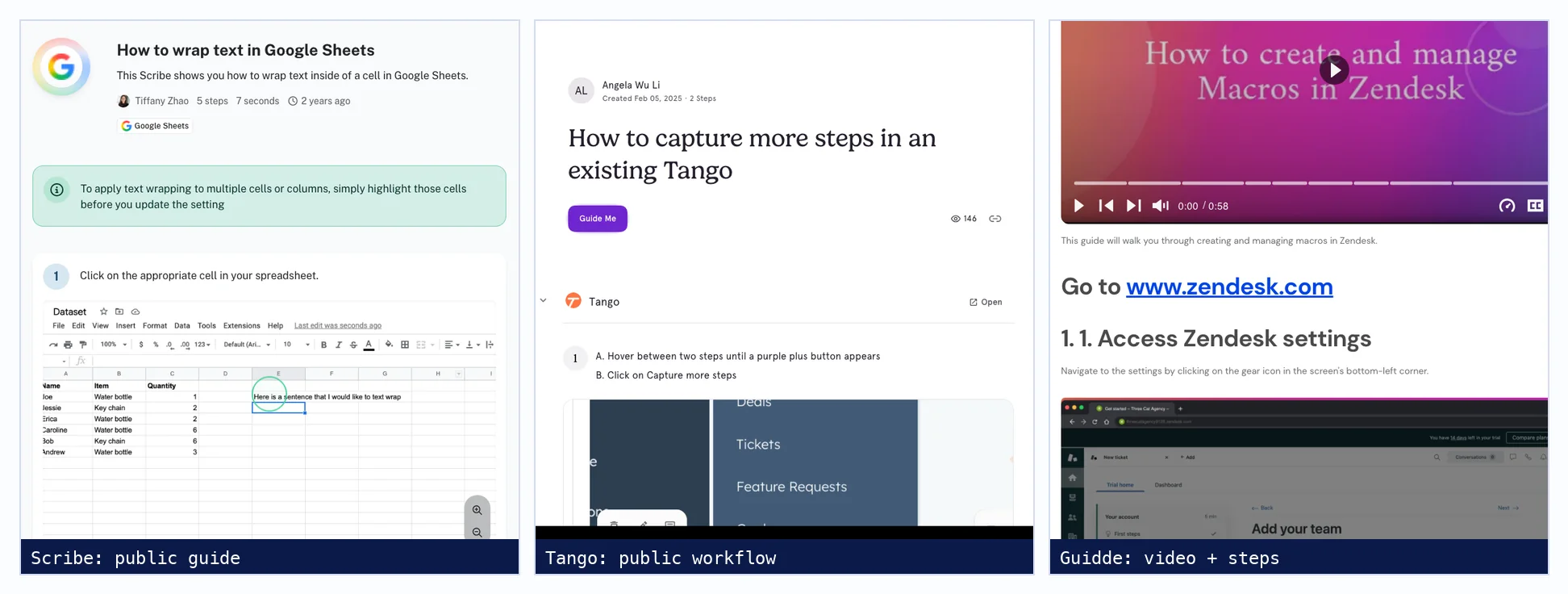
Scribe vs Tango vs Guidde at a glance
| Scribe | Tango | Guidde | |
|---|---|---|---|
| Main output | Written guide with screenshots | Written guide with screenshots | Narrated video plus a written guide |
| Capture | Chrome and Edge extension; Windows and Mac desktop app on Pro and up | Chrome extension (works in Edge); Mac and Windows desktop app on Pro | Chrome and Edge extension; Windows and Mac desktop app on Business and up |
| Free plan | Create freely, but only 10 guides shared at a time; no exports or redaction | 5 shared workflows, up to 10 users | Up to 25 videos with a watermark, your own recorded voice |
| Video | Scribe Movies play a guide as video with AI voiceover | Video Embeds on Pro, two AI narration voices, embed only | The core output; MP4, GIF and other exports on paid plans |
| In-app guidance | On-screen walkthroughs and pins | Guide Me and Pins, the strongest of the three | Broadcast plays videos inside web apps (Enterprise) |
| Translation | About 130 languages, Enterprise only | 15 languages, Enterprise only | AI voice in 50+ languages; translation bundles are an Enterprise add-on |
| Replacing a step | Delete it and add a new capture | Capture more steps into the existing guide | Replace Image swaps the screenshot and keeps the voiceover |
| Best for (our view) | Written SOPs and knowledge bases | Internal teams who want click-by-click guidance in the live app | Customer education that needs video and a doc from one capture |
Tango vs Scribe: what is the difference?
Scribe and Tango both record clicks in the browser and write a step-by-step guide with screenshots. The difference is what comes after. Scribe offers more export formats, more knowledge-base integrations and a broader translation list on Enterprise. Tango puts more into Guide Me, which highlights each element to click inside the live app while a colleague follows along.
Both extend to desktop applications only through a paid desktop app. Both limit the free plan by how many guides you can share, not by how many you create. Tango's Guide Me has limits worth knowing before you buy for it: according to Tango's help centre it does not work on desktop captures or uploaded screenshots, it needs the Tango extension and a Tango account, and it does not run on publicly shared links.
Scribe: widest exports and integrations
- Capture: the browser extension works on every plan. Pro adds a Windows and Mac desktop app that Scribe says captures Excel, Zoom, legacy software and operating systems.
- Output: a guide with screenshots, auto-written step text and cursor clicks. Pro exports to PDF, HTML, Markdown and Word; the free plan shares by link and embed only.
- Video: Scribe Movies replay a guide in a video-style format with AI voiceover. It is generated from the screenshots, not a screen recording.
- Updating: to replace a step, you delete it and add a new one. A feature to flag outdated docs when a workflow changes is listed as coming soon.
- Privacy: redaction and Smart Blur are on Pro and up; automatic PII and PHI redaction, SSO and SCIM are Enterprise.
Tango: best on-screen guidance
- Capture: Chrome extension on every plan, plus a Mac and Windows desktop app on Pro that can mix desktop and browser steps in one capture.
- Output: a written workflow with screenshots, highlights and descriptions. Pro adds PDF, HTML and Markdown exports and blur tools, including Batch Blur across every screenshot.
- Video: Video Embeds turn a workflow into a watchable video with optional AI narration and a choice of two voices. The help pages describe an embed, not an MP4 download.
- Updating: Capture more steps inserts new steps between existing ones, which is the least painful fix of the three when one screen changes.
- Limits: captures stop at 100 steps, and the extension cannot capture Chrome settings or the canvas inside Google Docs and Sheets.
Guidde: video first, with the doc attached
- Capture: browser extension on every plan; the desktop app and mobile capture start at Business.
- Output: every capture produces a narrated video and a written document at once. Editing the document directly detaches it from the video.
- Voice: the free and Pro plans use your own recorded voice. AI text-to-voice, with 200+ voices, starts at Business.
- Updating: Replace Image swaps only the screenshot on a step and keeps the voiceover and highlights. Editing the transcript regenerates the AI voice.
- Exports: MP4, GIF, PDF, PPTX, Word, HTML and Markdown on paid plans; SCORM on Enterprise. Videos are limited to 100 steps.
Are step recorders good enough for customer documentation?
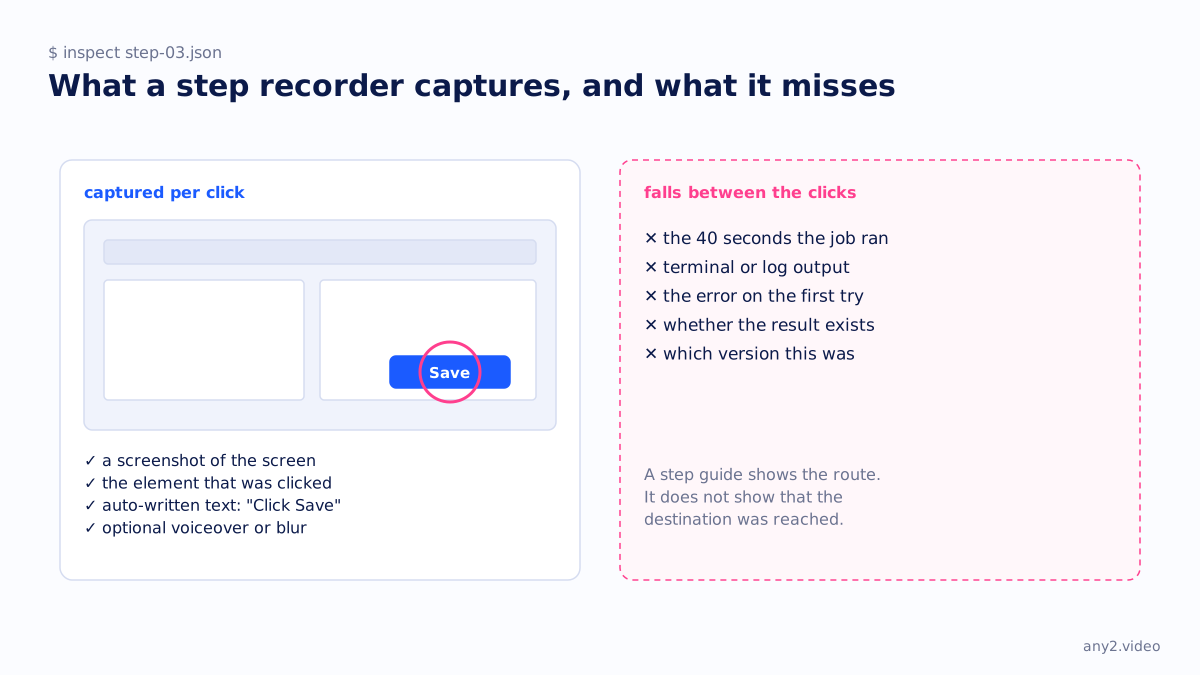
For a short process in a web app, yes. A step recorder produces an accurate, searchable guide in minutes, and customers can follow it at their own pace. It falls short when the task involves waiting for a job, reading output in a terminal, or checking that a result exists, because nothing between two clicks is captured.
That gap matters most for infrastructure and developer products. Installing an agent, running a backup or restoring a volume is mostly waiting and reading output, with a handful of clicks at the start. A guide built from those clicks shows the route and leaves out the part the customer is anxious about. Our comparison of step recorders and a finished task goes through that in more detail.
Can Scribe record video?
Not in the screen-recording sense. Scribe captures clicks and screenshots, and its Movies feature plays that guide back in a video-style format with motion and AI voiceover, on every plan. If you need real footage of the screen, with typing, scrolling and output appearing, use a screen recorder or Guidde's captured clips instead.
What is the best tool for creating how-to guides?
For written internal procedures, Scribe or Tango; pick Tango if colleagues should be walked through the live app, Scribe if the guides must be exported into many other tools. For customer education where video matters, Guidde, because one capture produces both the video and the doc. For proving a task works to a buyer, none of the three.
What happened to Windows Steps Recorder?
Microsoft deprecated Steps Recorder (psr.exe). Its deprecated-features list says the tool is no longer being updated and will be removed in a future release of Windows, and from the February 2024 Windows 11 update it shows a banner saying so. Microsoft suggests the Snipping Tool, Xbox Game Bar or Clipchamp for screen recording. As of 29 September 2026 it was not yet on the removed-features list.
How do you keep step-by-step guides up to date?
Re-capture only the steps whose screens changed, then check the guide end to end on the current version. Tango inserts newly captured steps into an existing workflow, Guidde replaces a screenshot while keeping its narration, and Scribe replaces a step by deleting it and adding a new capture. None of the three tells you which guides a release broke; someone has to run them.
That last sentence is the whole problem with product documentation at scale, whatever the format. A guide is correct on the day it was captured. Our note on what a verified walkthrough proves covers the version stamp and the checked result, and the Proxmox VE 9.2 install in the library shows what that looks like on a real product.
How much does Scribe cost?
Scribe has a free Basic plan that works with web apps through the browser extension. Pro Personal costs $25 per seat per month billed annually or $35 monthly, from one seat; Pro Team costs $13 per seat annually or $17 monthly, with a five-seat minimum. Enterprise is priced on request, according to Scribe's pricing page on 3 October 2026.
| Tool | Free plan | Entry paid plan | Billed annually | Billed monthly |
|---|---|---|---|---|
| Scribe | Basic, browser only | Pro Personal | $25 per seat | $35 per seat |
| Scribe | Pro Team (5-seat minimum) | $13 per seat | $17 per seat | |
| Tango | 5 shared workflows | Pro, 1 to 2 users | $22 per user | $26 per user |
| Tango | Pro, 3 or more users | $15 per user | $20 per user | |
| Guidde | 25 videos, watermark | Pro | $19 per creator | $29 per creator |
| Guidde | Business (AI voices, desktop capture) | $39 per creator | $59 per creator |
Where each tool wins, and where a walkthrough fits
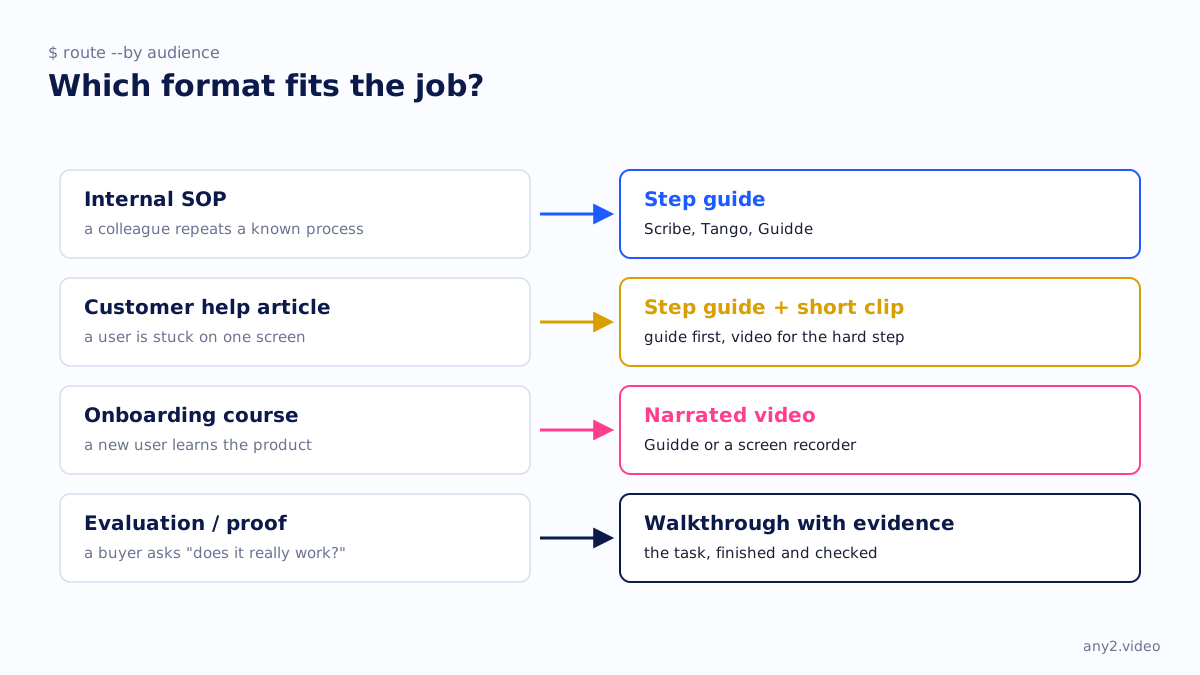
If the reader is a colleague repeating a known process, a step recorder is the right tool and a video production is overkill. If the reader is a customer stuck on one screen, a guide with one short clip for the hard step does the job. If the reader is a buyer deciding whether your product really does what the page says, they need to see the task finish, including the attempt that failed. For the other formats in this series, see interactive demo software compared and screen recorders for software demos.
Sources, all fetched 29 September 2026: Scribe pricing, Tango pricing, Tango on Guide Me, Guidde pricing, and Microsoft's deprecated Windows features list. Prices: Scribe, Tango and Guidde, fetched 3 October 2026.
Have a guide that stops before the result? Send us the task and we will run it on the real product, failures included. The first sample is free.
$ get-sample →