
Loom for Marketing: Where a Quick Screen Recording Stops, and Where a Verified Walkthrough Starts
Loom is excellent at what it was built for and a poor fit for the page a prospect evaluates you from. Four differences decide which kind of video a given job needs.
Part of our guide to AI Video Marketing for Software Products.
Plenty of software companies already make product video without calling it that. Someone records a Loom to answer a customer, sends it, and it does the job. Then somebody asks why the marketing site has no videos like that, and the answer takes a bit of explaining.
Loom is very good at what it does, and if you record quick explanations for customers, keep doing it. The useful question is which videos can stay Looms and which need to be made differently.
What Loom does well
- It is fast. You go from idea to a sent link in under five minutes, which is why people use it in the first place.
- It handles asynchronous answers: one customer, one question, one recording and no meeting.
- It suits bug reports and internal handoffs, where the audience already has the context.
- It feels personal. A face in the corner helps when the recipient knows who you are.
Nothing else comes close for those jobs, and replacing them with a production process would be a mistake.
Four things a quick recording does not do
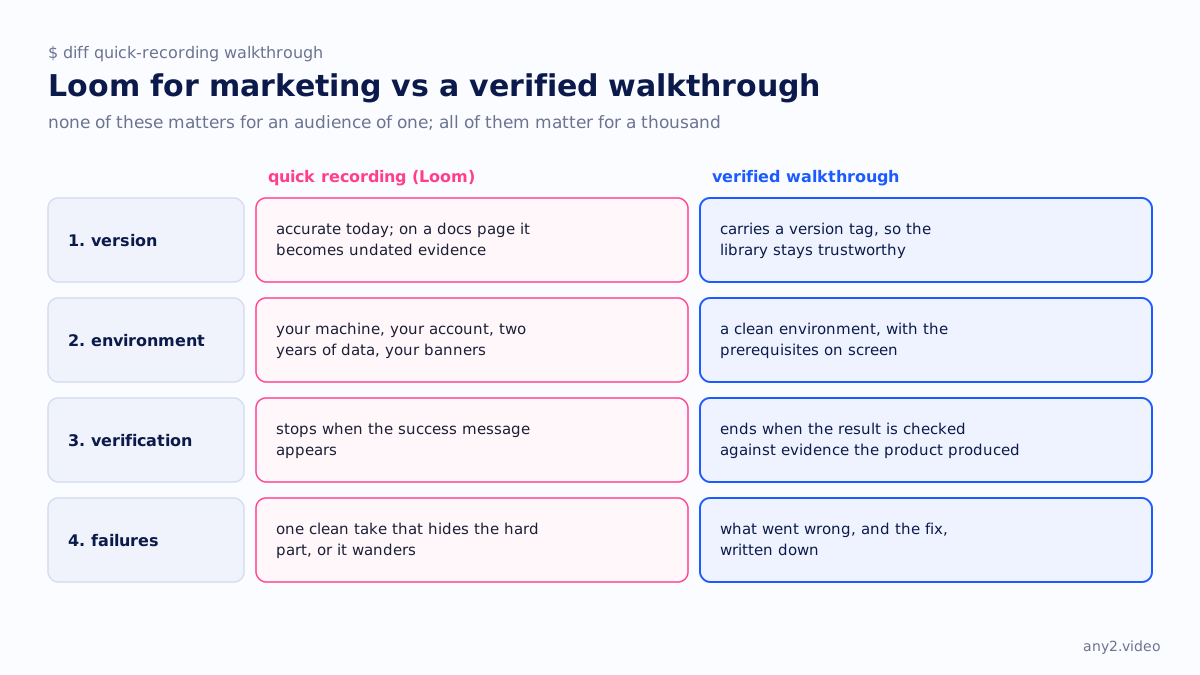
None of these matters for an audience of one, and all of them matter for an audience of a thousand.
1. It does not record which version it shows
A Loom sent today is accurate today, and both sides know that. Put the same recording on a docs page and it becomes undated evidence, so in six months nobody can tell whether the UI in it still exists. A library stays trustworthy through version tags, and quick recordings never carry one.
2. It shows whatever environment you happened to be in
The recording shows your machine, your account and permissions, two years of accumulated data and your notification banners. A customer who asked you directly can work around that. A stranger following along on a fresh install cannot tell which of the things on your screen are prerequisites.
3. It does not verify anything
A quick recording usually stops when the button is clicked and the success message appears. A walkthrough ends when the result has been checked against evidence the product produced independently, such as the file in the bucket with a matching checksum or the alert arriving in another inbox.
The two videos look almost identical, but one shows a button being pressed and the other shows the job getting done.
4. It has no failures in it, or too many
Either you recorded it in one clean take because you knew the answer, which hides the hard part, or it wanders around. Neither version documents what goes wrong and how to fix it, and that is the part your users search for.
A rule of thumb
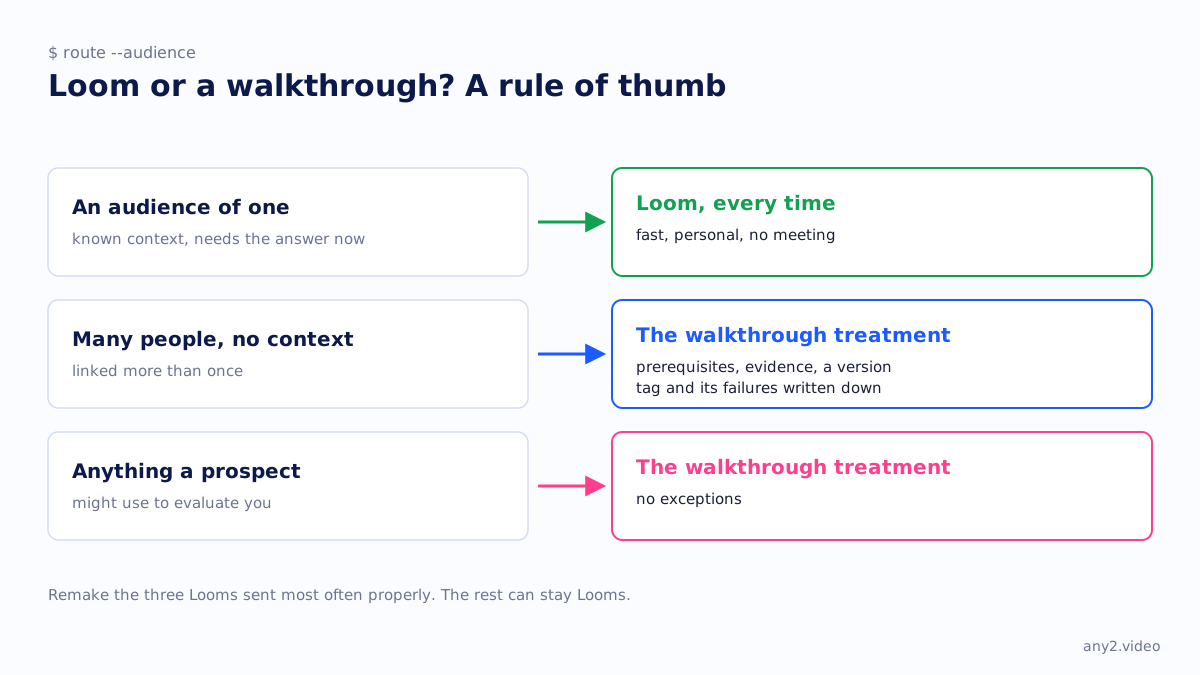
- For an audience of one with known context who needs the answer now, use Loom every time.
- If many people will watch without the context and it will be linked more than once, the video needs prerequisites, evidence, a version tag and its failures written down.
- Anything a prospect might use to evaluate you needs the second treatment, with no exceptions.
A short upgrade path
A folder of existing Looms puts you most of the way there, because the recordings prove the demand. Somebody asked, you answered, and you have a record of which questions came up most.
Take the three that were sent most often and remake them properly, with a clean environment, prerequisites on screen, evidence at the end, the failures kept and a written guide beside the video. The rest can stay Looms. It is about a week of work, and it turns a private habit into something you can publish.
The process is in how to make a marketing video for a software product, and the publishing checklist is in what makes a good marketing video for software.
What this means for choosing a tool
The recorder was never the deciding factor. Loom, OBS and your operating system's built-in recorder all capture a screen well enough. A walkthrough differs from a quick recording in its environment, its evidence and its honesty about what failed, and no recorder supplies any of those.
Video marketing software vs a video marketing service makes the same argument, and it explains why the tool stack is rarely what stalls a programme.
Have a Loom worth upgrading? Send the same task and see the difference. First sample is free.
$ get-sample →