
What Makes a Good Marketing Video for Software? Nine Things We Check Before a Walkthrough Is Published
Nine checks we run on every walkthrough before it goes out, each with the failure it prevents. None of them is about production values, and the list works whoever records the video.
Part of our guide to Product Video for Software Companies.
Ask what makes a good marketing video and most answers describe production: pacing, music, colour and a strong hook in the first three seconds. Those matter for an advert competing for attention in a feed. For a software walkthrough, watched by someone who went looking for it, they hardly matter.
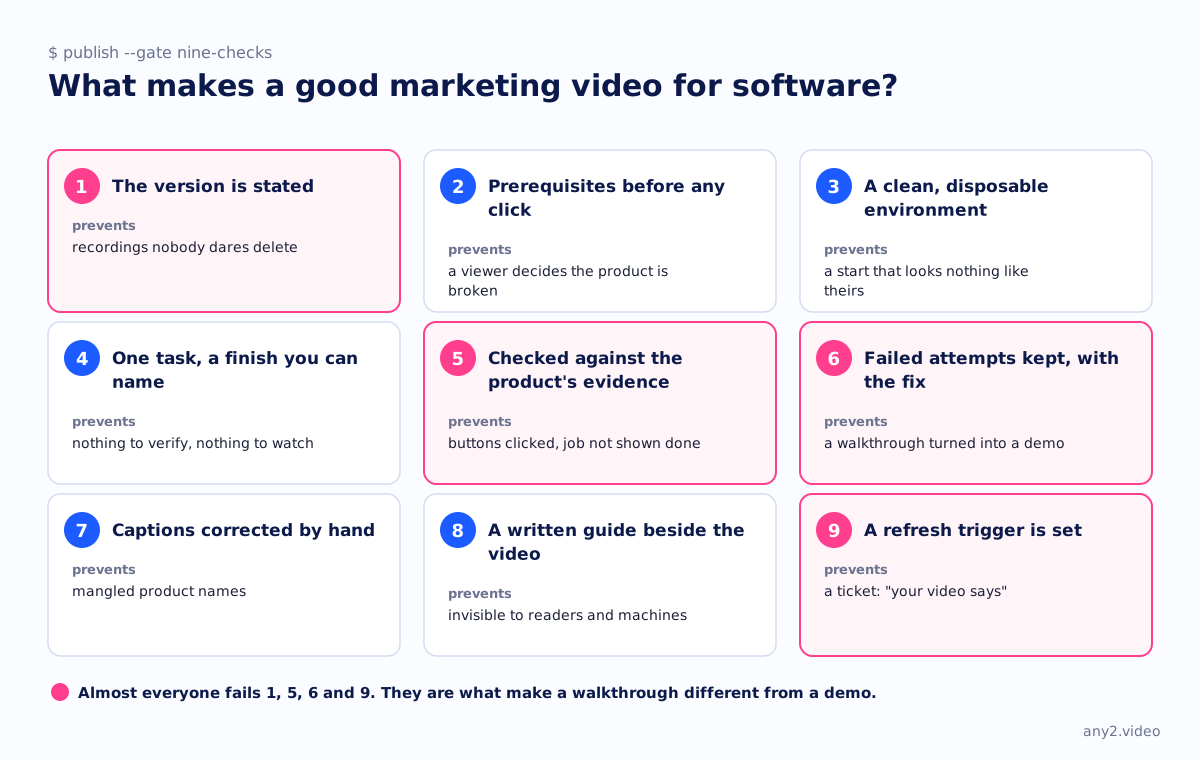
What matters is whether the video is accurate, complete and still accurate next quarter. These are the nine checks we run before publishing, each with the failure it prevents.
1. The version is stated
State it on screen and on the page. Without it nobody can tell whether the footage is current, you included. A video with no version can never be retired with confidence, so libraries fill up with recordings that might be wrong and that nobody dares delete.
2. Prerequisites appear before anything is clicked
Show the account type, permissions, dependencies that must already exist, and free space or quota, in the first thirty seconds.
This prevents the most common failure of published walkthroughs. A viewer follows along, hits a wall the video never mentioned, and decides the product is broken when their account was only missing a role.
3. The environment is clean and disposable
Use neither a demo tenant groomed for two years nor production. The viewer needs to believe the starting state looks like theirs, and you need the second take to start where the first one did.
4. One task, with a finish you can name
If you cannot point to the moment the job was done, there is nothing to verify and nothing satisfying to watch. "Show the reporting module" fails this check, and "export last quarter's revenue by region as a CSV" passes.
5. The result is checked against the product's own evidence
The narrator saying it worked does not count. The check needs something the product produced independently of the screen being clicked, such as the file in the bucket with a matching checksum, the alert in an inbox, a machine that boots or a record in an API response.
A few seconds of evidence on screen show that the job got done, where the rest of the footage only shows buttons being clicked.
6. Failed attempts are kept, with the fix
List whatever went wrong before it worked, along with what resolved it. Your users search for this section, and cutting it turns a walkthrough into a demo.
Internal teams skip this check more than any other, because the person recording wrote the confusing step and does not find it confusing.
7. Captions are corrected by hand
Auto-generated captions mangle the product names that matter, and captions are the only part of a video a search engine or a language model can read. If you kept a run log while recording, correcting them takes five minutes, since the vocabulary is already written down.
8. A written guide sits beside the video
Some people would rather read, and the written version is what search finds and answers cite. A video with no text beside it is invisible to half your audience and to every machine.
9. A refresh trigger is set
Bind the video to the version it ran against, so that it re-runs when a release touches the task. Otherwise the library slowly goes out of date and you find out from a ticket that starts "your video says".
What we left off the list on purpose
- Music. People watch a walkthrough for information, and a soundtrack under a terminal is noise.
- A presenter on camera. Nobody needs to see a face to learn whether the restore worked.
- A three-second hook. The viewer came from a search or a support reply and has already decided to watch.
- A length limit. The video takes as long as the task does, and cutting the pause while the product was working misleads someone planning a migration.
How to use this
Run the list as a publish gate rather than a review meeting. Nine yes-or-no checks take two minutes and catch the problems that make a video useless a quarter later.
Almost everyone fails checks one, five, six and nine, and those four are what make a walkthrough different from a demo. The recording process that satisfies them is in how to make a marketing video for a software product, and the Proxmox VE 9.2 install walkthrough is a worked example with its failures intact.
Want one that passes all nine, on your product? The first sample is free.
$ get-sample →