
A Video-First Strategy for Software Products: Every Task, Every Release, Every Language
Video-first usually means putting video on the homepage. For a software product it should mean every task a user can perform has a recording, and the recordings stay accurate after your next release.
Part of our guide to Video Content Strategy for Software Companies.
Video-first is usually a design choice: video at the top of the homepage, video in the email, video in place of a paragraph. That is a reasonable preference about format, and it changes nothing about what a buyer can find out about your product.
Software companies can use a stronger definition, although almost none do. Under it, video is the primary record of what the product does, and the written documentation is derived from the video instead of the other way round.
Why the arithmetic makes this hard
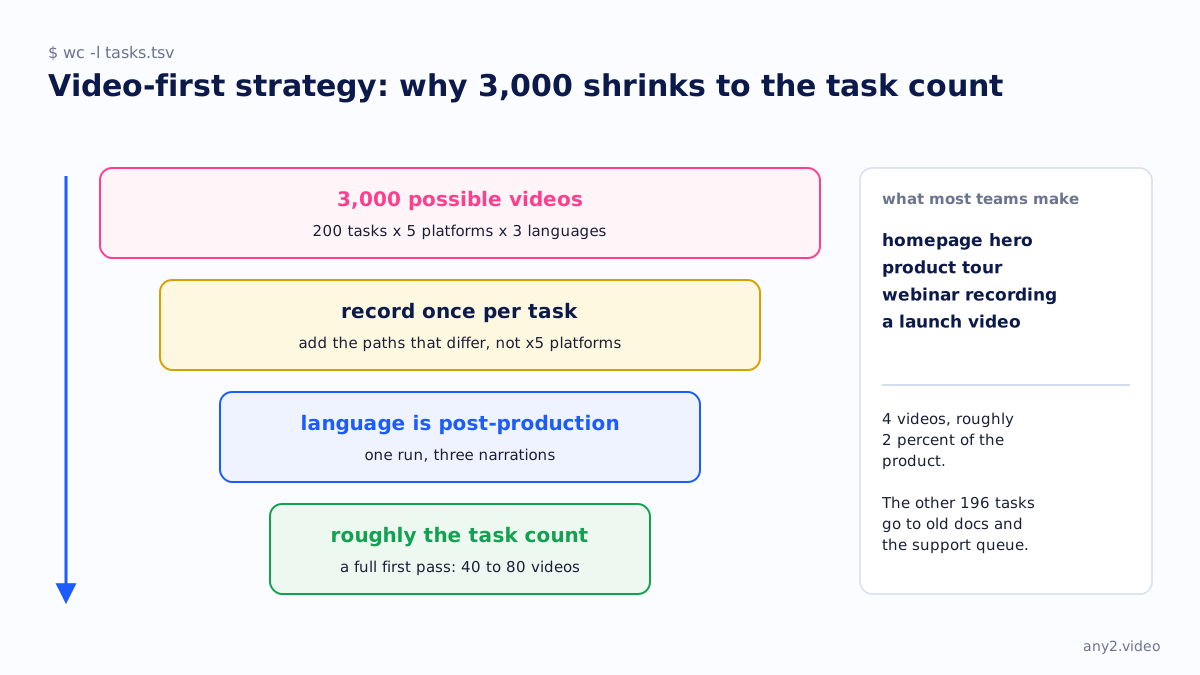
Take a mid-sized product with two hundred tasks a user might need to complete, five supported platforms and three languages you sell in.
That makes three thousand possible videos, and the next release will arrive before you have made any of them.
So teams do the sensible thing and make four: the homepage hero, a product tour, a webinar recording and something for a launch. Those four cover roughly two percent of the product. The other 196 tasks are left to documentation nobody updated and to a support team that answers each question individually, over and over, indefinitely.
With 200 tasks and 4 videos, the gap is in coverage, and commissioning one video at a time will not close it.
Two decisions that shrink the number
The real number is much smaller than three thousand, and it helps to make the two decisions that shrink it on purpose.
- Most tasks work the same way on every platform. Record each once and note the exceptions, so instead of multiplying by five you add a handful of paths that really do differ, usually on mobile.
- Language is post-production on one verified run, so each extra language does not need a second recording. Decide the languages before you record and produce them together, and three languages become one run with three narrations.
What remains is roughly the task count. For most products a full first pass is forty to eighty videos, which is still a lot but can be planned.
Order the list so the first ten count
Rank the task list by two numbers you already have: how many people search for the task outside your product, and how many tickets it generated last quarter. Tasks high on both go first. There are fewer of them than anyone expects, and marketing would almost never have picked them.
Video content strategy for software companies covers the full method with the scoring and a worked example, and the plan template has a spreadsheet for it.
Releases are the hard part
Reaching coverage is achievable. Most video-first strategies fail at keeping it.
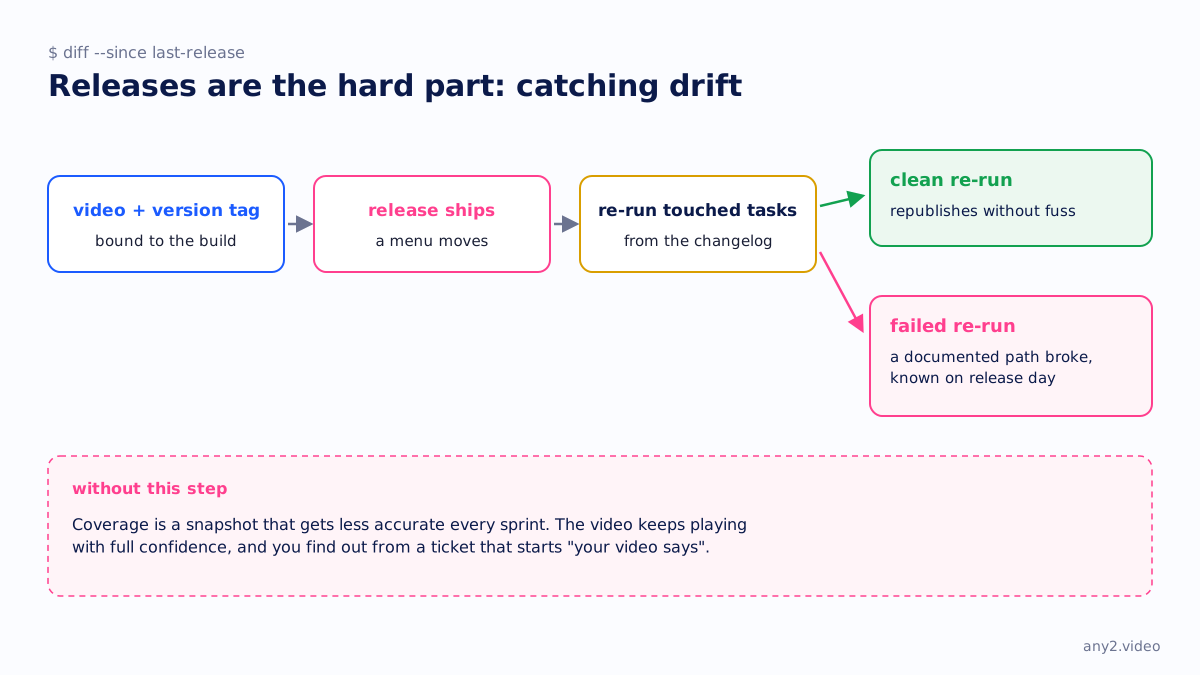
Every video starts going out of date the moment you ship. A menu moves, a default changes or a screen is redesigned, and the video keeps playing with full confidence while showing the wrong thing. Nobody re-watches their own library, so nobody notices until a customer follows the video into a dead end and opens a ticket that starts "your video says".
A video-first strategy therefore needs a way to catch that drift, and the fix is mechanical. Bind each video to the product version it ran against, and on each release re-run the tasks the changelog touched. A clean re-run republishes without fuss. A failed re-run tells you on release day that a documented path broke, which you would want to know anyway and would otherwise not find out.
Without that step, coverage is a snapshot that gets less accurate every sprint, and the library ends up costing you more than it helps.
What it looks like when it works
- A new hire watches the task itself instead of a two-hour recording of somebody explaining it.
- A support reply is a link, and when the ticket comes back it gets the same link.
- A prospect finds a video for the specific thing they were worried about, including what can go wrong.
- A partner gives the same demo as your sales engineer, because both of them watched it.
- When a release ships, the affected videos re-run that day, so the library is never more than one version behind.
Where to start
Start with the one task your team is most tired of explaining, before any coverage plan for two hundred tasks. Record it, publish it with the failures kept, and count how often you link to it over the following month.
That count is the business case for the next ten videos, and it will persuade people more than any strategy document written in advance.
Start with one. Send a product and a task in a sentence; the first sample is free.
$ get-sample →