
Video Content Strategy for Software Companies: From 200 Tasks to a Plan You Can Actually Ship
Most video strategies begin with channels and a content calendar. For a software product, begin with an inventory of tasks ranked by two numbers you already have, and the plan follows from that.
Ask five software companies for their video content strategy and you will get five content calendars, each with channels down one side, months across the top and a mix of formats picked to look balanced. That is a publishing schedule, and it falls apart the first time engineering slips a release.
A strategy is a set of decisions about what to cover and in what order. For a software product those decisions fit naturally around the task, rather than around the month or the channel.
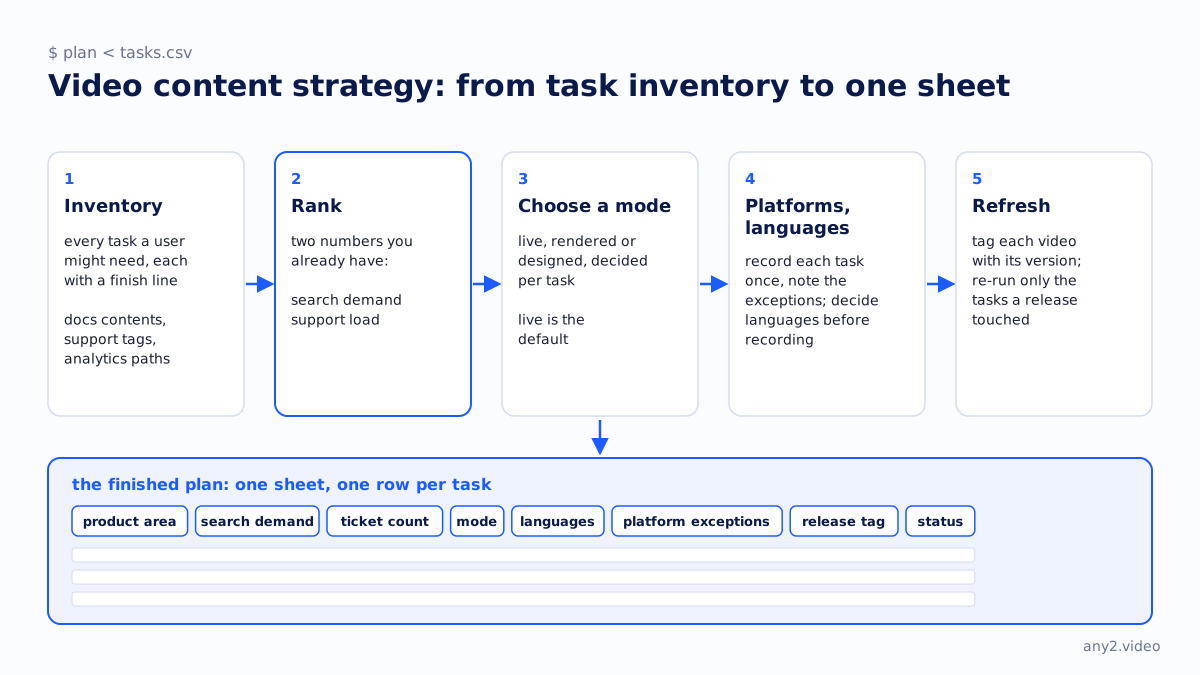
Start with an inventory
Before anything else, write down every task a user might need to complete in your product. Write tasks rather than features, each as a sentence with a finish line: "connect the billing integration", "restore a single file from last night's backup", "invite a teammate with read-only access".
For most products the list runs to a few hundred lines. That is an uncomfortable number, and it should be, because it is the real size of what a buyer might evaluate you on. Until it is written down, every content decision is made without it.
You can build the list without guessing from three sources: the table of contents of your documentation, the tags in your support queue and the click paths in your product analytics. The tasks that show up in all three are the ones that matter.
Rank by two numbers you already have
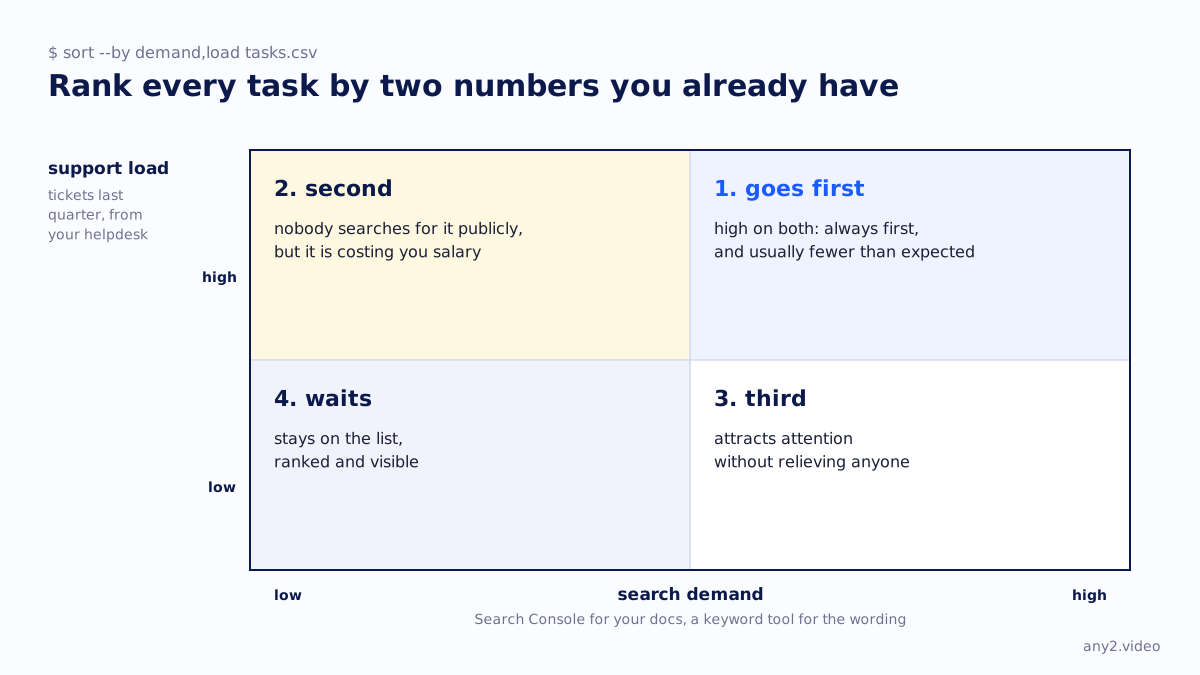
Score each task on two axes, both drawn from data you own.
- Search demand is how many people look for the task outside your product. Get it from Search Console for your own docs pages, and from any keyword tool for the wording users type. A task with search demand brings in traffic.
- Support load is how many tickets the task generated last quarter, which your helpdesk can export in a minute. A task with support load costs you money.
The ranking follows directly. Tasks high on both always go first, and there are usually fewer than people expect. High support load with low search demand comes second, since nobody is searching for it publicly but it is costing you salary. High search demand with low support load comes third, because it attracts attention without relieving anyone. Tasks low on both wait.
Make your first ten videos about the ten answers your team is tired of giving.
Choose the mode for each task
Teams tend to pick one production style and use it for everything. That overspends on trivial tasks and shortchanges the ones buyers evaluate, so decide for each task separately.
- If we can reach the task on a screen and operate it, record it live. That gives the strongest evidence and should be the default.
- If the task involves hardware, physical steps or an air-gapped system, render it from the run log and photographs, and say that it was rendered.
- For a concept, a comparison or a release summary, use designed motion graphics built on verified facts.
- If a task cannot be demonstrated at all, that tells you something about the product, and the content plan cannot fix it.
Plan for platforms and languages multiplying the work
Plans often break here without anyone noticing. Two hundred tasks is a content programme. Two hundred tasks across five supported platforms in three languages is six thousand possible videos, and nobody produces six thousand of anything.
Two decisions keep it manageable. Most tasks work the same on every platform, so record each once and note the exceptions instead of re-recording the whole matrix. And language is a post-production step on one verified run, so decide the languages before recording and produce them together.
After those two decisions, a full first pass is usually between forty and eighty videos. That is still large, but it can be planned and ordered by the ranking above.
Refresh on the release train
A video stays accurate only until your next release. Monthly refreshes mean updating videos that did not change and missing the ones that did.
Tag each video with the product version it ran against. When a release ships, read the changelog, find the tasks it touched and re-run only those. A clean re-run republishes. A failed one tells you the release broke a documented path, and it is better to learn that on release day than from a ticket three weeks later.
A worked example
Take a backup vendor with 140 tasks, four platforms, and English plus German. The support export shows restore tickets are 31% of volume, and Search Console shows the restore docs page is the second most visited page on the site. Restore goes first, since both axes point to it by a wide margin.
The first pass is six restore tasks recorded live in English with German captions, then four install and upgrade tasks, then two integration proofs against the platforms customers ask about most, then one release summary per shipped version. That makes sixteen videos over a quarter, covering roughly half the support volume and the top three organic pages.
The remaining 124 tasks stay on the list, ranked and visible, waiting their turn. Keeping them ranked is what makes the list a strategy and not just a backlog.
What a finished plan looks like
The finished plan is one sheet with a row per task. Each row holds the product area, search demand, ticket count, chosen mode, languages, platform exceptions, the release tag it is bound to and its status. The calendar and everything else are derived from that sheet.
You can copy the sheet from the video content marketing plan template, and the method behind it is on how it works.
More in this guide
Have the inventory but not the videos? Send one task and see what a finished one looks like.
$ get-sample →