
Video Marketing Tools for Software Companies: What to Use for Recording, Hosting, Captions and Proof
Video tools sorted by the job each one does, including the one job most stacks have no tool for. Written for teams recording their own product rather than editing brand films.
Part of our guide to AI Video Marketing for Software Products.
Search for video marketing tools and you get editors ranked by feature count. Those lists are written for people making adverts. When your video is a recording of your own software doing something, most of those features do not matter, and the two things that decide whether the video is any good do not appear on the list.
What follows is a map sorted by job. Pick one tool for each and stop there, because nobody uses a nine-tool stack twice.
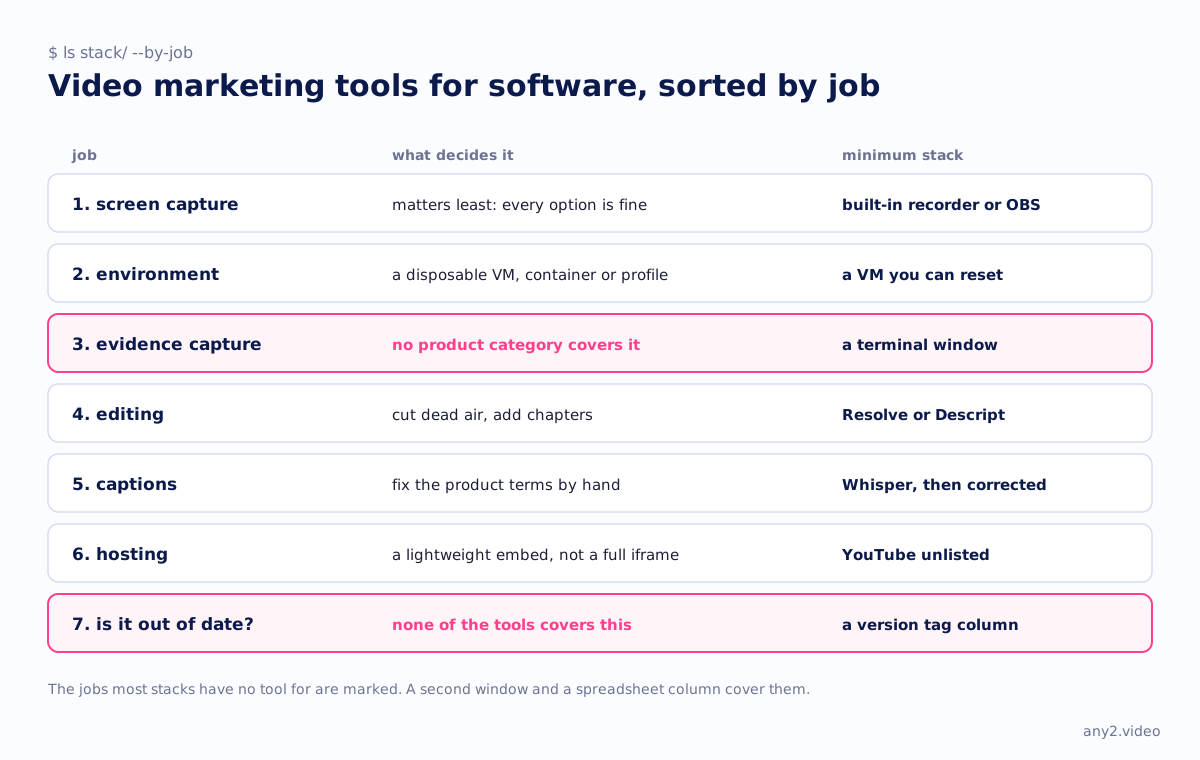
1. Screen capture
Everybody starts here, and it matters least, because every option is good enough. The built-in screen recorder on macOS is fine and free. OBS is free and cross-platform, and worth learning if you want scene switching or a webcam inset. Loom, CleanShot and Screen Studio cost money, and in return you get speed, automatic zooms and tidy cursor movement.
What does matter is recording at the resolution you will publish instead of scaling up afterwards, hiding notifications and bookmarks, and recording the whole session, including the parts that fail.
2. Environment isolation
Most teams skip this, and it is why their videos cannot be reproduced. If you record on a machine that has been someone's daily computer for two years, the viewer will not be able to follow along.
Use a disposable environment instead: a fresh VM, a container, a clean browser profile or a trial tenant created for the recording. Take a snapshot before and restore it afterwards, so the second take starts from the same place as the first. This is also why the answer to "can we record against production?" is always no.
3. Evidence capture
No product category covers this job, so nobody buys a tool for it and it rarely gets done.
Evidence is whatever the product produced independently of the UI you were clicking, such as a checksum in a terminal, the object listing in a storage console, an alert in an inbox or an API response in curl. Usually the only tools needed are a second window and a shell. Show the evidence on screen for four seconds at the end, and the video becomes a walkthrough instead of a demo.
- A terminal next to the app, for checksums, logs and API calls
- A second account or inbox, to show a notification arriving
- The provider's own console, to show the artefact exists outside your product
- A written run log with timestamps, kept while you work instead of reconstructed afterwards
4. Editing
Cut the dead air, add chapter markers and leave it at that. DaVinci Resolve is free and does more than enough. Descript is worth paying for if you like editing by transcript, which suits narrated walkthroughs, and iMovie will also do the job.
Avoid template packs. Animated titles and swooshes on a technical walkthrough look like an attempt to make up for having shown nothing.
5. Captions
Captions are required. People watch with the sound off more often than you would expect, captions are the only part of a video that search engines and language models can read, and auto-generated captions mangle the product names you care about.
Generate a first pass with Whisper, Descript or YouTube's own tool, then fix the product terms by hand. If you kept a run log while recording, the corrections take five minutes, because the vocabulary is already written down.
6. Hosting and embedding
Use YouTube unless you have a specific reason not to. It is free and fast everywhere, and unlisted mode is enough for samples meant only for prospects. Wistia and Vidyard cost money, and they add gated forms, analytics per viewer and no third-party branding, which matter if video is a lead source rather than documentation.
Wherever you host, use a lightweight embed. A standard YouTube iframe loads roughly a megabyte before anyone presses play, while a facade that swaps in the iframe on click loads only a thumbnail. On a docs page with six videos, that decides whether the page is fast or slow.
7. Knowing when a video is out of date
None of the tools on any list covers this. A video recorded against 3.1 can be wrong in 3.2, and nothing in your stack will tell you.
The solution is a spreadsheet column. Tag every video with the version it ran against, and on each release, re-run the tasks the changelog touched. The video content marketing plan template includes that column.
The minimum stack
| Job | What to use |
|---|---|
| Record | Built-in screen recorder or OBS, free |
| Clean environment | A VM or clean browser profile you can reset, free |
| Evidence | A terminal window, free |
| Edit | DaVinci Resolve or Descript |
| Captions | Whisper for a first pass, corrected by hand, free |
| Host | YouTube unlisted, with a lightweight embed, free |
| Track versions | One spreadsheet column for the version tag, free |
Most software companies could make their first ten walkthroughs with that stack for the price of an editor licence. The tools were never what held them back. The engineer's afternoon was, as video marketing software vs a video marketing service argues.
Or skip the stack entirely. Send one product and one task; the first sample is free.
$ get-sample →