
AI Voiceover for Software Tutorial and Demo Videos: Scripts, Product Name Pronunciation, Pacing and Accent
AI voiceover works for most software tutorial and demo videos once the script is written for the ear, product names are fixed in a pronunciation list and the voice is paced to the cursor. When a human voice is worth paying for, which pronunciation controls ElevenLabs, Azure and Google document, accent choice for Europe and how to disclose a synthetic voice.
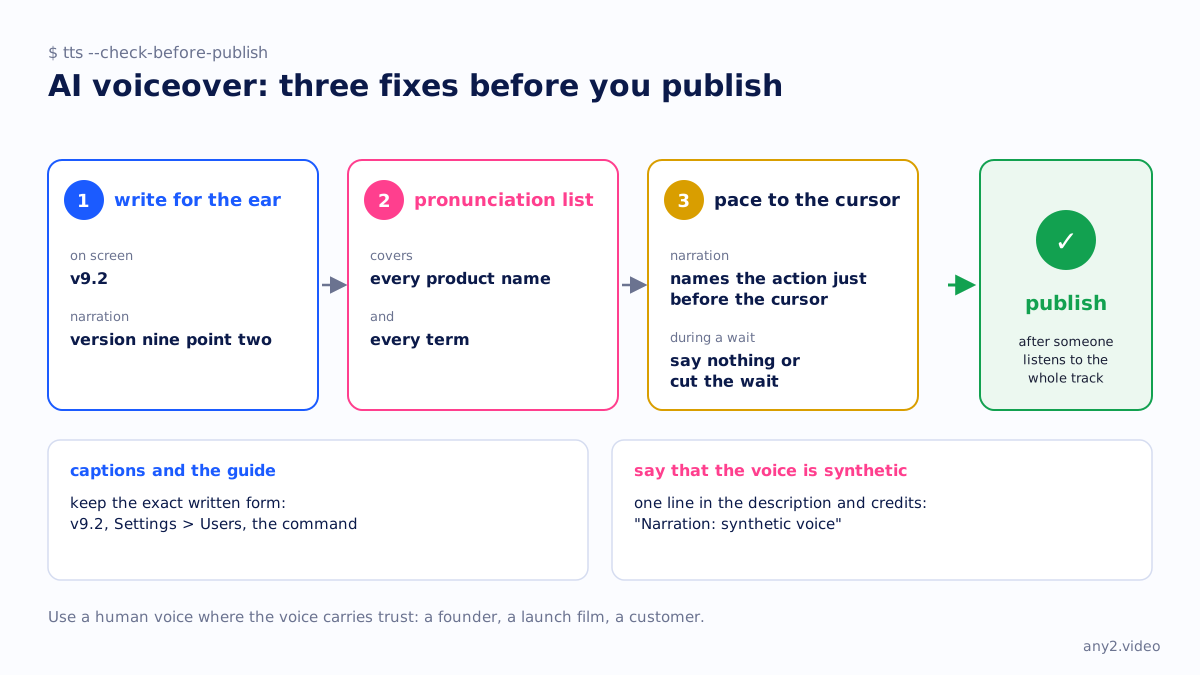
AI voiceover is good enough for most software tutorial and demo videos, provided three things are fixed before you publish: a script written to be heard, a pronunciation list for every product name and term, and narration paced to what the cursor is doing. Use a human voice where the voice itself carries trust, such as a founder, a launch film or a customer. Either way, keep the exact written form in the captions and the guide, and say that the voice is synthetic.
When an AI voice is fine, and when a human voice is worth it
An AI voice suits videos that change with every release. When version 9.3 changes three sentences, a synthetic voice re-reads them in the same tone as the rest of the track. Re-booking a voice actor for three sentences means a session, a fee and a take that sounds slightly different from last year's.
A human voice is worth paying for when the voice is part of the message: a founder explaining why the product exists, a flagship launch video, a sales piece where emphasis carries meaning. Synthetic voices still stress the wrong word now and then, and in "this step only runs once" the stress is the instruction. Never synthesise a real customer or colleague saying words they did not say.
Write the script for the ear
A reader takes in "v9.2", "Settings > Users" and a file path at a glance. A voice has to turn each one into sounds, and it guesses. Write the spoken form you want in the narration script, and keep the exact written form in the captions and the guide. The software demo script template gives the structure; this table covers the sentences inside it.
| On screen and in captions | In the narration | Why |
|---|---|---|
| v9.2 | version nine point two | Stops the voice guessing at the letter and the dot |
| Settings > Users > Add user | Open Settings, then Users, then click Add user | Symbols get skipped or read as "greater than" |
| https://192.168.1.10:8006 | the address on screen, port eight zero zero six | Nobody copies an IP address by ear |
| apt install -y nginx | run the install command shown on screen | The viewer copies commands from the guide, not the audio |
| SQL, CLI, YAML | one fixed reading for each, used every time | Two readings of one term sound like two things |
Put one instruction in each sentence, and name each button exactly as it is labelled, so the ear and the screen agree.
How to fix mispronounced product names
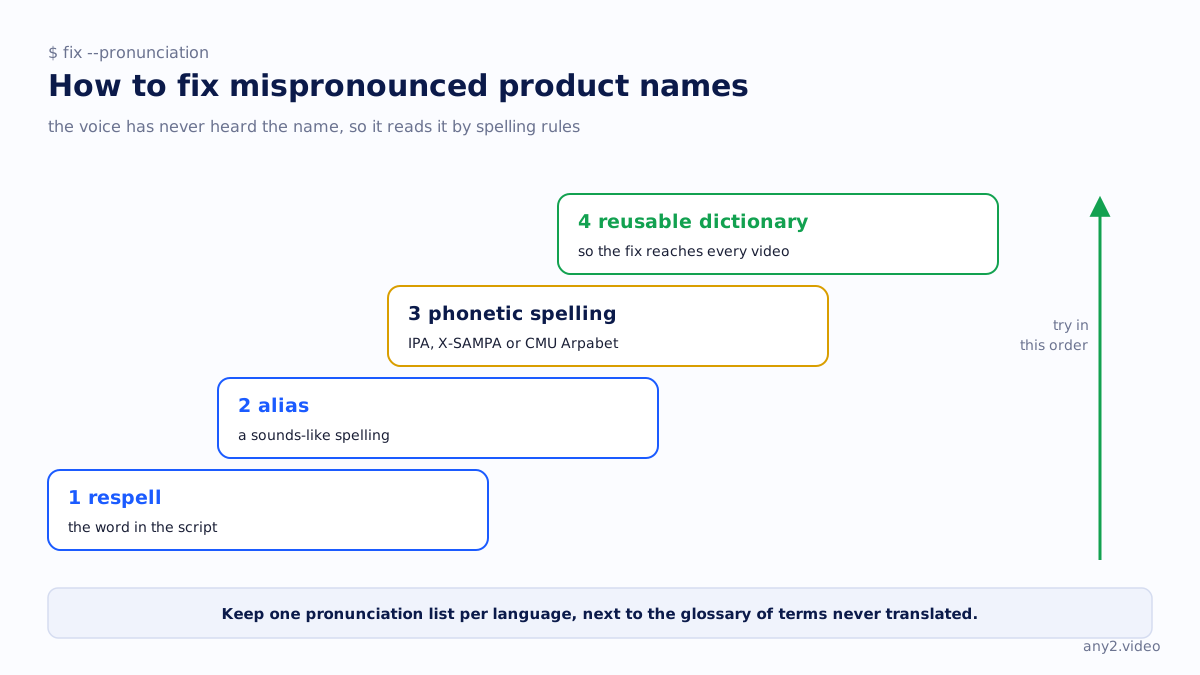
An AI voice mispronounces product names because it has never heard them. Invented names, acronyms and borrowed words get read by spelling rules. Fix them in this order: respell the word in the script, then use an alias (a sounds-like spelling), then a phonetic spelling, and finally a reusable dictionary so the fix reaches every video. We checked what three vendors document on 15 October 2026.
| Vendor | Inline controls | Reusable list | Catch |
|---|---|---|---|
| ElevenLabs | Phoneme tags (CMU Arpabet or IPA) on some models; alias tags | Pronunciation dictionary, uploaded as TXT or PLS in a Studio or Dubbing Studio project's settings | Entries are case sensitive and only the first match is used |
| Microsoft Azure Speech | SSML phoneme (IPA, SAPI, UPS, X-SAMPA), sub alias, say-as | Custom lexicon file in PLS format at a URL, referenced from SSML | One locale per lexicon, 100 KB limit, edits can take 15 minutes to apply |
| Google Cloud Text-to-Speech | SSML phoneme (IPA or X-SAMPA; yomigana for Japanese, pinyin or jyutping for Chinese), sub, say-as | Custom pronunciations in the synthesis request: a phrase plus its phonetic spelling | Custom pronunciations start with en-US |
Keep one pronunciation list per language, next to the glossary of terms that must never be translated. Sources: ElevenLabs, Azure Speech, Google Cloud SSML and Google custom pronunciations.
Robotic delivery and pacing to the cursor
Much robotic narration starts in the script. Long sentences and lists read aloud come out flat in any voice. Shorten the sentence before you change the voice, and regenerate a single bad line rather than the whole track.
Pacing is where a software video shows its seams. The narration should name an action just before the cursor does it, so the viewer looks to the right place. During an install or a page load, say nothing or cut the wait. Pause tags exist (Azure and Google support SSML break and prosody; ElevenLabs allows breaks of up to 3 seconds on some models and warns that many in one generation can cause instability). Editing the video to fit the voice is usually more reliable than stretching the voice.
British or American English for European buyers?
We have no data on which accent European buyers prefer, so this is reasoning, not a finding. Most continental buyers hear English as a second language. What costs them understanding is speed, idioms and a strong regional accent, more than British against American. Choose a clear, unhurried standard voice first.
Then match the English your product already uses. If the interface, documentation and captions are written in American English, use an American voice; if they are British, use a British one. For technical content the difference is audible in the terms themselves: "router", "schedule" and the letter Z, which matters every time the narration spells out an acronym or a file system name. Pick one variety, put those readings in the pronunciation list and never mix them within a series. If most buyers are in the UK or Ireland, that tips it to British. Vendors entering Europe covers the rest of that move.
Voiceover in other languages
One recording can carry narration in several languages. A German sentence still needs the product name said the way your own team says it, and pronunciation lists are per language (Azure ties each lexicon to one locale), so the English list does not carry over. Have a native speaker hear the first minute of each language. Product demo video in multiple languages covers when to subtitle, dub or re-record, AI video translation tools compares dubbing tools, and one demo, five markets shows one recording serving several. Our walkthroughs come with captions and narration in the languages you ask for.
Disclosing an AI voice
YouTube's policy on altered or synthetic content, checked 15 October 2026, requires disclosure of realistic content such as making a real person appear to say something they did not say. It lists cloning your own voice for voiceovers or dubs as not needing disclosure, and does not name synthetic narration as a category (YouTube Help). In the EU, Article 50 of the AI Act requires disclosure of audio that constitutes a deep fake (AI Act Service Desk). A cloned voice of a real colleague saying lines they never recorded is the case to take to your lawyer.
Our advice is simpler than the rules: say it anyway. One line in the description and the credits, such as "Narration: synthetic voice", costs nothing. A viewer who works it out alone starts doubting the steps.
Is AI voiceover good enough for software tutorials?
Yes, for most tutorials and how-to videos, once the script is written for the ear, product names are fixed in a pronunciation list and someone listens to the whole track before publishing. How-to videos covers the rest of the format.
Why does my AI voiceover mispronounce product names?
The voice has no recording of the word, so it reads it by spelling rules. Respell it in the script, or add an alias or phonetic entry to a pronunciation dictionary or lexicon so the fix carries across every video in that language.
How do I make an AI voiceover sound less robotic?
Shorten the sentences, cut lists read aloud, regenerate single bad lines and leave silence during waits instead of filling them. Flat delivery usually starts with text written for reading, not with the voice.
Should captions match the voiceover word for word?
Not always. Captions should show the version number, command and button label exactly as on screen, even where the voice says them in a friendlier form. Closed captions vs subtitles explains which file does which job.
Send one product and one task. We record it once and deliver captions and narration in the languages you need, with the written steps that worked. The first sample is free.
$ get-sample →