Gemini Omni 1.2 Flash: Video Price and Product Clips
Gemini Omni 1.2 Flash makes 15 second clips, edits them over several turns and cuts the 720p video price to about $0.07 per second. Here is what a clip costs, where it helps product teams, and where it stops.
Gemini Omni 1.2 Flash is Google's new video model, announced on 5 November 2026. It makes clips of up to 15 seconds and edits them over several chat turns. The video price drops to about $0.07 per second at 720p, so Google's pricing page puts a 15 second clip at about $1.04. It still cannot record your software doing a real task.
What changed in Gemini Omni 1.2 Flash
Google's announcement, written by Anish Nangia, a product manager at Google DeepMind, lists three headline changes over Omni 1.1. Clips now run up to 15 seconds, up from 10, and you set the length in one second steps from 3 to 15. You can refine a clip over several turns instead of regenerating it, for example by swapping the product or background, changing the lighting or weather, or switching the aspect ratio. And the model follows references more closely.
Those references can be character, product or style images, motion clips up to three seconds long, and audio cues. Google says faces, garments, packaging typography and brand colours stay consistent across camera angles, with less drift between the first and last frame. The post also claims cleaner lip-sync and steadier camera moves such as orbits and zoom-outs. Google names its own weak spots too: fast sports action, rapid script changes and complex physics are still being worked on.
The model is generally available in the Gemini API and on Google Cloud, and it reaches Flow, Google Vids, the Gemini app for Google AI Ultra subscribers, and the asset studio in Google Ads. Google says Vids users get 15 second clips at no extra cost. A Google Cloud post dated 6 November 2026 lists Runway, Picsart and invideo among the companies using it. OpenRouter now lists the model, and it was featured on Product Hunt on 7 November under the line "15s AI video at $0.07 per second".
What a 15 second clip costs at the new price
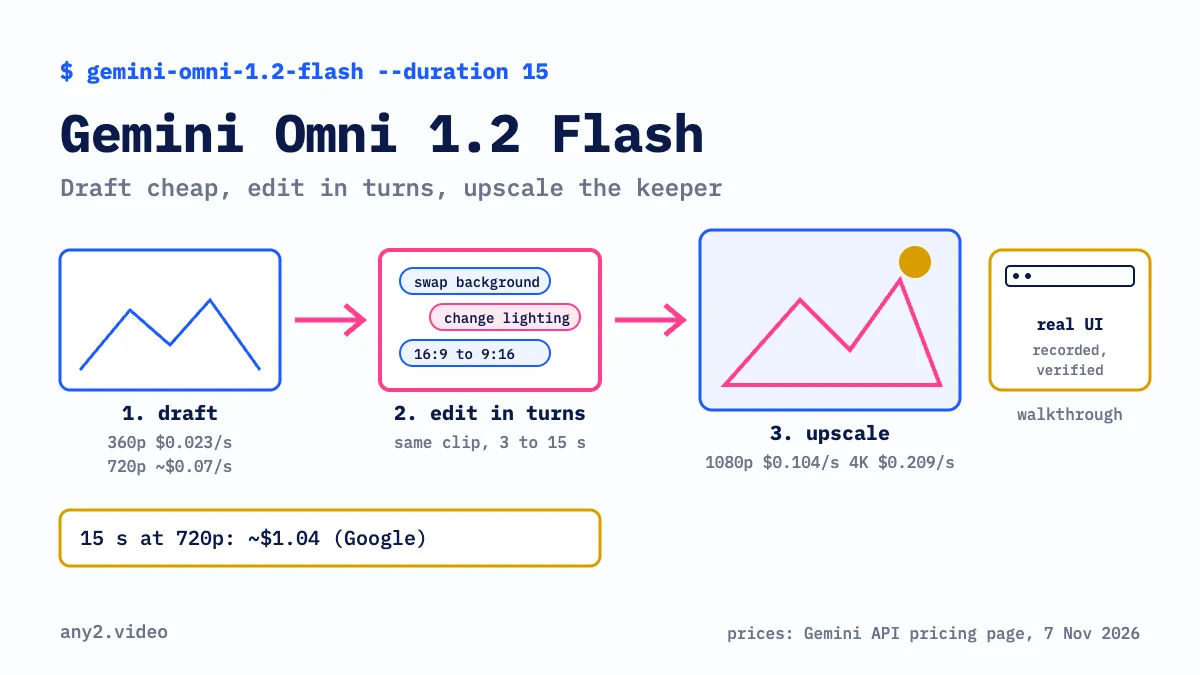
Google bills Gemini Omni 1.2 Flash video by output tokens: $12.00 per million, against $17.50 per million for Omni 1.1 Flash on the same pricing page. A footnote turns that into seconds. At 720p the model produces 5,792 tokens per second, which Google says comes to about $0.07 per second, or about $0.70 for a 10 second clip and about $1.04 for a 15 second clip.
The same footnote gives the other tiers: $0.023 per second at 360p, $0.104 per second at 1080p and $0.209 per second at 4K, the last two including upsampling. Multiplying out, a 15 second clip costs about $0.35 at 360p, about $1.56 at 1080p and about $3.14 at 4K. These are our sums from Google's per second rates, read on 7 November 2026; check the page before you budget.
For a product team, the useful pattern is the one Google describes: draft at 360p or 720p, fix details with follow-up edits, and only upscale the take you keep. The pricing page does not list a separate rate for edit turns, so until Google says otherwise, budget every turn that returns a new clip as a new clip at its resolution.
If you already call Omni 1.1 Flash through the API, Google's developer docs say those requests route to 1.2 Flash automatically from 3 December 2026 and are billed at the lower 1.2 rates.
Where it helps with product clips
Fifteen seconds in one generation is enough for the shots a generator suits in a software video: an opening shot, a transition, a hardware or packaging close-up, a short social teaser. The 9:16 option and aspect ratio changes in an edit turn mean one approved clip can be cut for a vertical feed without a second prompt from scratch. Better reference following matters most for physical products, where the box, the logo and the colour have to match the real thing.
Conversational editing changes the review loop. A marketing lead can ask for a different background or warmer light on the same clip, and the parts that were already right should stay put. The developer docs allow editing for generated clips up to 15 seconds and extensions up to 30 seconds in total.
Where it still falls short for product walkthroughs
A walkthrough has to prove that a task works in the real product: the menu path, the settings, the result on screen. Gemini Omni 1.2 Flash generates every frame. If you feed it a screenshot as a reference, any movement in the interface is the model's version of your app, and on screen text can come out wrong. A buyer who later follows the same steps in the product will notice.
Length is the second limit. One generation tops out at 15 seconds and an extended clip at 30, while a walkthrough of one task usually runs longer than a minute and has to stay correct from start to finish.
European teams hit a third limit. Google's developer docs say editing or extending uploaded videos is not available in the EEA, Switzerland or the UK; only clips the model generated can be edited there. So a team in Berlin or London cannot use the API to restyle a screen recording it made itself. The docs also say English is fully supported and other languages are untested, which matters if you need the clip in German or Japanese. For language versions of a real demo, see how to make a product demo video in multiple languages.
Use Gemini Omni 1.2 Flash for the shots around the product, and record the product itself for the part that has to prove it works. AI video generators for product marketing covers the same split for other models, and our TBC mischief 1 article looks at a much cheaper image to video model launched the week before.
Where any2.video fits
any2.video makes verified product walkthroughs. An operator runs a real task on the real product, checks the result against evidence the product produced, and keeps the failed attempts in the record. Our pricing page lists $6 to $15 per finished minute depending on the mode, and the first sample, one product and one task, is free. A Gemini opening and a recorded walkthrough can sit in the same video. What a verified walkthrough proves lists the questions to ask any video vendor, us included.
Questions about Gemini Omni 1.2 Flash
When was Gemini Omni 1.2 Flash released?
Google announced it on 5 November 2026 and made it generally available in the Gemini API and on Google Cloud the same week. It is rolling out in the Gemini app, Flow, Google Vids and Google Ads.
How much does Gemini Omni 1.2 Flash cost per second?
About $0.07 per second at 720p, according to Google's Gemini API pricing page, which also lists $0.023 at 360p, $0.104 at 1080p and $0.209 at 4K. Google says 720p is 30% cheaper than Omni 1.1 Flash.
How much is a 15 second Gemini Omni video?
Google's pricing page puts a 15 second 720p clip at about $1.04. From the per second rates, the same clip is about $0.35 at 360p and about $3.14 at 4K.
How long can a Gemini Omni 1.2 Flash video be?
Up to 15 seconds per generation, set in one second steps from 3 seconds. Google's docs say extensions can take a clip to 30 seconds in total.
Can Gemini Omni 1.2 Flash edit my own videos?
Through the API you can upload a clip of up to 15 seconds and edit it, except in the EEA, Switzerland and the UK, where only clips the model generated can be edited or extended.
Can I use Gemini Omni 1.2 Flash for a software demo video?
For short shots around the demo, yes. For the part that shows your software doing a task, record the real product, because any interface the model shows is generated and a clip tops out at 15 seconds.
Sources, all read on 7 November 2026: Google, Gemini Omni 1.2 Flash: Fast and cost-effective with longer clips (5 November 2026), Google Cloud blog, Gemini Omni 1.2 Flash now GA (6 November 2026), Gemini API pricing, Gemini API docs, Generate and edit videos with Gemini Omni Flash, OpenRouter, Gemini Omni 1.2 Flash model page, Product Hunt, Google Omni 1.2 Flash, ETV Bharat, AI updates (6 November 2026).
Use a generator for the shots around your product. For the part that has to prove the product works, send one product and one task. The first sample is free.
$ get-sample →