
Live Action vs Animation: Which One to Use for a Software Video
Live action is video of real people, places and screens captured by a camera or a screen recorder. Animation is video drawn or generated frame by frame, from 2D characters to motion graphics. For a software video the real choice is three-way: live action, animation, or a screen recording of the product itself.
What each one is good at
| Live action | Animation | Screen recording | |
|---|---|---|---|
| Shows | People, places, hardware | Concepts, abstractions, anything without a screen | The product doing a task |
| Trust comes from | A real face or place | Clarity of the idea | The interface and the result |
| Cost to change | Reshoot | Edit the scene | Re-record the task |
| Goes stale when | People or branding change | The concept changes | The product changes |
| Can prove a task works | Only if the screen is in shot | No | Yes, if the version and result are shown |
When to animate
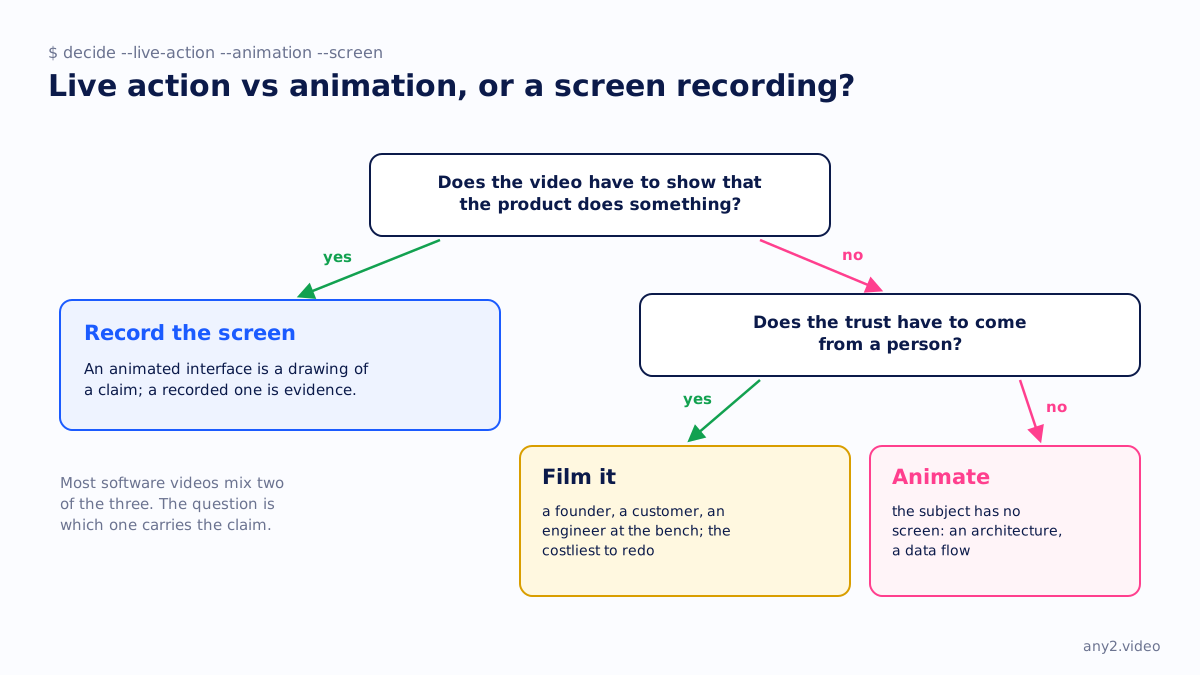
When the subject has no screen: an architecture, a licensing model, a data flow, a comparison of release cadences. Animation is also the honest choice when the product is not ready to be shown, as long as the video says so. Our designed mode is animation on verified facts, used for exactly these subjects and never presented as proof.
When to film
When the trust has to come from a person: a founder explaining a decision, a customer describing a result, an engineer at the bench with hardware and appliances where a screen recording cannot show the cable. Filming is also the costliest to redo.
When to record the screen
Whenever the video has to show that the product does something. An animated interface is a drawing of a claim; a recorded one is evidence, with the version on screen and the attempt that failed left in. The Proxmox VE 9.2 install is the recorded kind. The choice between the three is laid out further in AI video generators for product marketing, where generated footage adds a fourth option that behaves like animation.
Questions
Is a screen recording live action?
Technically yes, since it captures something real as it happens. In practice it is its own category for software, because it is the only one that shows the product performing a task.
Is animation cheaper than live action?
Usually cheaper to change afterwards, since a scene can be edited rather than reshot. The first version is not necessarily cheaper; it depends on the style and the length.
Can an animated video be a product demo?
It can illustrate what the product does. It cannot demonstrate it, because nothing in the animation ran. An animated interface is a drawing of the claim.
Which is better for a SaaS explainer?
A mix: a short live or animated opening for the problem, then the real interface on screen for the product. Pure animation leaves the viewer unsure what the product looks like.
See one, with its run log and the attempts that failed.
$ cd /library →