
Screen Studio Alternatives: Six Auto-Zoom Screen Recorders for Mac and Windows, With Prices (October 2026)
Screen Studio is Mac only, so most people looking for an alternative want automatic zoom on Windows or a cheaper licence. Cap is open source and runs on Mac, Windows and Linux; FocuSee and CANVID add auto zoom on both platforms; Tella adds hosting and analytics; Screenity runs in the browser; Camtasia is the full editor. Prices checked on 3 October 2026.
Part of our guide to AI Video Marketing for Software Products.
Screen Studio is a macOS screen recorder that zooms in on your clicks automatically and smooths the cursor, for polished product demos with little editing. It costs $9 a month billed yearly or $29 monthly, and its FAQ says there are no near-future plans for Windows. The alternatives below record with automatic or click-based zoom on other platforms, at other price points, or with sharing built in.
Prices were read off each vendor's own page on 3 October 2026, in US dollars as displayed; Camtasia's store showed euros from our location.
Screen Studio alternatives at a glance
| Tool | Platforms | Free option | Entry plan, annual | Monthly or one-time |
|---|---|---|---|---|
| Screen Studio (for reference) | macOS | None shown | $9 a month, billed yearly | $29 a month |
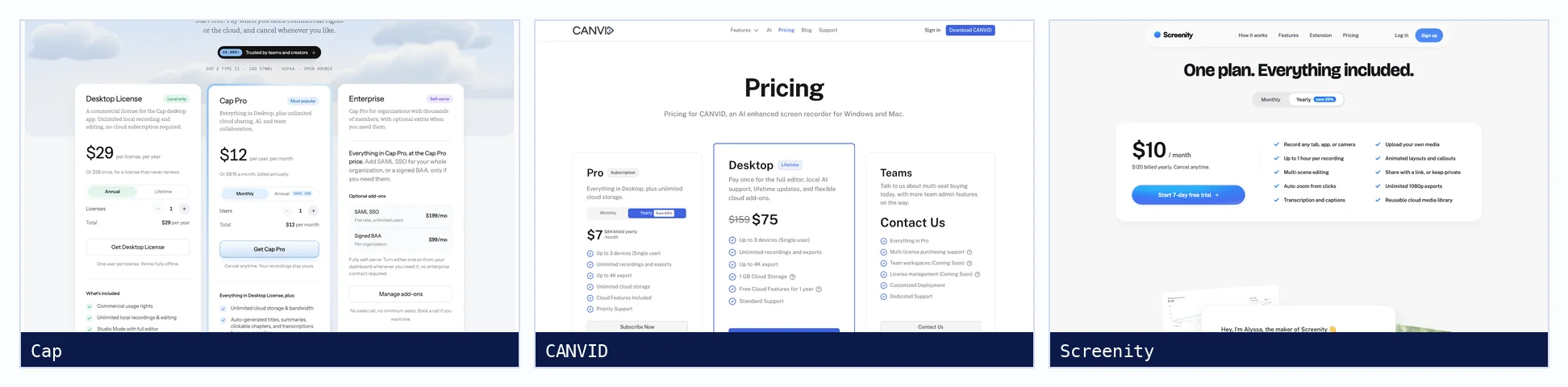
| Cap | macOS, Windows (beta), Linux | Free for personal use; open source | Desktop License: $29 a year | $58 one-time |
| FocuSee | Windows, Mac | Free download, watermark | Standard: $49.99 a year | Monthly plan offered |
| CANVID | Windows, Mac | None stated | Pro: $84 a year | $19 a month; Desktop lifetime $75 |
| Tella | Mac, Windows, Chrome | None listed | Pro: $13 per user | $26 per user |
| Screenity | Chrome, browser | Open-source extension | Pro: $120 a year | $14 a month |
| Camtasia | Windows, macOS | Watermarked exports | Essentials: €182.49 a year | Yearly only |
What is the best Screen Studio alternative for Windows?
For automatic zoom on Windows, FocuSee and CANVID both zoom on clicks and run on Windows and Mac; CANVID also sells a one-time desktop licence. Cap is open source with Windows in beta and generates zoom segments from clicks. Tella records on Windows with auto zoom and adds hosted share pages and analytics.
Is there a free Screen Studio alternative?
Cap is free for personal use and open source, with a paid licence for commercial use. Screenity's Chrome extension is free and open source; its editor and sharing need Pro. FocuSee has a free download with a watermark. OBS Studio is free on every platform but has no automatic zoom.
The alternatives, briefly
| Tool | Recording and editing | Also worth knowing |
|---|---|---|
| Cap | Open-source recorder with a Studio Mode editor and click-generated zoom | Cap Pro adds cloud sharing and AI titles |
| FocuSee | Auto zoom that follows clicks and typing; 4K 60 fps export | AI features on credits |
| CANVID | Automatic zoom on every click, captions and webcam background blur | Lifetime desktop licence available |
| Tella | Mac, Windows and browser recording with auto zoom and transcript editing | View analytics |
| Screenity | Browser-based recorder and editor with click zooms as editable keyframes | Hosting in Europe |
| Camtasia | A full timeline editor with cursor effects and captions | Sold yearly |
Where a walkthrough fits
Auto zoom makes a recording easy to watch; it does not make it current. A demo recorded on one version keeps showing that version after a release. Our screen recorder comparison covers Screen Studio in depth, and Loom alternatives covers sharing-first tools. A verified walkthrough, like the Proxmox VE 9.2 install, carries the version and is re-run on change.
Sources, all fetched 3 October 2026: Screen Studio, Cap, FocuSee, CANVID, Tella, Screenity and Camtasia.
Need the task shown finishing on the real product, with the version and the failed attempt kept in? Send it to us. The first sample is free.
$ get-sample →