
Short-Form vs Long-Form Video: The Difference, and Which Fits Product Content
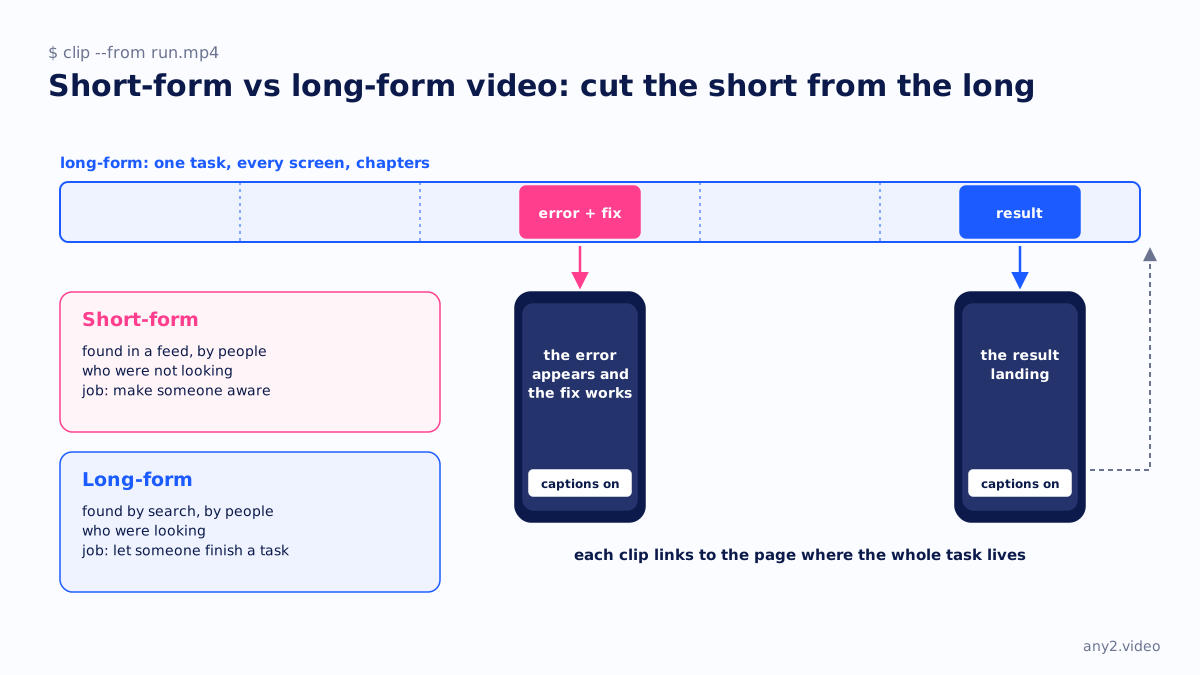
Short-form video is video made to be watched in a feed: brief, usually vertical, designed to hold attention from the first second and to be understood without sound. Long-form video is made to be chosen and followed: a tutorial, a walkthrough, a recorded talk, found by search and watched to the end by someone who needs it.
The difference is the viewer's intent
The length is a symptom. Short-form reaches people who were not looking for you, so it has to earn every second. Long-form serves people who were looking, so it has to be complete. A two-minute explainer and a nine-minute install walkthrough are not the same kind of video made at different lengths; they are answers to different questions.
What each one does for a software product
| Short-form | Long-form | |
|---|---|---|
| Found through | A feed, recommendations | Search, documentation, a link from support |
| Shape | Vertical, captions on, one idea | Landscape, chapters, written steps beside it |
| Job | Make someone aware a product or a fix exists | Let someone finish a task |
| Goes stale when | The hook stops working | The product changes |
| Measure | Views, follows | Completion, tickets avoided |
Cutting long into short
The most reliable short-form for a software company is a clip from a long-form run: the moment the error appears and the fix works, or the result landing. It is real, it is specific and it points at a page where the whole task lives. Clipping tools do this quickly; our comparison of screen recorders for software demos covers the ones that record in clips from the start, and social media video strategy for B2B software covers where to put the clips.
Where short-form misleads
A short clip cannot carry a version, prerequisites or a result, so it cannot be evidence of anything. Treat it as the headline, and make sure the headline links to a page that can be checked, such as a verified walkthrough. The Proxmox VE 9.2 install is the long-form end: one task, every screen, the failures kept.
Questions
What counts as short-form video?
Video made for a feed: brief, usually vertical, understood without sound, and designed to hold attention from the first second. The platforms set the exact length limits and change them.
Is long-form video still worth making?
For software, yes, because it is the kind people search for when they need to finish a task, and the kind documentation and support can link to.
Should a B2B company make short-form video?
Yes, as clips cut from real long-form runs, each pointing at the page where the full task lives. Short-form made from nothing tends to be claims without a product behind them.
What is the difference between a short and a clip?
A short is a vertical video published as its own item on a platform. A clip is a segment cut from a longer video; many shorts are clips, and the best ones link back to the source.
See one, with its run log and the attempts that failed.
$ cd /library →