
Turn Release Notes Into a Video: Which Changes Deserve One, a Script Structure and What Automation Can Show
To turn release notes into a video, pick the one change a user can act on, record it as a task on the new version, and keep the version on screen. Which notes deserve a video, a script structure, three formats, what automation from a GitHub release can and cannot show, launch day and languages.
To turn release notes into a video, pick the one change a user can act on, write it as a task with a finish line, and record that task on the new version from start to result, with the version number on screen. Most lines in release notes do not deserve a video. The ones that do change what a user clicks, types or sees. A release video that never shows the new version running is the changelog read aloud.
Our pages on release week video formats and the video campaign for a product release cover the week around a release. This page starts one step earlier, with the notes themselves.
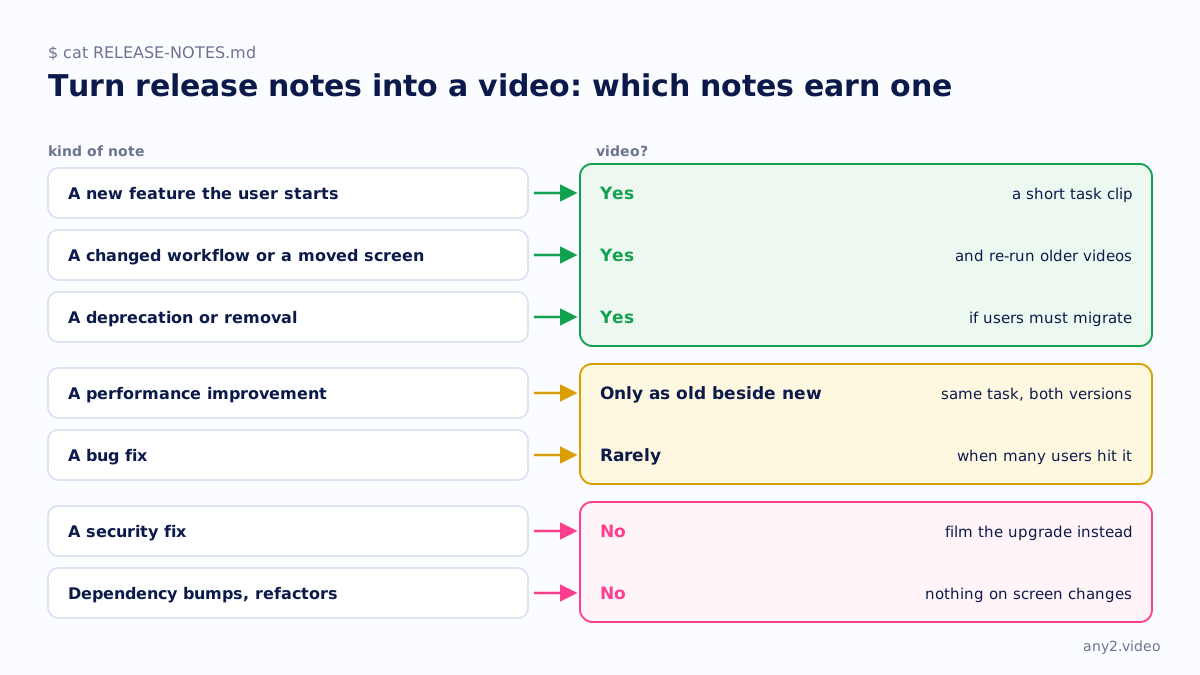
Which release notes deserve a video, and which do not
| Kind of note | Video? | Why |
|---|---|---|
| A new feature the user starts | Yes, a short task clip | There is a new thing to do, and a finish line the product can show |
| A changed workflow or a moved screen | Yes, and re-run older videos | Users look for the old button, and old videos point the wrong way |
| A performance improvement | Only as old beside new | Same task, same data, both versions; otherwise it is an adjective |
| A bug fix | Rarely | Only when many users hit it: show the failing steps now finishing |
| A deprecation or removal | Yes, if users must migrate | The video is the migration path, not the announcement |
| A security fix | No, film the upgrade instead | The advisory carries the detail; users need to see the upgrade |
| Dependency bumps, refactors, internal changes | No | Nothing on screen changes, so there is nothing to show |
How to pick the one change to show
A release with twelve notes still gets one headline video, and every team wants its own change first. Four questions settle it:
- Can a user do it without help from support?
- Does it end on something the product shows, such as a file, a status or a new screen?
- Which change will most users meet first after upgrading? That beats the one the team is proudest of.
- Did it move something existing users rely on? A moved screen breaks documentation and older videos.
Write the winner as one sentence with a finish line before anything is recorded. "Set a retention policy on one bucket and see it applied" can be filmed. "Improved retention handling" cannot. Our one-sentence brief is this step as a form.
A release video script structure
Write the script after a rehearsal run, from its log, so the words describe what the product actually did. The order that works:
- The version and the change in one line, on screen in the first seconds.
- The starting state: edition, role, and anything that must already exist.
- The task, start to result, with real clicks on the release build.
- The evidence, taken from the product's own output rather than a confirmation banner.
- Anything that went wrong on the way, and the fix, kept in the cut.
- Where the written steps and the upgrade notes live.
Leave out the roadmap tease and the list of every other change; the description links the notes. The software demo script template has a longer version for the feature deep-dive.
Three formats: a short per feature, a version walkthrough, a changelog roundup
A short per feature
One change, one task, finish line first, for the docs page, the in-app what's new panel and social accounts. The tradeoff is volume: twelve features make twelve clips, each needing its own version tag. Short-form vs long-form video covers where each length belongs.
A version walkthrough
One longer recording on the release build that runs every headline change once, with chapters matching the headings in the notes. On YouTube, chapters come from timestamps in the description; YouTube's help page says the first must start at 00:00, a video needs at least three, and each chapter must last at least 10 seconds (YouTube chapters, checked 15 October 2026). This is the video a customer deciding whether to upgrade watches, so the upgrade belongs in it.
A changelog roundup
A weekly or monthly cut of small changes, for teams that ship continuously. It works when every item cuts to its screen, and fails when it becomes bullet points over music.
Generating a video from a changelog or GitHub release automatically
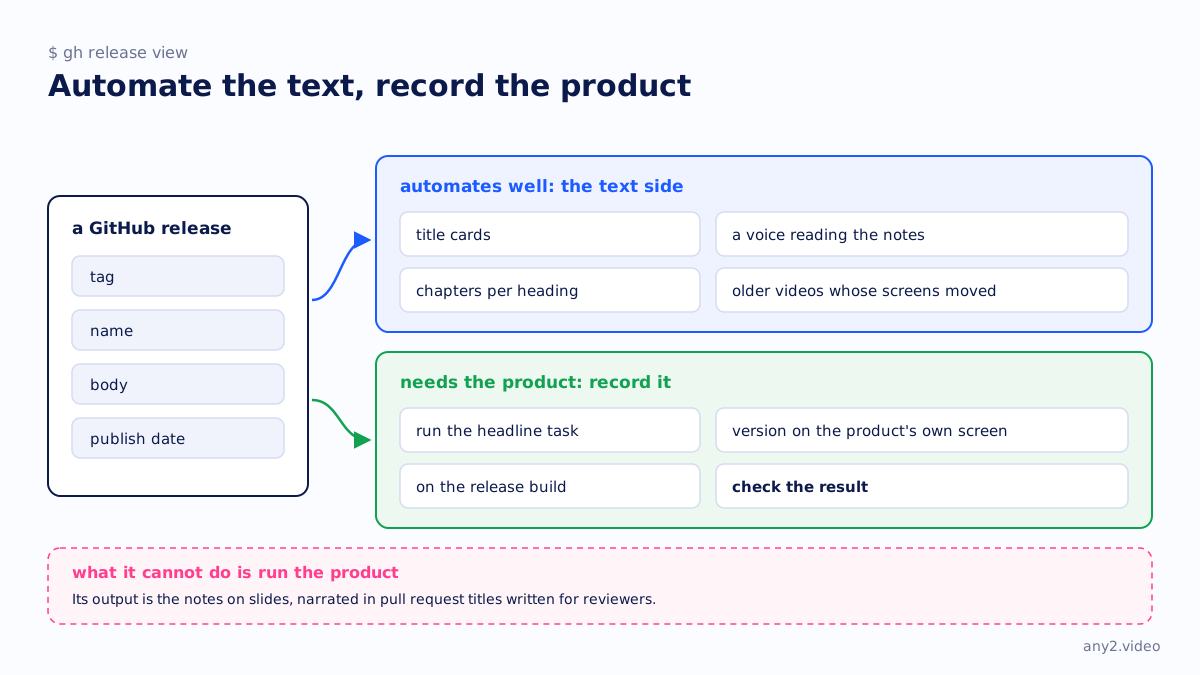
The text side automates well. GitHub's REST API returns each release with its tag, name, body and publish date, and a generate-notes endpoint drafts notes without saving them (GitHub releases API). GitHub's automatically generated release notes list the merged pull requests and the contributors, grouped into categories you define by label in a .github/release.yml file (generated release notes). Both checked 15 October 2026. A script that turns a new release into title cards with a synthetic voice reading the notes is not hard to build.
What it cannot do is run the product. Its output is the notes on slides, narrated in pull request titles written for reviewers. Worse, an AI video generator asked to illustrate a feature can draw an interface that does not exist. Our comparison of AI video generators sets out where they help and where they do not.
Automate the parts that are text and record the parts that are product. Let the release trigger the roundup's title cards and a list of older videos whose screens moved, then record the headline task on the build. Our own free AI video maker makes silent designed brand videos, and it says plainly that it does not show the product.
Show the new version running
Record on the release candidate or the tagged release, not on a nightly and not on a screenshot pasted into a slide. Put the version where the viewer can read it, on the About screen, the footer or the output of a version command, at the start and the end. A viewer who sees it on the product's own screen knows the footage is current. What a product video must show makes the full case, and the Proxmox VE 9.2 install is an example with the version on every screen.
A launch-day video, for example on Product Hunt
A launch video is for people who never read your notes, so it opens on the problem rather than the version number, and still shows the product doing the job. A motion-graphics promo video can sit beside it, not replace it.
On Product Hunt, read its own guidance first. Its help page on posting a product, checked 15 October 2026, says only YouTube links are supported for video, that they must be the full URL because shortened links will not load, and recommends uploading ahead of launch and confirming the video is not private. It also says the gallery needs two or more images before it is viewable, at a recommended 1270x760 (How to post a product). Its preparing for launch page marks video as optional. So publish it on YouTube, public or unlisted, the day before, and paste the full link.
Release videos in more than one language
One recording can serve every market. Translate the captions and, where it helps, the narration, with a glossary that keeps feature names, menu labels and commands exactly as they appear on screen. Re-record only for markets that use a localised interface. The details are on product demo video in multiple languages. Our walkthroughs are made in English and Chinese in house, with German, Japanese and Spanish on request, all from one run.
Can you turn release notes into a video automatically?
The text, yes: title cards, a voice reading the notes, chapters per heading. Showing the new version working needs someone, or an AI operator, to run the task on the release build and check the result.
How long should a release video be?
As long as the task takes, with the dead air cut. We have no data on an ideal length. A single-feature short is often under a minute; a version walkthrough runs longer because it covers the upgrade.
Does every release need a video?
No. A release of bug fixes and dependency updates has nothing new to show. Make one when a release adds something a user can do, moves a screen they rely on, or asks them to migrate. Re-run the older videos a release breaks either way.
Send the one change from your next release notes that users will meet first. We record it on the release build, version on screen, with the written steps. The first sample is free.
$ get-sample →