
The 12 Types of Marketing Videos Software Companies Actually Need, and the 4 That Waste the Budget
A working list for software and SaaS teams of what each video type is for, how long it should run, who owns it, what evidence it needs and when to re-record it, plus four types that look important and rarely pay for themselves.
Lists of video types are usually written for marketing in general, which is why testimonials, explainers and brand stories sit at the top and release notes never appear. A software company is better served by sorting videos by the job each does in the funnel and in the support queue than by production style.
Twelve types are worth making for a software product, and four usually are not.
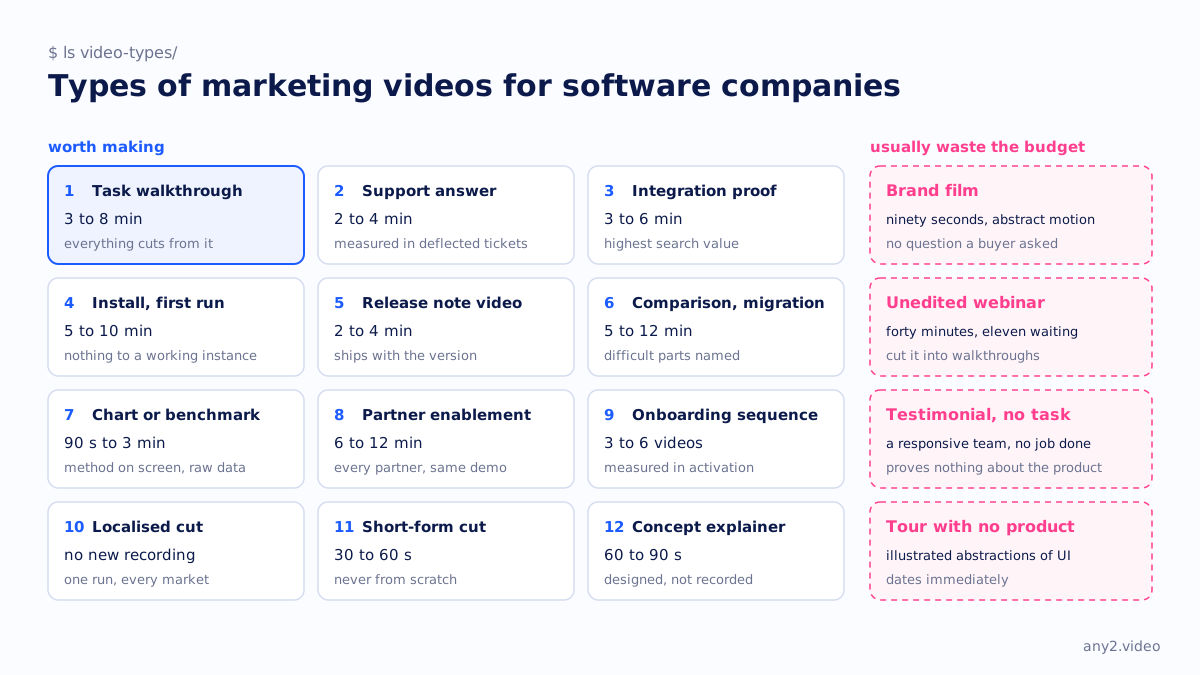
The twelve worth making
1. Task walkthrough
A task walkthrough shows one job done on the real product from start to finish, in three to eight minutes. Everything else depends on it, since every other type on this list can be cut from one. It needs a clean environment, prerequisites on screen and evidence at the end. Re-record it when a release changes the path.
2. Support answer
A support answer reproduces a common ticket and shows its cause and fix, in two to four minutes. Support owns it, and it is measured in deflected tickets rather than views. No other type returns as much per minute, because the demand is already sitting in your queue.
3. Integration proof
An integration proof shows your product doing something real with one named third-party platform, with the prerequisites stated, in three to six minutes. It has the highest search value on this list, because people searching "[your product] + [their product]" know what they want and rarely find a good answer. The other vendor is also more likely to cite it than any other type.
4. Install and first run
This goes from nothing to a working instance in five to ten minutes. It deflects the whole class of tickets that begin "I got stuck at the network screen", and someone who has not bought anything yet is more likely to find it than any other video you make.
5. Release note video
A release note video operates each headline change once on the release build. It runs two to four minutes and ships the day the version does. Put the old behaviour beside the new where it matters, so the improvement is shown on screen instead of asserted.
6. Comparison and migration
This covers moving from a competitor or an older major version, with the difficult parts named, in five to twelve minutes. Making it honestly is uncomfortable, and an honest version persuades far more people than you would expect, because everyone else in the category has published the flattering one.
7. Chart or benchmark video
Measured numbers, animated, with the method on screen: the dataset, the environment, the number of runs and what is plotted. It runs ninety seconds to three minutes. Publish the raw data alongside it, or leave the video unpublished.
8. Partner and reseller enablement
This records the exact click path a sales engineer uses, so every partner gives the same demo. It runs six to twelve minutes, usually with a one-page click path beside it, and it replaces the two-hour recorded training call that nobody watches to the end.
9. Onboarding sequence
An onboarding sequence is three to six short videos covering the first week, sent on a schedule instead of being left in a help centre. Each runs two to three minutes. It is measured in activation, and it is the one type where a series really does work better than a single longer video.
10. Localised cut
A localised cut is the same verified run with narration and captions in another language, so it needs no new recording. Decide the languages before you record and produce them together, and one run serves every market you sell into.
11. Short-form cut
A short-form cut runs thirty to sixty seconds and comes from a walkthrough you already made. The moment where something fails and then gets fixed is the best material on this list for social, because it has a beginning and a turn. Never produce a short from scratch.
12. Concept explainer
A concept explainer uses motion graphics to explain something true that has no screen, such as an architecture, a licensing model or the difference between two things that sound alike. It runs sixty to ninety seconds. It is the only type here that is designed instead of recorded, and although nothing is filmed, it still has to rest on verified facts.
Four that usually waste the budget
None of these is always wrong. All four regularly get commissioned for the wrong reasons and at the wrong cost, by teams who needed one of the twelve above.
- The brand film is ninety seconds of abstract motion with a voice describing a category. It is expensive, supposedly evergreen, and answers no question a buyer asked. A funding announcement or a rebrand can occasionally justify one, but rarely a second.
- The recorded webinar published unedited runs forty minutes, the first eleven of them waiting room. The content inside is often excellent, which makes it a shame. Cut into task walkthroughs, it becomes six useful videos.
- A customer testimonial that names no task has a satisfied executive saying the team is responsive, which proves nothing about whether the product does the job. A testimonial that walks through the specific problem the customer solved is a case study video, and it belongs on the first list.
- An animated product tour with no product in it shows illustrated abstractions of your UI, usually commissioned because the real UI was being redesigned. It dates immediately, and viewers notice they never saw the actual software.
How to choose
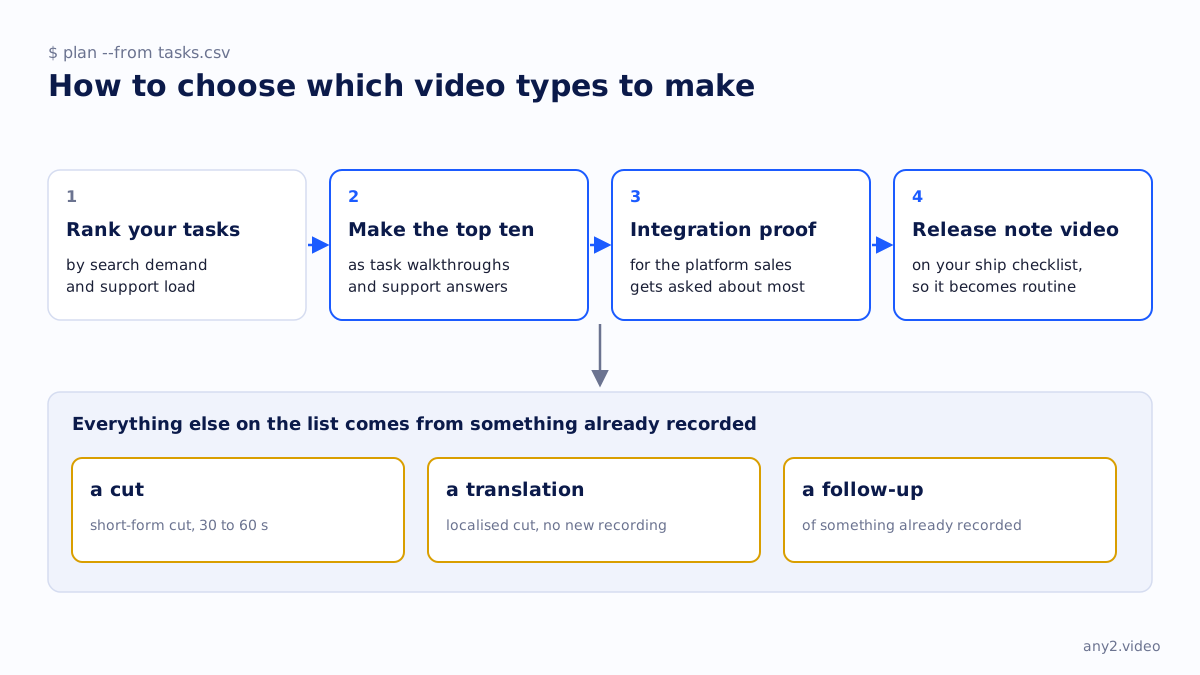
Rank your tasks by search demand and support load, take the top ten, and make them as task walkthroughs and support answers. Add an integration proof for the platform your sales team gets asked about most, and put a release note video on your ship checklist so it becomes routine. Everything else on the list is a cut, a translation or a follow-up of something already recorded. That is the whole plan, and video content strategy for software companies covers it in more depth.
A one-page version of this list, for printing or sending to a stakeholder, is the types of product videos cheat sheet.
More in this guide
Pick a type, send one task, and see the finished thing. First sample is free.
$ get-sample →