
SaaS Explainer Videos: What to Show, How Long to Make Them, and When a Walkthrough Works Better
A SaaS explainer video says what a software product is, who it is for and why it matters, in about two minutes. The good ones show the real interface doing one task. This page covers the five beats, length, animation versus screen recording, how SaaS video production is usually done, and where an explainer stops.
Part of our guide to The 12 Types of Marketing Videos Software Companies Actually Need, and the 4 That Waste the Budget.
A SaaS explainer video is a short video, usually around two minutes, that tells a prospective customer what a software product is, the problem it solves, who it is for and what to do next. It sits at the top of the funnel: on the homepage, at the top of a landing page, or in the first email after a sign-up. It introduces the product. It does not teach it, and it cannot prove it.
The difference between a SaaS explainer that works and one that does not is usually one beat in the middle: whether the viewer sees the real interface doing something. This page covers that beat and the four around it, and when a different video does the job better.
 1:53
1:53
What is a SaaS explainer video?
A SaaS explainer video is an explainer video for a software-as-a-service product: a short piece that makes the product understandable to someone who has never used it. It answers "what is this and why should I care" for a buyer, and hands them to a trial, a demo or a walkthrough for "how does it work on my problem".
What should a SaaS explainer video show?
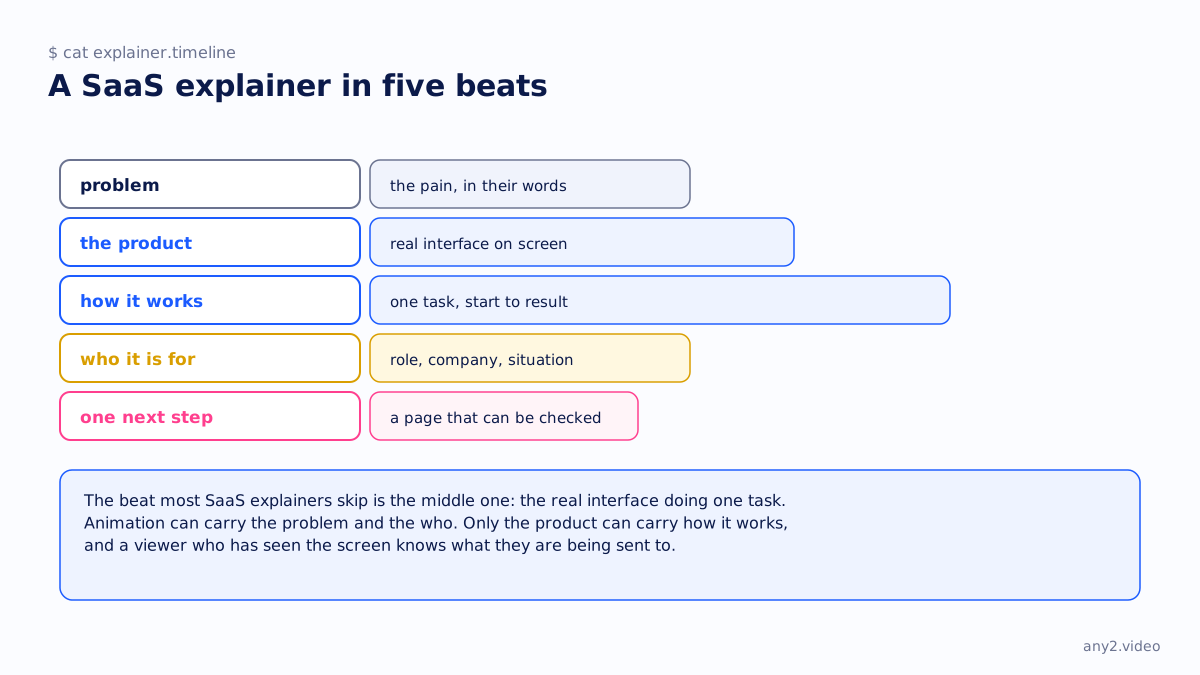
Five beats, in order: the problem in the viewer's words, the product with its real interface on screen, how it works shown as one task from start to result, who it is for, and one next step. Animation can carry the problem and the audience. Only the real product can carry how it works, and a viewer who has seen the screen knows what they are being sent to.
How long should a SaaS explainer video be?
Short enough to finish before the viewer decides to leave: about two minutes is common, and the four explainers on our own channel run between 1:53 and 2:01. Length follows the five beats rather than a target. If the how-it-works beat needs more than a minute, the video is turning into a demo, and it is worth making that demo separately.
Animated or screen-based?
For SaaS, show the real interface, even if the rest is animated. Fully animated explainers exist because the product was not ready to show or the team did not want to re-record after each release, and viewers can tell that the screen they are looking at is a drawing. A mix works well: an animated or presenter-led opening for the problem, then the real product. Live action versus animation sets out the trade-off in more detail.
| Animated | Screen-based | Mixed | |
|---|---|---|---|
| Shows the real product | No | Yes | Yes, for the middle beat |
| Cost to change after a release | Edit the scene | Re-record the task | Re-record one beat |
| Goes stale when | The concept changes | The interface changes | The interface changes |
| Best for | Abstract products, no UI yet | Products with a clear first task | Most SaaS |
How is SaaS video production usually done?
Three ways. An agency writes, designs and animates the explainer, which gives polish and takes weeks. An in-house team records the product and edits it, which is cheap until the product changes. Or a service records the real task and keeps it current, which is what we do. Our comparison with a video agency and our note on recording it in house say where each route genuinely wins.
Where a SaaS explainer stops
An explainer makes a claim; it cannot check one. A viewer who finishes it knows what the product says about itself, and nothing about whether their task works on the current version. That is the job of a product demo video or, for evaluators, a verified walkthrough. The Proxmox VE 9.2 install in our library is the recorded kind, with both of its failures kept in. A SaaS site with only an explainer has the first page of the conversation and none of the rest; interactive demo software is one way teams fill the middle.
Have an explainer and nothing behind it? Send us one task and we will record it on the real product. The first sample is free.
$ get-sample →