
How-To Videos for Software Documentation: What to Film, What Stays as Text, and How to Embed It
How-to videos for software documentation belong beside the written steps, for tasks where readers need to see the path and the result. What to film, docs-as-code habits, embedding in Docusaurus, Sphinx, MkDocs and Zendesk Guide, and captions.
How-to videos for software documentation work best beside the written steps they show. Film tasks where the reader needs to see where things are and what success looks like; keep reference material and anything people copy as text. Record by following your own published steps on a clean environment, then embed the video next to them with captions and a version.
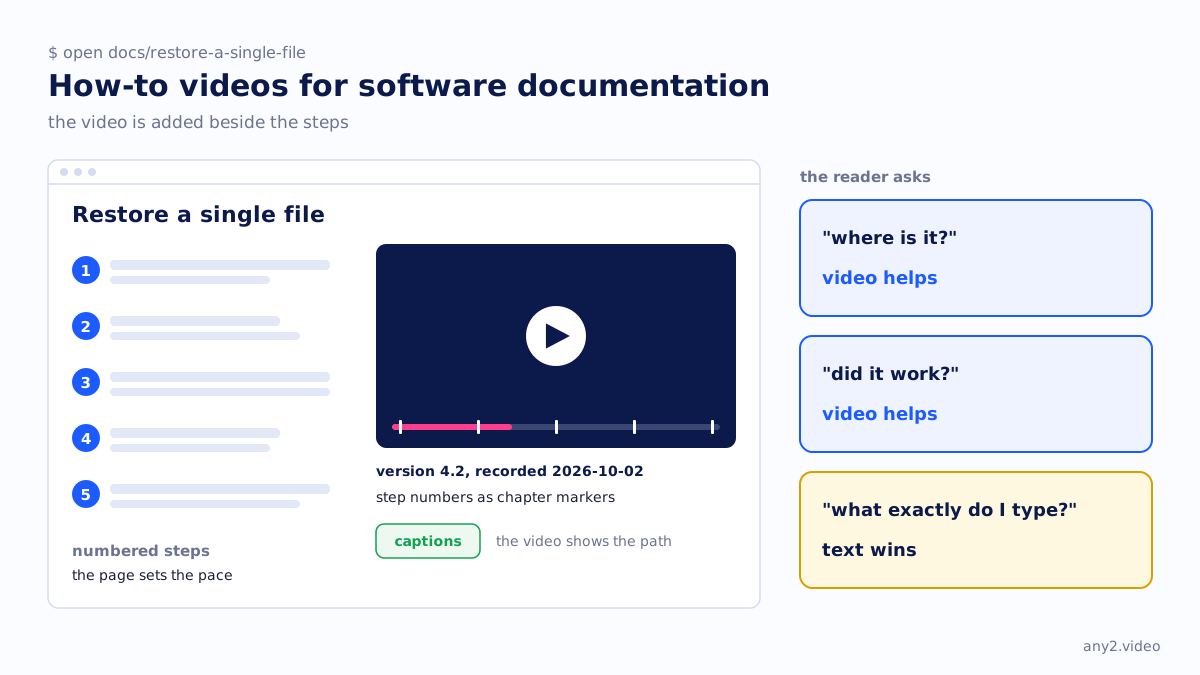
What belongs in a video and what stays in text
Video shows where something is on screen and what success looks like. It is poor at anything a reader scans, searches or copies. If the reader asks "where is it" or "did it work", video helps. If they ask "what exactly do I type", text wins.
| Content | In the video | In the text | Why |
|---|---|---|---|
| A task across several screens with a visible result | Yes | Yes, as numbered steps | The video shows the path; the page sets the pace |
| Installation and first-run setup | Yes | Yes | A failing step is easier to spot once seen |
| Commands, config files, API calls | Show them running | The exact text | Nobody should retype a command from a frame |
| Option and parameter reference | No | Yes | Reference is searched, not watched |
| Concepts and architecture | Only a short diagram for a flow | Yes | Explanation belongs in prose |
| Errors and troubleshooting | The failure and the fix | Yes, with the exact message | Readers search for the error string |
| Release notes | Rarely | Yes | They change too often |
API documentation is mostly reference and stays text. The exception is the getting-started path: create a key, make the first call, see a real response. A short recording of that, with the request and response printed below it as text, answers a developer's first question: does it work?
How to turn a docs page into a how-to video
Technical writers without video experience have one advantage: the page is already the script. Every step now has to be performed for real, on camera, in the order written.
- Pick a page whose task ends in something visible, such as a restored file or a job marked Succeeded. If you cannot name the finish line, fix the page first.
- Use a clean trial environment with realistic fake data. Never production.
- Start recording before the first click and follow the published steps exactly. Where the page is wrong, note the time and keep going.
- Log time, step number and what happened. The log becomes the captions, the chapters and the page corrections.
- Say what you click and where it sits: "Settings, top right", not "here".
- End on evidence from the product, not on your narration saying it worked.
- Cut dead air, not failures; a failed step and its fix go in the troubleshooting section.
The first run often finds a missing prerequisite or a moved button. That finding is worth more than the footage, so fix the page before publishing either. How to write step-by-step instructions covers the page, and how to make a how-to video covers recording and editing.
How-to videos in a docs-as-code workflow
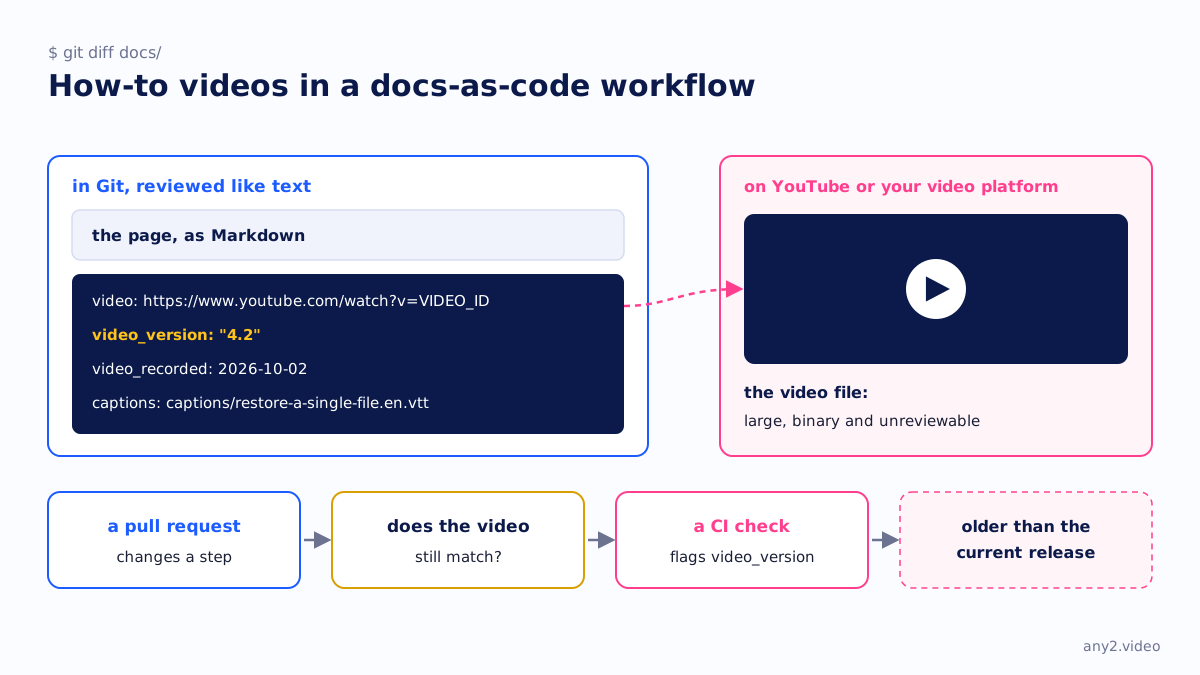
In docs-as-code, the page lives in Git as Markdown and goes through review. The video file does not belong there: it is large, binary and unreviewable. Host it on YouTube or your video platform and keep the small parts next to the page: its URL, the version shown, the recording date and the caption file, which is text and gets reviewed like text.
---
title: Restore a single file
video: https://www.youtube.com/watch?v=VIDEO_ID
video_version: "4.2"
video_recorded: 2026-10-02
captions: captions/restore-a-single-file.en.vtt
---
Use front matter if your generator accepts custom keys, or a sidecar file if not. A pull request that changes a step should say whether the video still matches, and a CI check can flag pages whose video version is older than the current release.
Embedding video in Docusaurus, Sphinx, MkDocs and Zendesk Guide
All four can show a YouTube or Vimeo player, each differently. We checked each vendor's own documentation on 15 October 2026.
| Platform | How to embed | Watch out for |
|---|---|---|
| Docusaurus | Paste the iframe into an .mdx page; Docusaurus treats HTML in MDX as JSX | Inline styles must be JSX objects; the CommonMark format allows no JSX |
| Sphinx (hosted on Read the Docs, among others) | Put the iframe inside a raw directive for html | Docutils calls raw a potential security hole (raw_enabled turns it off); non-HTML outputs such as PDF can ignore it |
| MkDocs | Paste the iframe as raw HTML in the Markdown file | MkDocs cannot validate or convert links inside raw HTML |
| Zendesk Guide | Article components button, then Embed, then paste the video URL | The toolbar takes listed hosts (YouTube, Vimeo, Wistia, Loom, Vidyard and others); other hosts need embed code with unsafe HTML allowed; no YouTube Shorts |
.. raw:: html

   <iframe src="https://www.youtube.com/embed/VIDEO_ID"
           title="Restore a single file, version 4.2"
           allowfullscreen></iframe>
Read the Docs hosts any tool that outputs HTML, including Sphinx, MkDocs and Docusaurus, so the method follows the generator, not the host. On every platform, put a plain link to the video and its recording date under the player, so a PDF build or a blocked iframe still leaves a way to it.
Sources, checked 15 October 2026: Docusaurus MDX and React, Docutils directives, MkDocs writing your docs, Zendesk inserting videos and Read the Docs documentation tools.
Keeping the written steps and the video in step
A video and a page that disagree are worse than either alone. Tie them together:
- Use the page's step numbers as chapter markers in the video.
- Show the version under the player and in the video itself.
- Treat a release that moves a button as a bug in every video that shows it.
- When only a label changes, fix the captions and the page. When the path changes, re-record.
Scribe, Tango and Guidde compares tools that build step guides from a capture, and AI SOP generators covers the wider category. Both speed up the page; keeping it true after a release is a separate job.
Captions, transcripts and accessibility
For prerecorded video with audio, captions are required at WCAG Level A. Level A also asks for either audio description or a transcript covering the visual content, Level AA asks for audio description, and a full transcript is a Level AAA item, per W3C's media planning page, checked 15 October 2026.
The simple way to cover description is to narrate visual detail as you go, which W3C calls integrated description: "click Save, bottom right", not "click here". W3C's transcripts page recommends putting the transcript or a link to it right under the video. On a docs page, the written steps already carry most of it.
Write captions from your log or correct generated ones against it, because automatic captions get product names and file paths wrong. Closed captions vs subtitles explains which file you need once the docs are translated.
When to hand the recording to someone else
Recording is the small part. The environment, re-runs after each release and extra languages take the time. Our verified walkthroughs take that on: an AI operator performs the task from your docs page on a trial environment, a person checks the result against the product's own evidence, and you get the video, the steps that worked, troubleshooting notes, captions, a version tag and a re-run on the next release. Install Proxmox VE 9.2, every screen shows one. any2.video vs a technical writer is plain about where prose wins.
Should software documentation include videos?
Yes, for tasks that cross several screens and end in a result the reader must recognise, placed next to the written steps. Not for reference, commands or concepts, which are cheaper to search and correct as text. Start with installation.
How do I embed a YouTube video in Docusaurus or Read the Docs?
In Docusaurus, paste the iframe into an .mdx page and write any inline style as a JSX object. For Sphinx on Read the Docs, wrap it in a raw html directive. For MkDocs, paste it as raw HTML.
Do documentation videos need captions?
Yes, if they have speech: WCAG Level A requires captions for prerecorded video with audio. Correct automatic captions before publishing.
Can I generate a how-to video from a documentation page automatically?
You can generate a narrated video from the text with slides or stock visuals; AI video generators for product marketing covers that category. It cannot show the product doing the task, so it does not test the page. For a how-to, record the steps being followed.
Send one docs page and access to a trial environment. We run the task exactly as written, record it, check the result and send back the video, the steps that worked and captions. The first sample is free.
$ get-sample →