
15 Free Video Templates and Checklists for Software Teams: Scripts, Briefs, Guides and Pre-flight Checks, Each One Opened and Described
Fifteen free video templates and checklists for software teams: eight of ours (demo script, brief, how-to guide, cheat sheet, content plan, and three new one-page checklists), all direct downloads, plus seven from other vendors that we opened on 7 October 2026, with what each contains and whether it needs an email or an account. And a table of the ones we checked and left out.
Part of our guide to How to Make a Marketing Video for a Software Product, Step by Step, Recorded From a Real Run.
Free video templates and checklists for software teams are easy to find and hard to trust: most of the ones that come up in a search are either a form that wants your email, a board that wants an account, or a script outline written for a brand film rather than a product. This page lists fifteen that we either made or opened ourselves, with what each one contains, what format it is in, and whether you can download it without signing up for anything. Eight are ours, free and direct. Seven are from other vendors, checked on 7 October 2026.
Ours are built around one real run, the Proxmox VE 9.2 install, so every filled-in example is something that happened. The third-party ones are listed as we found them; we have not used them on a production, and the descriptions are what the page or file itself showed.
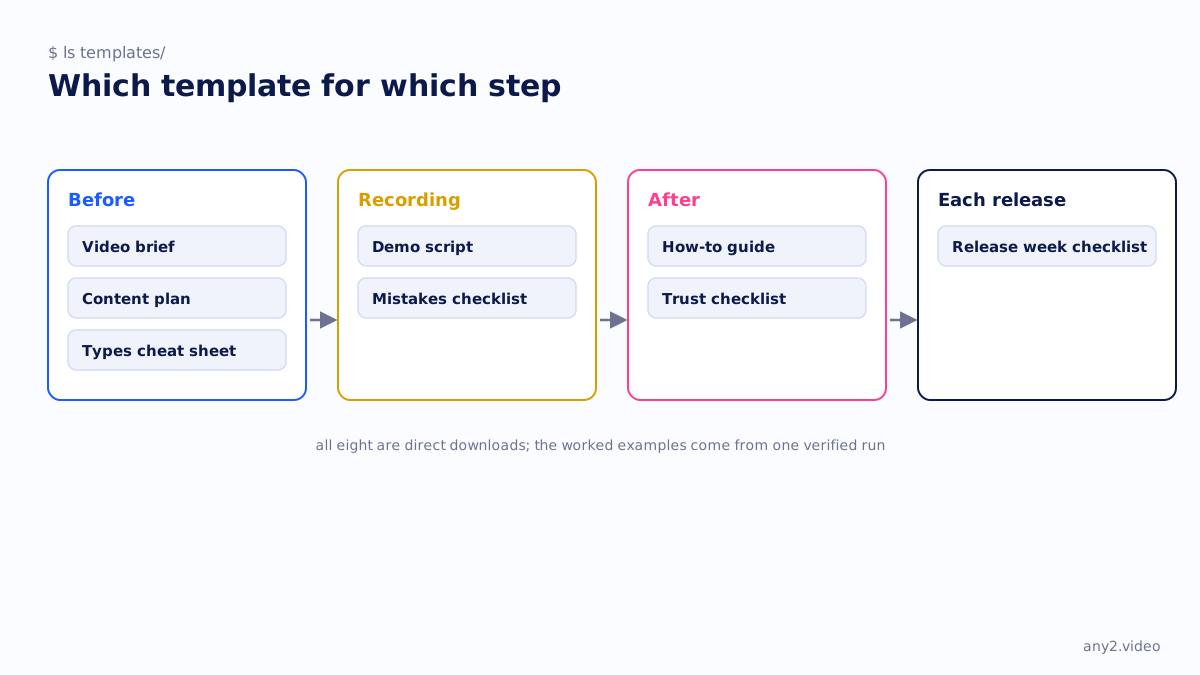
The fifteen at a glance
| Template | From | Format | Download without an email? | What it is for |
|---|---|---|---|---|
| 1. Software demo script template | any2.video | PDF, Docx | Yes | A scene-by-scene script with a finish line and a kept failure |
| 2. Video brief template | any2.video | PDF, Docx | Yes | One page: six decisions before anyone records |
| 3. How-to guide template | any2.video | PDF, Docx | Yes | Written steps beside the video, with prerequisites and a check |
| 4. Types of product videos cheat sheet | any2.video | Yes | Which type of video answers which question | |
| 5. Video content plan template | any2.video | CSV, PDF guide | Yes | A spreadsheet of tasks, versions and re-run dates |
| 6. Demo video mistakes checklist | any2.video | Yes | Twelve lines to tick before a demo goes out | |
| 7. Product video trust checklist | any2.video | Yes | Score any product video out of ten | |
| 8. Release week video checklist | any2.video | Yes | Nine formats on the T-5 to launch timeline | |
| 9. Video scripting questionnaire | Wistia | PDF, 4 pages | Yes, direct file | Pre-scripting questions: audience, takeaways, feel, call to action, where it will live |
| 10. Video production creative brief | Smartsheet | Word template | Yes, direct file | A question-based brief: goals, resources, budget, equipment, schedule |
| 11. Video production brief | Product Marketing Alliance | PDF, 3 pages | Yes, direct file | Project details, collaborators, objectives and metrics, audience, core message |
| 12. Video brief template | Storyblocks | Google Doc | No email, but a Google account to copy it | Overview, objectives, audience, core message, tone, talking points, specs, budget |
| 13. Video pre-production checklist | Vidyard | Web page | Yes, plain page | Timeline, brief, budget, script, storyboard, talent |
| 14. Video production SOP | ClickUp | ClickUp Doc | No email, but a ClickUp account | Pre-production, production and post-production checklists with roles |
| 15. Shooting schedule | Asana | Asana project | No email, but an Asana account | Daily timeline, scene breakdown, cast and crew, locations |
Ours: eight free downloads
All eight are direct links, no form, and the worked examples in them are from a run that was recorded, logged and verified. They are generated from committed scripts, so the templates cannot drift from the pages that describe them.
1. Software demo script template
A scene-by-scene script: the brief, the scenes with what is on screen and what is said, the expected result per scene, and the finish line. The filled-in example is the Proxmox install, with the failed attempt scripted in rather than cut. On the template page, as PDF and editable Docx.
2. Video brief template
One page, six decisions: one task or message, who watches, where it runs, the product and version, the finish line and its evidence, and the languages. Each decision names what it prevents. On the creative brief page, PDF and Docx.
3. How-to guide template
The written steps that go beside a video: the task as a verb phrase, what it applies to and when it was last checked, prerequisites before step one, one action per step with what the reader should see, and a check at the end. On how to write step-by-step instructions.
4. Types of product videos cheat sheet
One page mapping the types of product video to the question each one answers and the evidence each one carries. From the cheat sheet page.
5. Video content plan template
A spreadsheet rather than a document: one row per task, with the product, the version it was recorded on, the owner, the publish date and the re-run date. The guide beside it explains the columns. From the plan template page.
6. Demo video mistakes checklist
The twelve demo video mistakes as a pre-flight sheet, grouped by before, during and after recording. Tick all twelve before the video goes out.
7. Product video trust checklist
The ten things a product video must show as a score sheet. It works on your own videos and on a competitor's: count the ticks, and notice which group is empty.
8. Release week video checklist
The nine release week formats as one page, grouped by T-5 to T-3, T-2 to T-1 and release day. The line most teams miss is the re-run of invalidated videos at T-1.
Theirs: seven we opened, with what we found
These are the ones that could be opened and read without paying. Three are direct files; four need a free account on the vendor's own platform but not an email capture. The descriptions are what the page or file showed on the day, not our opinion of how well they work.
9. Wistia: Video Scripting Questionnaire
A four-page PDF of fill-in questions to answer before writing a script: what the project is and why, the audience and how familiar they are with the product, two to four takeaways, a comparable video for style, how the viewer should feel afterwards, the call to action, where the video will live, and whether screencasts or live action are needed. Linked from Wistia's scripting tips; the PDF itself opens directly. The closest of the seven to our brief, and a good first page for a team that has never written one.
10. Smartsheet: Video Production Creative Brief
A Word template on Smartsheet's free creative brief templates page, described there as a question-based brief covering goals, resources, budget, equipment and scheduling. The Word file downloads without a form; the Smartsheet-format versions on the same page need a Smartsheet sign-up. The same page carries general creative briefs for clients, advertising and design.
11. Product Marketing Alliance: Video production brief
A three-page PDF exported from a Google Doc: project details with distribution, budget and deadline; collaborator roles; objectives with metrics for success; audience and what the viewer wants; a core message written as think, feel, do; and links to the script and designs. Direct file. Written for product marketers, which shows in the metrics line.
12. Storyblocks: Video brief template
A Google Doc behind how to write a video brief, with sections for overview, objectives, audience, core message and takeaways, tone and brand guidelines, talking points and call to action, technical specs and deliverables, budget and timeline. There is no email form, but the copy link goes to a Google sign-in, so you need a Google account.
13. Vidyard: Video pre-production checklist
Not a file but a web page that walks the pre-production stages in order: timeline, creative brief, budget, script, storyboard and talent, with tips under each. It mentions a downloadable creative brief, but no link was present on the page when we read it. Useful as a sequence; bring your own documents.
14. ClickUp: Video production SOP
A ClickUp Doc template with a standard operating procedure across pre-production, production and post-production, task checklists per stage, role assignments, equipment tracking and quality-control notes. No email capture, but adding it signs you up for ClickUp. ClickUp also has a video production list template with statuses from concept to live, for teams that run production as tasks.
15. Asana: Shooting schedule
An Asana project template for the production day itself: project overview, daily timeline, scene breakdown, cast and crew schedule, location details and departmental notes, with a timeline view. It is built for film shoots, which makes it the right one on this list for live action and the wrong one for a screen recording. Needs an Asana account.
Checked and left out
So that you do not spend the afternoon we spent: these were opened on the same day and are not on the list, with the reason.
| Template | Why it is not listed |
|---|---|
| HubSpot Video Marketing Starter Pack, with script templates | Behind an email form with every field required. The blog post it hangs off does show free script outlines for how-to, product demo and onboarding videos inline |
| Demand Metric Video Script Template | The Word file redirects to a membership login |
| Later shot list spreadsheet | Form required |
| TechSmith sample script for Camtasia | The file sits behind a Microsoft login |
| Trello YouTube editorial calendar board | Sign-up required to see the board |
| Miro, FigJam and Canva storyboard templates | Open to browse, but each needs an account on that platform to use; they are drawing boards, not planning documents |
| Notion video production templates | Listed as free, but the gallery pages do not itemise what is inside, so there was nothing to describe |
| Biteable, Descript, Synthesia, Vyond, Animoto | Guides or in-product templates, no planning document to download |
Which video template should you start with?
The brief. Every other document on this list is downstream of six decisions: one task, who watches, where it runs, product and version, the finish line with its evidence, and languages. Write that page first and the script, the guide and the plan fill themselves in. If you only ever use one third-party template, the Wistia questionnaire covers the same ground as questions.
Is a storyboard template useful for a software demo?
Rarely. A storyboard is for deciding what the camera sees in each shot, which matters for live action and animation. A screen recording's shots are decided by the product; what you need instead is a script with the expected result per scene and a checklist for what must be on screen. Use a storyboard for a brand film, and a script plus the trust checklist for a demo.
Are free video templates any good?
The ones above do what they say, within the limits we listed: three download directly, four need a platform account, and all seven are written for a general marketing video rather than a product walkthrough. None of them has a line for the version, the prerequisites, the kept failure or the re-run date, which is why ours do. Start with whichever matches your team's tools, and add those four lines.
Templates get you to a plan. Send us one task and we will record it on the real product, with the log and the failures, and the first sample is free.
$ get-sample →