Synthesia Alternatives for Software Demo Videos: Avatar Tools, Screen Recorders, Step Guides and Verified Runs
Synthesia is strong at presenter-led video in many languages, but a software demo has to show the product doing the task. Seven alternatives compared by approach, from other avatar tools to recorders, step-guide tools and a verified walkthrough service.
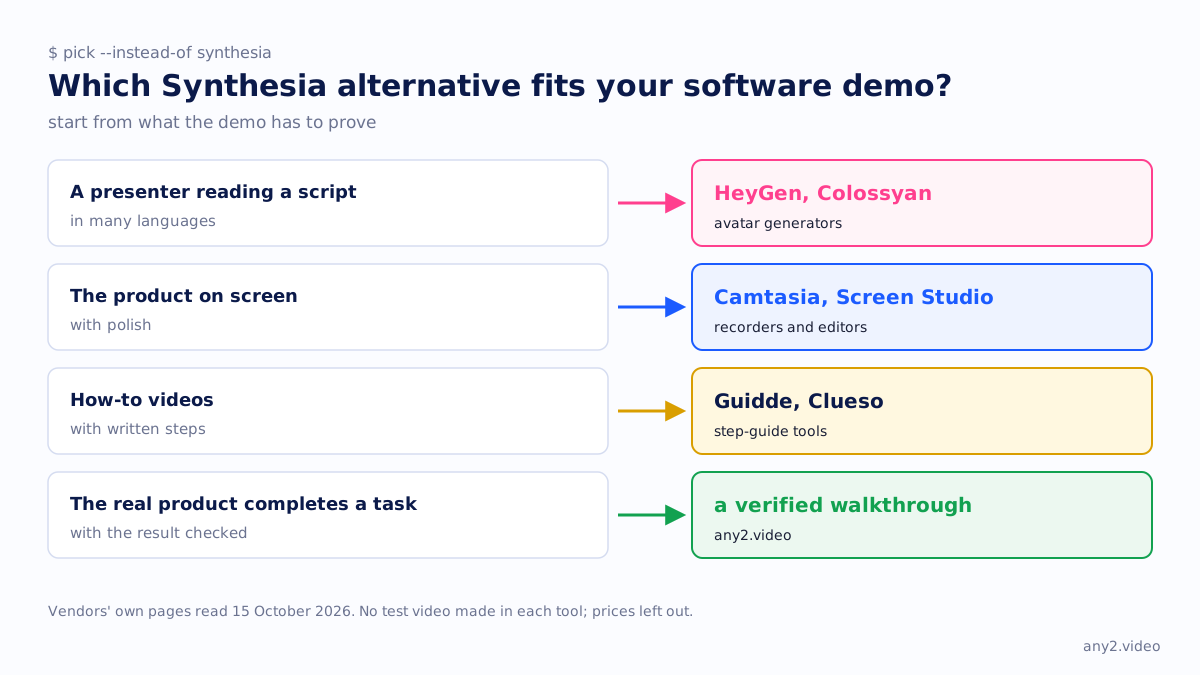
The right Synthesia alternative for a software demo video depends on what the demo has to prove. If you want a presenter reading a script in many languages, HeyGen and Colossyan do the same job as Synthesia. If you want the product on screen with polish, a recorder such as Camtasia or Screen Studio fits better. If you want how-to videos with written steps, Guidde or Clueso. If the buyer needs to see the real product complete a task, with the result checked, that is a verified walkthrough.
We read each vendor's own pages on 15 October 2026. We did not make a test video in each tool, and we left prices out. any2.video is our own service, included as one row with its limits stated.
What Synthesia is good at
Synthesia turns a script into a video with a generated presenter. Its features page lists voiceovers and one-click translation in 140+ languages, a brand kit that applies your colours, fonts and logo, real-time commenting and review, and SCORM export so a video can sit in a learning system. Its avatars page lists 240+ ready-made avatars. For training that must go out in many languages and be updated without a filming day, that is a strong set.
It also records screens. The AI Screen Recorder help article describes a Chrome and Edge extension that captures a tab, window or full screen, transcribes your voiceover into an editable script, removes filler words and splits the recording into scenes. The product demo page sets out the workflow: write a script, record your screen, then choose an avatar to present beside the recording.
Where an avatar-led video stops for a software demo
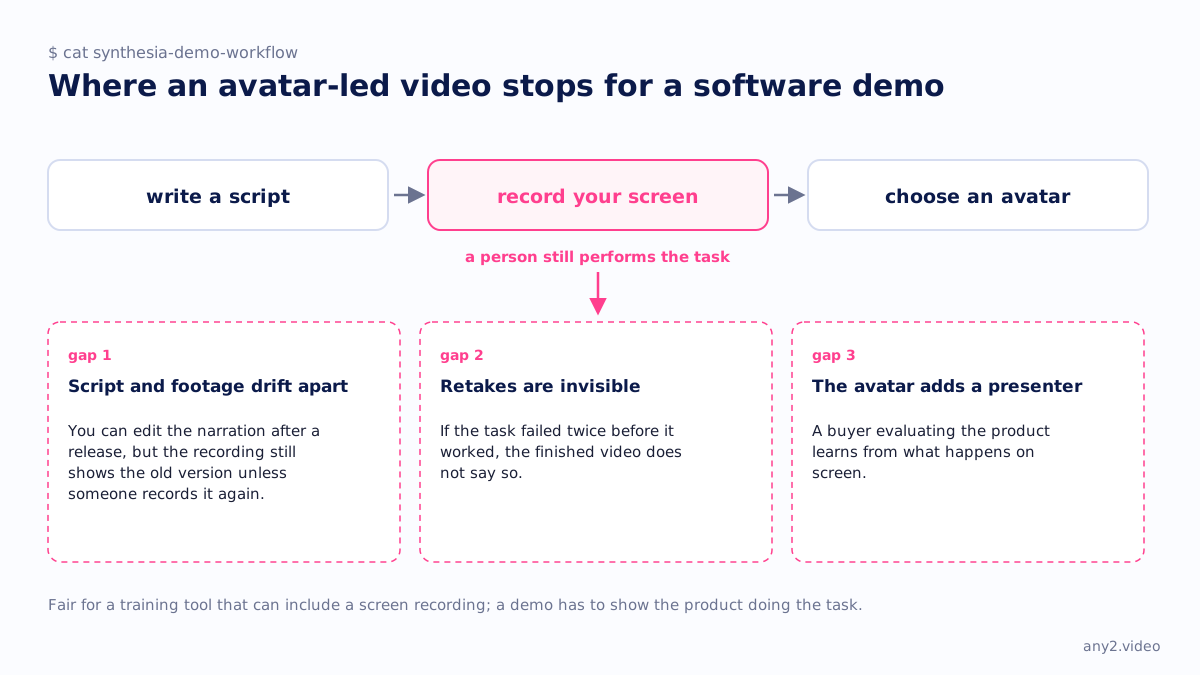
In that workflow, a person still performs the task. Synthesia's pages do not describe it operating your product or checking what the product returned. That leaves three gaps.
- The script and the footage can drift apart. You can edit the narration after a release, but the screen recording still shows the old version unless someone records it again.
- Retakes are invisible. If the task failed twice before it worked, the finished video does not say so, and the viewer meets those failures on their own.
- The avatar adds a presenter. A buyer evaluating the product learns from what happens on screen, and a generated face adds nothing to that.
That is a fair limit for a training tool that can include a screen recording. AI video generators for product marketing covers the same split, and the licence limits on stock avatars in paid ads.
Synthesia alternatives at a glance
| Tool | Approach | How the product gets on screen | Presenter and voice | Suits |
|---|---|---|---|---|
| HeyGen | Avatar generator | Browser recorder for screen, webcam and microphone | Custom avatars; translation into 175+ languages and dialects | Presenter videos, translated versions |
| Colossyan | Avatar generator for training | Browser recorder inside the editor, with zoom | 300+ stock avatars, 100+ languages | Training courses with quizzes and SCORM |
| Camtasia | Recorder and editor | Screen, camera and audio on separate layers, up to 4K at 60 fps | Your voice, AI voices or AI avatars | Tutorials edited in detail, Windows and Mac |
| Screen Studio | Recorder | Mac recording with automatic zoom on clicks | Your voice and webcam | Short polished demos on a Mac |
| Guidde | AI step-guide | Captures a workflow by extension, desktop app or mobile | 200+ voices and languages; translation into 50+ languages | How-to videos with a written guide |
| Clueso | Screen-to-video | Turns a rough recording, slides or a document into a video | AI voiceover and AI presenters | Help-centre videos and articles from one recording |
| any2.video | Verified walkthrough service | An AI operator runs the task; a person checks the result | Narration and captions in the languages asked for | Demos a buyer judges you by, re-run each release |
Other avatar generators: HeyGen and Colossyan
HeyGen offers digital-twin avatars, a Video Agent that turns a prompt into a finished video, translation into 175+ languages and dialects, and an API. Its screen recorder runs in the browser, records screen, webcam and microphone together, and trims pauses and adds captions. Choose it if translation and an avatar of your own team matter most.
Colossyan is built for training: 300+ stock avatars, 100+ languages, quizzes and branching in the same editor, SCORM export, and conversion of PDFs, slides and URLs into courses. Its screen recorder runs in the browser and lets you zoom in and add an AI voice or avatar to the recording. It is the closest like-for-like swap for software training. Both tools share Synthesia's gap: someone still performs the task.
Screen recorders and editors: Camtasia and Screen Studio
Camtasia runs on Windows and macOS. Its feature list includes separate screen, camera and audio layers, recording up to 4K at 60 fps, AI auto zoom and pan, cursor path editing, captions from the transcript, AI voices, AI avatars and translation into 7 languages and 9 dialects. It suits teams that want full editing control.
Screen Studio is macOS only. It zooms in on clicks automatically, smooths the cursor, exports MP4 up to 4K at 60 fps, generates captions on the Mac and shares a link. Our screen recorder comparison and Screen Studio alternatives go further. A recorder shows the product, but failed takes are cut and a new release means a new recording.
AI step-guide and screen-to-video tools: Guidde and Clueso
Guidde captures a workflow through a browser extension, desktop app or mobile, and generates a step-by-step guide when you stop. It offers over 200 voices and languages, translates into 50+ languages, and embeds or exports guides into knowledge bases. Clueso turns rough recordings, slides or documents into a finished video with AI voiceover, spotlights and zoom, and also writes step-by-step help articles. Its homepage gives both 80+ and 150+ languages in different sections. Scribe vs Tango vs Guidde compares the step-recorder side.
any2.video vs Synthesia for product demos
Synthesia wins on presenter-led explainers, onboarding welcomes, policy and pricing updates, and training at scale. It is self-serve, it speaks 140+ languages, it plugs into a learning system through SCORM, and a script change is a regenerate rather than a reshoot. We do not make avatar videos, and we are a service: you send a task and wait for the result instead of editing it yourself that afternoon.
any2.video fits when the video has to show the real product doing a task. An AI operator performs the task on a trial or demo environment, on camera. A person checks the result against the product's own evidence before anything is published. Failed attempts stay in the log and in the video under Troubleshooting. You get the video, the written steps that worked, captions, narration, a version tag and run date, and a re-run on the next release. We need a trial environment and the docs page for the task, never production access. Install Proxmox VE 9.2, every screen shows the result, and stop repeating the same demo shows why teams use it.
The two combine: an avatar introduces the product in each language, then the verified run shows the task. See our comparison with AI video generators and the page for SaaS onboarding teams.
Is Synthesia good for product demos?
For a narrated overview, yes. Its screen recorder, editable script and avatar make a tidy demo quickly, in many languages. For a demo a buyer uses to judge whether the product works, it has the same limit as any recording a person made: you see the take that worked, on whichever version was current that day.
What are the best Camtasia alternatives for SaaS?
Screen Studio for polished recording on a Mac. Guidde or Clueso for help-centre videos with written steps. Synthesia, HeyGen or Colossyan for a generated presenter. Our Loom alternatives page covers more recorders, with prices checked on 3 October 2026.
Synthesia or HeyGen for a SaaS product demo?
In both, a person still records the product. Synthesia leans towards training, with SCORM export and a brand kit. HeyGen leans towards personal avatars and translation into 175+ languages and dialects. Neither documents operating your product, so pick on presenter and language needs.
Can I make a SaaS onboarding video with an AI avatar?
Yes, and a welcome or orientation video is where avatars work well. Keep the avatar for the why and show the steps on the real interface, with a plan for who re-records them after each release.
Weighing Synthesia for a product demo? Send one task on your product. We run it on a trial environment, check the result and deliver the video with the written steps. The first sample is free.
$ get-sample →